


Based on real-world use and long-term testing, A2 Hosting (now rebranded as hosting.com) continues to be a strong and dependable choice in 2026, especially for users who prioritise speed, uptime, and technical reliability over visual site builders.
It is particularly well suited to WordPress users, developers, agencies, and growing businesses that need hosting capable of scaling without constant intervention.
In this A2 Hosting reviews, I’ll walk through how the platform performs today under the hosting.com brand, what you actually get for the price, the strengths and limitations you should be aware of, and whether it makes sense for UK-focused websites in 2026.
What Makes A2 Hosting Popular In 2026?

A2 Hosting has carved out a clear identity in the hosting market by focusing on performance-first infrastructure rather than gimmicks. While many providers compete on low introductory pricing, A2 Hosting competes on speed, server quality, and support expertise.
What stands out in 2026 is how consistent the platform has been. It hasn’t radically changed direction or stripped features to cut costs. Instead, it has continued to refine its core offering by upgrading hardware, improving caching layers, and expanding managed hosting options.
With millions of websites hosted globally and data centres distributed across more than 40 locations, A2 Hosting has become a dependable choice for businesses that want predictable performance rather than experimentation.
How Fast Is A2 Hosting In Real-World Use?
Speed is the foundation of A2 Hosting’s reputation, and it remains its strongest advantage. The platform is built around performance-oriented components rather than entry-level server configurations.
WordPress Built For Speed In Real-World Conditions

Beyond raw hardware, A2 Hosting’s modern platform (now operating under hosting.com) focuses heavily on how content is delivered, not just where it’s hosted. This is especially important in 2026, where performance is measured in milliseconds and influenced by global audiences, AI crawlers, and real-time ecommerce activity.
At the core of its fastest WordPress setups is an edge-first delivery model, designed to reduce time to first byte (TTFB) and ensure pages load instantly regardless of visitor location.
Edge-Based Performance Architecture
| Performance Layer | What It Does | Real-World Impact |
|---|---|---|
| Global Edge Network | Serves content from nearby locations | Faster initial load worldwide |
| Full-Page Edge Caching | Delivers cached pages instantly | Near-instant page rendering |
| Cloudflare Enterprise CDN | Distributes assets globally | Stable performance during traffic spikes |
| Enterprise WAF | Filters malicious traffic | Protects speed under attack |
Rather than relying solely on a single data centre, the platform leverages a global edge network with response times consistently under 100ms. Content is delivered closer to the visitor, reducing latency and improving perceived speed.
This setup mirrors the infrastructure used by large publishers and high-volume ecommerce platforms, but is applied here to WordPress hosting without requiring custom configuration.
How Speed Directly Impacts Google Rankings?
| Performance Metric | Effect On SEO | Business Outcome |
|---|---|---|
| Faster LCP | Improved rankings | Higher organic traffic |
| Low CLS | Better UX signals | Increased trust |
| Faster INP | Better engagement | Lower bounce rates |
| Consistent TTFB | AI crawl efficiency | Better content visibility |
Website speed is no longer just a technical metric. In 2026, it directly affects how sites are ranked, surfaced, and evaluated by both traditional search engines and AI-driven discovery tools.
Google’s Core Web Vitals remain a ranking signal, but they now sit alongside AI-powered search systems that heavily favour fast, responsive websites.
A2 Hosting’s performance stack is designed to keep these metrics consistently within recommended thresholds, even as sites grow or experience traffic surges.
Smart Dynamic Caching For WordPress And WooCommerce

One of the most overlooked performance challenges is handling dynamic content. Many hosts rely on aggressive caching that breaks carts, logins, or personalised pages. A2 Hosting avoids this by using intelligent, behaviour-aware caching.
The system automatically decides when to serve cached content and when to deliver fresh data, without requiring manual exclusions or complex plugin rules.
| Dynamic Feature | How It’s Handled | Result |
|---|---|---|
| WooCommerce carts | Cache bypassed intelligently | No checkout issues |
| Logged-in users | Session-aware delivery | Accurate dashboards |
| Device types | Per-device cache rules | Faster mobile loads |
| Cookies | Cookie-aware logic | No broken personalisation |
This approach removes one of the most common causes of performance conflicts on WordPress sites.
Why Faster Sites Convert Better?
Speed isn’t just about rankings. It has a direct, measurable impact on revenue and engagement. Studies consistently show that even a one-second delay can reduce conversions by up to 20%.
With edge caching and enterprise-grade delivery, sites hosted on A2 Hosting maintain responsiveness even during peak traffic periods.
| Speed Improvement | Conversion Impact |
|---|---|
| Faster page loads | Higher engagement |
| Instant product pages | Lower cart abandonment |
| Stable checkout flow | More completed purchases |
| Faster mobile UX | Improved retention |
This is particularly important for ecommerce and lead-generation websites where performance directly affects revenue.
Optimised For AI Crawlers And Future Search
In 2026, visibility is no longer limited to traditional search engines. AI crawlers, voice assistants, and answer engines increasingly shape how content is discovered.
While some hosting providers restrict or throttle AI crawler traffic to save resources, A2 Hosting is built to handle it without compromising performance.
| AI Readiness Feature | Benefit |
|---|---|
| Stable crawler handling | No slowdowns during AI indexing |
| Optional crawler controls | Full transparency and choice |
| Edge-based delivery | Faster AI content retrieval |
| High uptime consistency | Reliable discovery signals |
This ensures that WordPress sites remain visible not just in Google results, but across emerging AI-driven platforms.
Speed Summary In Real-World Use
In practical terms, A2 Hosting’s speed advantage comes from delivery architecture, not marketing claims. Hardware performance, edge caching, dynamic handling, and AI-readiness all work together to create faster, more resilient websites.
For WordPress and WooCommerce users in 2026, this translates into quicker load times, stronger SEO signals, higher conversions, and a platform that remains performant as search and discovery continue to evolve.
What Hosting Plans Does A2 Hosting Offer?

A2 Hosting offers one of the most complete hosting portfolios available in 2026, covering everything from beginner-friendly shared hosting to fully managed VPS solutions for high-traffic and business-critical websites. What sets A2 Hosting apart is that performance, security, and reliability are baked into every plan rather than reserved only for premium tiers.
Across its shared, cPanel, reseller, and VPS hosting ranges, all plans benefit from modern infrastructure such as AMD EPYC CPUs, NVMe SSD storage, LiteSpeed web servers, global data centres, and a 99.9% uptime SLA. This makes it easier to start small and scale without needing to change providers later.
Shared Hosting Plans Overview
Shared hosting is designed for individuals and businesses launching their first sites or running low-to-moderate traffic projects. Despite being entry-level, these plans still include features that many hosts reserve for higher tiers.
Core features included across all shared plans
- NVMe SSD storage with LiteSpeed caching
- Unlimited MariaDB databases
- Advanced malware protection and free SSL
- Daily backups and free website migration
- Global data centres and 24/7/365 in-house support
Shared Hosting Plan Comparison
| Plan | Websites | Storage | Memory / CPU | Email Accounts | Starting Price |
|---|---|---|---|---|---|
| Starter | 1 | 15GB | 2GB RAM / 2 vCPU | 10 | $1.99 / month |
| Plus | 2 | 30GB | 3GB RAM / 2 vCPU | 10 | $1.99 / month |
| Pro | 10 | 50GB | 6GB RAM / 4 vCPU | 20 | $6.99 / month |
| Max | 100 | 100GB | 8GB RAM / 4 vCPU | 40 | $8.99 / month |
The Starter and Plus plans are well suited to personal sites and small businesses, while Pro and Max are better for users managing multiple websites or higher traffic volumes.
cPanel Hosting Plans Explained

For users who prefer full control with a familiar interface, A2 Hosting’s cPanel hosting offers the same performance benefits with added flexibility. These plans are particularly popular with developers, agencies, and users migrating from traditional hosting providers.
All cPanel plans include NVMe storage, LiteSpeed servers, unlimited databases, daily backups, and a free domain for the first year on annual plans.
cPanel Hosting Plan Comparison
| Plan | Websites | Storage | Memory / CPU | Email Accounts | Starting Price |
|---|---|---|---|---|---|
| Starter | 1 | 15GB | 2GB RAM / 2 vCPU | 10 | $1.99 / month |
| Plus | 2 | 30GB | 3GB RAM / 2 vCPU | 10 | $1.99 / month |
| Pro | 10 | 50GB | 6GB RAM / 4 vCPU | 20 | $6.99 / month |
| Max | 100 | 100GB | 8GB RAM / 4 vCPU | 40 | $8.99 / month |
The advantage of cPanel hosting lies in simpler site management, one-click installs for popular CMS platforms, and greater control over files, databases, and email accounts.
Reseller Hosting For Agencies And Client Work
A2 Hosting also offers reseller hosting for users managing multiple client websites or launching their own hosting business. These plans are fully white-labelled and powered by WHM and cPanel.
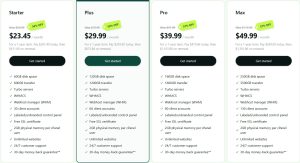
Reseller Hosting Plan Comparison
| Plan | Disk Space | Transfer | Client Accounts | Key Tools | Starting Price |
|---|---|---|---|---|---|
| Starter | 60GB | 600GB | 30 | WHM, WHMCS, Turbo servers | $23.45 / month |
| Plus | 120GB | 1200GB | 60 | WHM, WHMCS, Turbo servers | $29.99 / month |
| Pro | 160GB | 1600GB | 90 | WHM, WHMCS, Turbo servers | $39.99 / month |
| Max | 250GB | 3500GB | 130 | WHM, WHMCS, Turbo servers | $49.99 / month |
These plans are ideal for agencies, freelancers, and consultants who want full branding control without managing physical infrastructure.
Managed VPS Hosting For Performance-Critical Projects
Managed VPS hosting is designed for businesses that need dedicated resources but don’t want the complexity of server administration. A2 Hosting’s managed VPS plans are fully maintained by experts, covering updates, security, monitoring, and performance tuning.

Managed VPS Plan Comparison
| Plan | CPU Cores | RAM | Storage | Control Panel | Starting Price |
|---|---|---|---|---|---|
| VPS XS | 2 | 4GB | 80GB | cPanel Solo | $38.00 / month |
| VPS S | 4 | 8GB | 160GB | cPanel Solo | $43.50 / month |
| VPS M | 8 | 16GB | 320GB | cPanel Solo | $45.50 / month |
| VPS L | 16 | 32GB | 640GB | cPanel Solo | $60.50 / month |
These plans run on AMD EPYC CPUs with NVMe storage and include CloudLinux, Imunify360, malware scanning, and 24/7 proactive monitoring.
Managed Vs Unmanaged VPS Comparison
| Feature | Managed VPS | Unmanaged VPS |
|---|---|---|
| OS & software updates | ✓ | ✗ |
| Monitoring & alerts | ✓ | ✗ |
| Proactive support | ✓ | ✗ |
| Full root access | ✗ | ✓ |
| Daily backups | ✓ | Optional |
| SLA | 99.9%+ | 99.9% |
For most businesses, managed VPS hosting offers the best balance between power and peace of mind.
Which A2 Hosting Plan Makes Sense In 2026?
If you’re launching a new site or running a small business, shared or cPanel hosting offers excellent value and performance. Agencies and freelancers managing multiple clients will benefit from reseller hosting, while growing ecommerce stores and high-traffic sites are best served by managed VPS plans.
The key advantage across all tiers is consistency. Regardless of where you start, you’re getting modern hardware, strong security, and infrastructure that’s designed to scale, making A2 Hosting a long-term solution rather than a temporary stop.
How Secure Is A2 Hosting In 2026?
Security is one of the areas where A2 Hosting clearly separates itself from budget-first hosting providers. In 2026, security is not sold as an optional upgrade or hidden behind premium tiers. Instead, it is embedded across all hosting plans, regardless of whether you are on shared hosting or managed VPS.
This integrated approach significantly reduces risk for business websites, ecommerce stores, and WordPress-driven platforms where outdated software and weak protection are the most common attack vectors.
Built-In Security Architecture
A2 Hosting uses a layered security model that protects websites at both server and application levels. Updates, patches, and core protections are handled automatically, which removes one of the biggest failure points for non-technical users.
Core Security Features Comparison
| Security Feature | Included on All Plans | Practical Benefit |
|---|---|---|
| Free SSL Certificates | Yes | Encrypts user data and improves trust & SEO |
| DDoS Protection | Yes | Prevents traffic-based attacks and outages |
| Brute Force Defence | Yes | Blocks repeated login attacks |
| Malware Scanning | Yes | Detects malicious files early |
| Server-Level Updates | Yes | Reduces vulnerabilities from outdated software |
| Imunify360 (VPS & higher tiers) | Yes | Advanced intrusion prevention |
For WordPress users, this setup is particularly valuable. Many WordPress security issues stem from missed updates or poorly configured plugins rather than sophisticated attacks. By handling much of this at the server level, A2 Hosting reduces reliance on third-party security plugins.
Reliability And Uptime Performance
Security also ties directly into uptime. A2 Hosting maintains a 99.9% uptime SLA, backed by redundancy, load balancing, and proactive monitoring.
In real-world use, downtime is rare. Even during traffic surges or scheduled maintenance, websites remain accessible due to infrastructure failover and resource isolation. This consistency is especially important for ecommerce stores and lead-generation websites where even short outages can have a measurable financial impact.
How Does Hosting.com Keep Your WordPress Site Secure At All Times?

Security on hosting.com’s Managed WordPress platform is always on and fully pre-configured. Instead of relying on plugins or manual setup, every site is protected 24/7 using enterprise-grade security built directly into the hosting environment.
This approach removes the most common WordPress security risks, such as missed updates, weak firewall rules, or conflicting plugins, allowing site owners to focus on running their business with confidence.
Enterprise-Grade Protection Built In
Every Managed WordPress plan includes layered security powered by Cloudflare Enterprise and Imunify360, providing protection at both the network and server levels.
| Security Layer | Technology | Protection Focus |
|---|---|---|
| Network edge | Cloudflare Enterprise | DDoS, bots, malicious traffic |
| Server & application | Imunify360 | Brute-force, exploits, malware |
| WordPress layer | Pre-configured rules | Core, themes, plugins |
This layered setup ensures threats are blocked early and automatically, without user intervention.
Dual Firewall Defence Explained
Each WordPress site runs behind two firewalls working together. Cloudflare Enterprise filters traffic at the edge before it reaches your server, while Imunify360 provides deep application-level protection against attacks like brute-force logins and zero-day exploits.
| Firewall Type | Role | Benefit |
|---|---|---|
| Cloudflare WAF | Edge-level filtering | Stops attacks before they reach your site |
| Imunify360 | Server-level defence | Protects WordPress internally |
Both firewalls update automatically, ensuring protection stays current.
Always-On WordPress WAF

The Web Application Firewall is permanently enabled and fully managed. It blocks bots, SQL injection, and XSS attacks before they impact performance.
| WAF Feature | Result |
|---|---|
| OWASP Top 10 protection | Covers common vulnerabilities |
| Real-time blocking | Stops threats instantly |
| PCI-compliant infrastructure | Safe for ecommerce sites |
Pre-Configured WordPress Security
Security is active from day one with no setup required. Common WordPress threats are automatically blocked, including SQL injection, cross-site scripting, malicious file uploads, directory traversal, local file inclusion, and comment spam.
This ensures WordPress sites remain secure without slowing them down or adding complexity.
How Good Is A2 Hosting’s Customer Support?
Customer support is often overlooked until something breaks. In those moments, the difference between average and excellent support becomes immediately clear. A2 Hosting’s Guru Crew support remains one of its strongest assets in 2026.
Unlike many providers that rely on outsourced call centres, A2 Hosting uses in-house technical staff who are trained to resolve real server and application issues rather than escalate endlessly.
Support Quality Breakdown
| Support Area | A2 Hosting | Typical Budget Host |
|---|---|---|
| Availability | 24/7/365 | Limited or tier-based |
| Support Staff | In-house experts | Often outsourced |
| Technical Depth | High | Script-driven responses |
| Migration Support | Included | Often paid or limited |
| Developer-Level Help | Yes | Rare |
Response times are consistently fast, but more importantly, solutions are practical. For agencies and developers managing multiple sites, this reliability saves hours of troubleshooting and reduces client downtime.
How Easy Is It To Migrate To A2 Hosting?
Migration is one of the biggest psychological barriers when switching hosting providers. A2 Hosting removes much of that friction by offering free, expert-led migrations across most plans.

Migration Process Explained
The migration team handles:
- Website files and databases
- Email accounts and configurations
- Domain settings (where applicable)
Migrations are scheduled to minimise downtime and are tested before final handover. For cPanel users, transfers are often completed using direct backups. For non-cPanel environments, migrations are handled manually with clear communication throughout.
Migration Comparison
| Migration Feature | A2 Hosting | Many Competitors |
|---|---|---|
| Cost | Free | Often paid |
| Downtime | Minimal | Can be significant |
| Manual Testing | Yes | Not always |
| Email Migration | Included | Often excluded |
This makes A2 Hosting particularly appealing to users leaving underperforming hosts who want stability without rebuilding their site.
What Types Of Websites Is A2 Hosting Best For?
A2 Hosting supports a wide range of website types, but it performs best in scenarios where speed, uptime, and scalability matter more than visual editors.
It is especially well suited to WordPress blogs, WooCommerce stores, business websites, agency-managed client portfolios, and high-traffic content platforms. Developers also benefit from VPS plans that provide deeper server-level control.
Website Suitability Comparison
| Website Type | Suitability | Reason |
|---|---|---|
| WordPress Blogs | Excellent | Speed + managed updates |
| WooCommerce Stores | Excellent | NVMe + caching improves checkout |
| Business Websites | Very Good | Stability & security |
| Agency Client Sites | Excellent | Scales across multiple sites |
| Drag-and-Drop Sites | Moderate | Requires CMS setup |
For users who prioritise visual simplicity over control, a website builder may feel easier initially. However, for SEO-driven growth and long-term scalability, A2 Hosting offers significantly more flexibility.
What Do Real Users Say About A2 Hosting In 2026?
Customer reviews in 2026 show strong consistency across platforms. Users repeatedly highlight three areas: speed improvements, support quality, and long-term stability.
Many reviews come from customers who switched after years with mainstream budget hosts. The most common feedback mentions faster page loads, fewer outages, and more competent support interactions.
This feedback closely mirrors my own experience managing content-heavy and business websites on A2 Hosting, where performance gains were immediate and sustained.
What Are The Main Pros And Cons Of Using A2 Hosting?
A2 Hosting offers a strong overall package, but it is not designed to be the simplest option on the market.
Strengths And Limitations Comparison
| Aspect | Strength | Limitation |
|---|---|---|
| Performance | Excellent speed & caching | Turbo plans cost more |
| Security | Built-in, no add-ons | Advanced configs need knowledge |
| Support | High-quality, in-house | Not beginner hand-holding |
| Scalability | Strong VPS & reseller options | Overkill for very small sites |
| Ease of Use | Powerful tools | Interface is more technical |
For users who want performance without long-term platform lock-in, the trade-off is usually worthwhile.
How Does A2 Hosting Compare To Other Hosting Providers In 2026?
Compared to entry-level shared hosts, A2 Hosting delivers noticeably better speed, security, and uptime. Against premium managed WordPress providers, it offers similar performance at a more accessible price point.
Unlike website builders, A2 Hosting provides full ownership and control of your site. This makes it better suited to SEO-focused projects, content businesses, and ecommerce operations that expect to scale.
Hosting Type Comparison
| Provider Type | Control | Performance | Scalability |
|---|---|---|---|
| Budget Shared Hosts | Low | Moderate | Limited |
| Managed WordPress Hosts | Medium | High | Medium |
| Website Builders | Very Low | Moderate | Limited |
| A2 Hosting | High | High | Strong |
What Has Been My Personal Experience With A2 Hosting In 2026?
In recent projects, I’ve used A2 Hosting for WordPress-based business and content sites with consistent results. Setup was quick, migrations were handled professionally, and performance gains were visible immediately.
What stood out most was long-term consistency. Load speeds remained stable over time, support was responsive when needed, and there were no unexpected limitations as traffic increased. While advanced customisation does require some technical familiarity, the platform rewards users who view their website as a long-term asset rather than a short-term project.
FAQs
Is hosting.com good for high-traffic WordPress sites?
Yes. It uses edge caching, global CDN delivery, and scalable infrastructure to handle traffic spikes smoothly.
Do I need extra WordPress security plugins?
Usually no. Security is built in with firewalls and malware protection, reducing the need for plugins.
Are WordPress updates handled automatically?
Yes. Core updates and critical security patches are managed at the platform level.
Can hosting.com run WooCommerce stores reliably?
Yes. Smart caching ensures carts, checkouts, and logged-in users work without issues.
Will AI crawlers slow down my website?
No. The platform handles AI crawler traffic without affecting performance.
Is hosting.com beginner-friendly?
Yes. Most performance and security features are pre-configured with no setup required.
Is hosting.com better than website builders long term?
Yes. It offers more control, stronger SEO potential, and better scalability.
