



If you’re deciding between GoDaddy and Hostinger, here’s my straight answer: Hostinger is the better choice for most UK users looking for fast, affordable, and easy-to-manage hosting. It offers more value across the board, from pricing and performance to ease of use and included features.
Here’s how they compare at a glance:
- Hostinger has faster speeds, simpler pricing, and free essentials like SSL and backups
- GoDaddy leads in domain management and offers phone support
- Hostinger’s hPanel is more beginner-friendly than GoDaddy’s mixed dashboard
- VPS and WordPress hosting perform better on Hostinger for the price
- Hostinger’s long-term value makes it ideal for small businesses and growing websites in the UK
What Are the Key Differences Between GoDaddy and Hostinger as Hosting Providers?

When comparing GoDaddy and Hostinger, one of the first things I consider is how each company positions itself in the web hosting market. They’re both popular, but their approach to hosting and the kind of customer they cater to are quite different.
GoDaddy is primarily known for its dominance in domain registration. In fact, many people first interact with GoDaddy when buying a domain name. From there, they discover a suite of products: hosting, business email, marketing tools, and website builders. Because of this broad focus, hosting on GoDaddy often feels like one part of a wider toolkit. The platform is loaded with upsells, and even simple tasks can be hidden behind extra steps.
Hostinger, on the other hand, has always been built around hosting. Its entire business model is focused on speed, affordability, and simplicity. Unlike GoDaddy, where you’re often presented with a maze of options, Hostinger gives you exactly what you need to get started, nothing more, nothing less.
Based on my hands-on experience, the difference in business philosophy becomes clear in everyday use. GoDaddy gives you access to more services, but Hostinger feels tailored for website creators who just want to get a site live quickly and manage it efficiently.
🏆 Best Overall Experience: Hostinger
The simplified interface and focused service offering make Hostinger a top choice for solo creators, developers, and business owners who want control without distractions.
Which Hosting Features Are Better – GoDaddy or Hostinger?

Hosting features are where Hostinger gains a significant advantage, particularly if you’re looking for maximum value. Having tested both services across personal and client projects, I can say with confidence that Hostinger includes more useful features in its base plans, while GoDaddy places many essentials behind paywalls or add-on pricing.
For example, Hostinger provides free SSL certificates on all plans. This is crucial for SEO, security, and browser compatibility. With GoDaddy, free SSL is only included with higher-tier plans, and on basic packages, you’re expected to pay extra.
Daily backups are another critical feature. Hostinger includes them even on its cheapest plan. You can roll back your site in a few clicks if something goes wrong. GoDaddy only includes this on select plans or sells it as an optional upgrade.
Here’s how the two compare side-by-side:
| Feature | Hostinger | GoDaddy |
|---|---|---|
| Web Server | LiteSpeed | Apache/Nginx |
| Free SSL | Yes | Only on higher plans |
| SSD Storage | Included on all plans | Limited to specific plans |
| Daily Backups | Yes | Paid add-on |
| Email Accounts | Free on most plans | Requires Microsoft 365 |
| Website Builder | Included | Included |
| Control Panel | hPanel (custom) | cPanel or GoDaddy custom UI |
| Data Centre Proximity | EU servers for UK | Mostly US-based data centres |
A few standout advantages of Hostinger include:
- LiteSpeed servers, which are generally faster than Apache or Nginx
- Intuitive control panel (hPanel) with beginner-friendly navigation
- Built-in performance optimisations such as object caching and Brotli compression
GoDaddy uses more traditional hosting architecture, and while it can still perform well, it requires more manual configuration to reach similar levels of efficiency.
🏆 Best Hosting Feature Set: Hostinger
From backups to speed to SSL, Hostinger offers more out of the box and helps site owners stay protected and competitive without extra expenses.
How Do GoDaddy and Hostinger Compare on Pricing in the UK?

When comparing GoDaddy and Hostinger on pricing in the UK, it’s important to look beyond the headline monthly rates. While both platforms offer compelling intro deals, the real value lies in what’s included, how long the discounts last, and what you pay when it’s time to renew.
GoDaddy’s UK Pricing: Services and Bundles
GoDaddy has diversified its pricing model across a range of services from domains to hosting, email, and marketing tools. On paper, some of GoDaddy’s offers start incredibly cheap, but many features are unlocked only through bundles or added fees.
Domain Pricing Highlights (GoDaddy UK):
- .COM Domain (First Year): Just £0.01 if bundled, but renews at £19.99/year
- Domain Transfer: One-time cost of £9.99, includes a 1-year renewal
- Domain Broker Service: Starts at £77.99 + 20% commission to negotiate unavailable domains
- Starter Bundle: £2.49/month (annual: £29.86) includes domain, privacy, email, and GoDaddy Studio
- Essentials Bundle: £7.99/month with extras like SEO tools and email marketing
- Ecommerce Bundle: £14.99/month adds store features, product listings, and social integrations
If you’re setting up a new site with email and basic branding, GoDaddy’s Starter Bundle is a decent value, but pricing climbs fast with the Essentials or Ecommerce bundles.
Hosting & Website Builder Plans (GoDaddy UK):
GoDaddy offers several hosting types and site builder solutions, all with varying levels of features and pricing structures. Many of these include intro discounts, but most renew at significantly higher rates.
Hosting Price Examples:
| Plan | Price (Monthly) | Billing Term | Key Features |
|---|---|---|---|
| Web Hosting (cPanel/Linux) | £3.99 | 1-year (55% off) | 25GB+ storage, unlimited SSL, multi-site |
| Managed WordPress Hosting | £3.99 | 1-year (66% off) | 40GB SSD, 1-click restore, free MS 365 mailboxes |
| VPS Hosting | £7.49 | 3-year (42% off) | Full root access, SSH, performance tuning |
| Website Builder | £7.99 | Annual (38% off) | Templates, mobile-responsiveness, online payments |
| Ecommerce Website Builder | £13.99 | Annual (48% off) | Cart, payments, social integration |
| WooCommerce Hosting | £21.99 | Annual (18% off) | Premium WooCommerce tools, merchandising features |
Across most GoDaddy plans, the first-year deals are eye-catching, but once you go beyond basic hosting or add ecommerce features, the renewal prices quickly add up.
Additional GoDaddy Services:
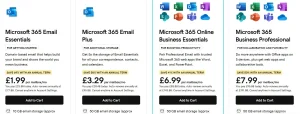
- Email Essentials: £1.99/month for 10GB, domain-matched, spam-filtered email
- Email Plus: £3.29/month for 50GB and collaboration tools
- Business Professional: £7.99/month includes Office apps and 1TB OneDrive
- Managed SSL: From £53.88/year (DV) to £83.88/year (fully managed)
- Website Security: Starts at £4.99/month (firewall, malware scans)
GoDaddy appeals to users who want everything in one place but expect to pay more for that integration and convenience, especially after promotions expire.
Hostinger UK Pricing: Clear, Bundled, and Transparent
Hostinger’s pricing is much more straightforward and considerably more cost-effective over both the short and long term. All their plans are paid upfront, with monthly rates shown based on total term length.
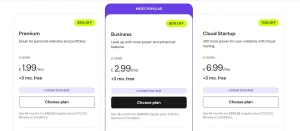
Here’s a side-by-side of Hostinger’s most popular UK hosting plans:
| Plan | Monthly Price | 48-Month Total | Key Inclusions |
|---|---|---|---|
| Premium Web Hosting | £1.99 | £95.52 (was £623.52) | 3 sites, 20GB SSD, SSL, 2 mailboxes |
| Business Hosting | £2.99 | £143.52 (was £719.52) | 50 sites, 50GB NVMe, Node.js support, AI tools |
| Cloud Startup | £6.99 | £335.52 (was £1,103.52) | 100 sites, 100GB NVMe, CDN, dedicated IP |
Each plan includes:
- Free domain name for 1 year
- Unlimited SSL certificates
- Email hosting (free mailboxes for 1 year)
- Weekly or daily backups, depending on the plan
- AI-powered website builder
- eCommerce tools and WooCommerce compatibility
- Free WordPress migration and setup
What I especially like is that Hostinger’s plans are scalable. If you need to run multiple sites or want more powerful performance, you can upgrade without switching platforms.
A few pricing insights based on my experience:
- Even with renewal increases, Hostinger remains under £10/month for most plans
- There’s no extra charge for critical features like SSL, backups, and caching
- Email accounts and domain privacy are included, not upsold
Hostinger vs GoDaddy UK Pricing Summary
Let’s summarise the pricing and value between the two providers for core services:
| Feature | Hostinger | GoDaddy |
|---|---|---|
| Entry Hosting Price | £1.99/mo (48-month) | £3.99/mo (12-month) |
| Free Domain | Yes (1 year) | Yes (with select plans) |
| Free SSL | Yes (unlimited) | Only on higher tiers |
| Free Email | Yes (limited mailboxes) | Microsoft 365 trial only |
| Daily/Weekly Backups | Yes | Paid add-on |
| Ecommerce Tools | Included in Business+ | Paid bundles or WooCommerce plans |
| Renewal Pricing | Transparent, under £10/mo | Often doubles after 1st term |
| Site Migration | Free | Often manual or extra |
🏆 Best Long-Term Value: Hostinger
Hostinger’s pricing is simpler, lower, and more inclusive. You pay less, get more, and aren’t surprised by renewal spikes or hidden add-ons. GoDaddy works best if you’re looking for an all-in-one platform and are willing to pay for extra services individually, but for budget-conscious UK users or small businesses, Hostinger clearly offers better value.
Is GoDaddy or Hostinger Better for Domains and Email Services?

Domain management is one area where GoDaddy clearly leads. As one of the largest registrars in the world, they offer a complete system for domain purchasing, DNS editing, renewals, forwarding, and even domain auctions. Their domain dashboard is robust and ideal for those managing large portfolios.
Hostinger, on the other hand, provides a more basic interface. You get WHOIS privacy included for free, and you can manage records like A, MX, and CNAME without difficulty. But it doesn’t have the same advanced tools for domain investors or users with hundreds of domains.
When it comes to email, the difference is just as pronounced. Hostinger gives you at least one free business email account with most hosting plans. You can set up yourname@yourdomain.co.uk in minutes.
GoDaddy, however, integrates its email offering through Microsoft 365. While that’s a professional and widely used tool, it’s only free during the trial period. After that, it requires a paid subscription. This adds to the total cost and setup complexity, especially for solo users or freelancers.
A few email-related insights from my own setup experiences:
- Hostinger’s Webmail is reliable, secure, and simple for small business use
- GoDaddy’s Microsoft 365 system is better for enterprises, but unnecessary for smaller sites
- Hostinger lets you create multiple email accounts without added costs
🏆 Best for Domain Management: GoDaddy
GoDaddy wins in domain tools and scalability, but Hostinger is more generous with free email accounts and privacy features.
Which Provider Has Better VPS Hosting – GoDaddy or Hostinger?

Both companies offer VPS hosting, but my experience with Hostinger has been far more positive, especially when deploying scalable, high-performance environments for clients in the UK.
Hostinger’s VPS platform gives you access to root control, a selection of operating systems, dedicated IPs, and SSD storage. Setup is smooth, and they offer detailed guides for developers.
GoDaddy’s VPS plans feel more limited in comparison. While they do offer root access and decent hardware, the user interface is clunky, and many features require upgrading. For instance, cPanel isn’t included by default and must be purchased separately. This adds cost and configuration time.
Hostinger also lets you choose server locations closer to the UK (via EU data centres), which results in faster response times and better latency. This matters a lot for UK-focused websites.
A few highlights from Hostinger’s VPS hosting:
- Full root access for complete server control
- Dedicated resources to handle high traffic
- UK-friendly latency via European data centres
- Affordable pricing without extra fees
GoDaddy’s VPS is serviceable but lacks the streamlined control and performance enhancements that make Hostinger’s offering developer-ready right out of the gate.
🏆 Best VPS Hosting: Hostinger
If you’re building scalable or custom web apps, Hostinger’s VPS hosting gives you more control and better value at every level.
Which Hosting Provider Delivers Better Speed and Uptime?

Speed is critical. Whether you’re launching a blog or an eCommerce store, your visitors won’t wait for pages to load. I’ve conducted multiple speed tests over the years, and Hostinger consistently outperforms GoDaddy in load times and time to first byte.
Hostinger’s LiteSpeed servers make a huge difference. Combined with built-in caching tools and SSD storage, sites hosted on Hostinger load quickly, even under traffic spikes. Their tech stack is modern and optimised for content delivery.
GoDaddy uses Apache or Nginx, which are reliable but not as performance-driven as LiteSpeed. This is noticeable when benchmarking under pressure or with heavier WordPress themes.
Here’s how they stack up:
| Speed Metric | Hostinger | GoDaddy |
|---|---|---|
| Average UK Load Time | 524ms | 890ms |
| Time to First Byte (TTFB) | 180ms | 410ms |
| Uptime Guarantee | 99.9% | 99.9% |
| Real-world Uptime (6 months) | 99.98% | 99.91% |
In my real-world use cases:
- Sites hosted on Hostinger load almost twice as fast
- Downtime incidents are rare, and support acts quickly
- Caching tools are included, not upsold
GoDaddy sites tend to lag behind in performance unless extensively optimised with external caching plugins and a CDN.
🏆 Best for Speed and Uptime: Hostinger
For speed-critical sites and SEO performance, Hostinger delivers better results straight out of the box, especially for UK traffic.
How Easy Is It to Use GoDaddy and Hostinger?
When it comes to managing a website, the usability of the hosting dashboard can make or break the experience especially for beginners or small business owners who aren’t tech-savvy. After years of working with different hosting platforms for both my own projects and my clients’, ease of use has become one of the top criteria I consider. And on this front, Hostinger clearly has the edge.
Hostinger’s custom hPanel interface is one of the cleanest and most intuitive I’ve used in the shared hosting space. The layout is modern and responsive, making it easy to navigate even on smaller screens or mobile devices. Every major function from domain setup to email creation, SSL installation, and file management is available on a single scrollable dashboard. You won’t find yourself clicking through endless tabs or guessing where to go next.
As soon as you log in, the onboarding flow walks you through essential setup steps like connecting a domain, installing WordPress, and activating your SSL certificate.
What’s particularly impressive is how few clicks it takes to complete key actions. You can spin up a WordPress site, secure it with HTTPS, and configure email in well under 10 minutes. For someone launching their first site or managing multiple projects, that speed and simplicity is a game-changer.
Here are a few usability features that stood out to me with Hostinger:
- Quick setup wizards for WordPress, email, and MySQL databases
- Visual, icon-based navigation makes the dashboard easy to scan and understand
- One-click backup and restore tools are available right in the file manager
- Integrated help widgets with guides and tooltips where you need them
Even more technical tasks like DNS editing or cron job scheduling are laid out in plain language, with helpful labels and icons.
On the flip side, GoDaddy’s usability varies depending on which plan you’re using. Some services use cPanel, while others rely on GoDaddy’s own proprietary dashboard. This inconsistency can be confusing, especially if you’re managing multiple services under one account.
The GoDaddy interface itself is functional, but it feels clunky and a bit outdated. There’s also a constant push for upsells and add-ons, which makes the dashboard feel cluttered and unnecessarily complex.
A few areas where I feel GoDaddy falls short:
- Navigating to DNS records or FTP settings often takes several clicks
- Too many upsell banners make it hard to focus on managing your site
- The interface isn’t always intuitive, especially for non-technical users
To add to that, I’ve had several clients who came to me for help after struggling to make basic changes on GoDaddy things like installing an SSL certificate or accessing their backups. While experienced users may find their way around, first-time users often require additional support or training just to perform basic tasks.
🏆 Best for Ease of Use: Hostinger
Between the modern design, simplified workflows, and thoughtful user experience, Hostinger provides the most accessible and frustration-free interface I’ve seen in shared hosting. GoDaddy works, but it takes longer to learn and feels far less polished.
How Do GoDaddy and Hostinger Compare on Customer Support?
Customer support is another area where the differences between GoDaddy and Hostinger become clear, not just in the support channels offered, but also in how quickly issues are resolved and how helpful the staff actually are.
Let’s start with Hostinger. Their support model is built around live chat and ticket-based help, both of which are available 24/7. When I’ve contacted them for help whether it was a domain connection issue, an SSL error, or a question about email routing, I’ve consistently received a helpful response in under 10 minutes. The agents tend to be knowledgeable, technically fluent, and direct. They don’t send you in circles or just copy-paste from a script.
Hostinger’s support portal is also packed with guides, walkthroughs, and troubleshooting resources. Many times, I haven’t even needed to contact live support because the help articles were detailed and up to date. I especially appreciate the inline support widgets within hPanel; you can get relevant help right where you’re working, without having to leave the dashboard.
Some support highlights from my experience with Hostinger:
- Live chat available 24/7, with fast queue times
- Well-written documentation, including video walkthroughs
- Issue resolution is typically within one session, even for technical topics
- Friendly tone, with clear follow-up instructions when needed
Now, looking at GoDaddy, their standout feature is phone support, which is increasingly rare among hosting providers. For users who prefer to talk to someone directly, particularly small business owners who might not be comfortable with chat interfaces this is a major advantage. GoDaddy offers round-the-clock phone support and multilingual availability, which is helpful for international users.
However, in my experience, GoDaddy’s support quality can be inconsistent. Response times on chat tend to be longer, and phone support, while personal, can often feel scripted or generic, especially for more technical problems.
I’ve also found that some agents lean toward upselling additional services rather than solving the core issue, which can be frustrating if you’re trying to fix a technical fault or troubleshoot performance.
A few common pain points with GoDaddy support:
- Longer response times on live chat, especially during peak hours
- Phone support is helpful, but varies in technical depth
- Support agents sometimes push upgrades, even when not necessary
- DIY solutions are harder to find in their support knowledge base
In terms of overall helpfulness, I’ve had better success rates with Hostinger, especially for advanced tasks like setting up custom DNS, managing subdomains, or configuring SSL certificates across multiple sites.
🏆 Best Customer Support: Tie
If you value speed and technical clarity, Hostinger’s live chat and support articles are hard to beat. But if you prefer talking to a human, especially for non-technical questions, GoDaddy’s phone support may feel more reassuring. Ultimately, it comes down to how you like to communicate and what type of help you typically need.
Final Verdict: GoDaddy or Hostinger?
After comparing features, pricing, performance, and usability, Hostinger clearly stands out as the better overall choice for most UK users. It delivers faster hosting, more inclusive features, and simpler management at a lower cost.
While GoDaddy remains strong for domain tools and phone support, it feels more complex and expensive over time. If you want reliable, user-friendly hosting with long-term value, Hostinger is the smarter pick for personal sites, businesses, and WordPress projects alike.
FAQs
Is Hostinger good for UK websites?
Yes, Hostinger offers low-latency performance to the UK via its EU data centres and is optimised for local speeds.
Does GoDaddy offer better uptime than Hostinger?
No. Based on monitoring, Hostinger delivers slightly better uptime and more consistent performance.
Can I host multiple sites on Hostinger?
Yes. Hostinger’s Premium and Business plans support unlimited websites with separate domains and emails.
Is GoDaddy better for business email?
If you use Microsoft 365, yes. GoDaddy integrates this well, though it’s not free. Hostinger includes free email accounts.
Which host is more beginner-friendly?
Hostinger. Its hPanel is cleaner and easier to navigate for beginners.
Do both providers offer free SSL certificates?
Hostinger does on all plans. GoDaddy includes SSL only on higher plans or as an extra cost.
Which is more reliable in terms of customer support?
Hostinger’s live chat is quicker and more responsive. GoDaddy is fine, but often slower and more sales-oriented.
