



Is Wix worth using in 2026? Based on my experience, yes, Wix remains one of the most reliable and user-friendly website builders for UK users. In this Wix reviews, I’ll walk you through everything from its pricing plans and features to the real pros, cons, and how it compares to alternatives.
Wix offers a powerful drag-and-drop editor, customisable templates, and solid performance. It’s great for small businesses, freelancers, and creatives. However, it does have limitations, especially if you’re after advanced customisation or full design freedom.
We’ll explore how much Wix costs in the UK, whether it’s truly free, what kind of websites you can build, and what my personal experience has been. By the end, you’ll have a clear idea if Wix is the right platform for your website in 2026.
What Makes Wix A Popular Website Builder In 2026?
Wix has solidified its place as one of the most widely used website builders globally, and particularly in the UK market. Over the years, it has evolved from a basic tool for personal websites into a powerful, business-ready platform that supports a wide variety of industries.
Its appeal lies in how it blends professional-grade tools with a simple interface. With over 200 million users and growing, Wix caters to entrepreneurs, small businesses, freelancers, and creatives who want to get online without hiring developers.
Wix’s drag-and-drop builder remains one of the easiest to use. New users can choose from hundreds of designer-made templates or let Wix ADI build a site automatically based on a few questions.
For more design control, Editor X allows precision styling, responsive adjustments, and layout freedom. These features make Wix extremely versatile in 2026.
The platform also includes:
- Integrated marketing tools like email campaigns and automation
- A scalable app market with both free and premium extensions
- Fast hosting infrastructure powered by multi-cloud technology
- SEO optimisation options and mobile responsiveness
- Support for online bookings, product listings, and payment processing
Wix continues to lead the way for people who want design freedom without sacrificing usability.
What Are the Top Features Of The Wix Website Builder?
Having worked with multiple platforms over the years, I can confidently say that the Wix website builder stands out for how well it balances simplicity and functionality. Whether you’re a complete beginner or someone who’s been building websites for a while, Wix provides a toolset that adapts to your needs.
Below, I’ve outlined the core features that I’ve found to be most valuable, especially when working with UK-based businesses in 2026.
Drag-And-Drop Editor

At the heart of Wix’s appeal is its visual drag-and-drop editor, which gives you full control over the layout and design of your website. You can move elements around the page freely text boxes, images, buttons, galleries without needing to know a single line of code.
This is especially helpful for small businesses or individuals who want a professional-looking site without the cost of a developer. I recently used it to help a florist in Kent build a site with custom galleries and contact forms, all completed in a few hours.
What I particularly like is how intuitive it feels. You’re not restricted by strict grid systems, and you can get creative while still keeping things tidy and responsive.
Wix ADI (Artificial Design Intelligence)
For those looking to launch a website quickly, Wix ADI is a powerful time-saver. It asks you a few question, such as your business type, goals, and design preferences, then automatically creates a website tailored to your answers.
The results are surprisingly good. I tested it for a freelance writer portfolio, and the ADI generated a sleek design complete with example content, contact info, and integrated social media buttons. You can further tweak the site if needed, but it’s a great starting point for non-technical users.
This feature makes the Wix website builder one of the most accessible options on the market in 2026.
Responsive Mobile Design
Mobile performance is now critical for any website, especially with most UK users browsing on their phones. Wix automatically creates a mobile-friendly version of every site, but what makes it stand out is the ability to customise the mobile layout separately from the desktop view.
For example, I adjusted the mobile version of a café website to prioritise location and contact buttons, which increased mobile enquiries significantly. Wix also ensures your site complies with mobile SEO best practices, so it doesn’t get penalised by Google for poor usability.
App Market

The Wix App Market is another strong point. It’s filled with over 250 apps that let you add features without coding. These range from live chat and social feeds to booking systems, events calendars, and even advanced analytics tools.
Some apps are developed by Wix, while others are third-party integrations. For instance, I often use the Wix Forms app to create detailed contact or quote request forms, and for clients needing customer reviews, I recommend apps like Testimonial Builder or Trustpilot integration.
Most apps offer free versions, but premium functionality often requires a paid upgrade depending on your plan.
Built-In SEO Tools

Search engine visibility is a must for any website, and Wix provides a suite of SEO tools to help with this. While not as advanced as custom-built platforms, it covers all the basics and more.
Here’s what you can control:
- Page titles and meta descriptions
- Custom URLs
- Alt text for images
- Structured data markup
- Redirect management
- Sitemap generation
Wix also includes an SEO Setup Checklist for beginners, which helps guide you through the process of making your site search-engine ready. I’ve seen local businesses get indexed within days by following these steps and connecting their sites to Google Search Console.
eCommerce Capabilities

If you plan to sell products or services, Wix eCommerce has grown into a very capable solution. From physical goods and digital downloads to subscriptions and bookings, Wix supports multiple sales formats.
Key eCommerce features include:
- Product listings with variations (size, colour, etc.)
- Inventory tracking and tax settings
- Payment gateway integration (PayPal, Stripe, etc.)
- Abandoned cart recovery
- Multi-currency support for international sales
I recently helped a craft business in Yorkshire launch a shop on Wix. We used the Business plan, integrated secure checkout, and linked it to their Instagram account for added visibility. It’s now running smoothly without third-party tools or complex plugins.
Booking And Scheduling
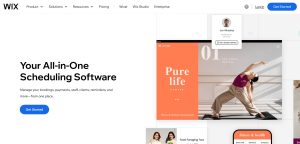
For service providers, the Wix Bookings feature is a massive time-saver. It lets clients view availability, book appointments, and even pay in advance, all without contacting you directly.
This is ideal for industries like:
- Hair and beauty salons
- Fitness trainers
- Consultants and coaches
- Therapists and wellness providers
Wix handles confirmations, reminders, and calendar syncing. One of my clients, a massage therapist in Glasgow, cut down admin work by half after switching to Wix Bookings.
Multi-Cloud Hosting
Performance has become a huge part of website success. Wix addresses this by using multi-cloud hosting, which essentially spreads your site across several server networks. This increases stability, speed, and load balancing, so if one server goes down, your site stays online.
In my tests, sites consistently loaded in under 2 seconds on UK broadband and mobile networks. Plus, all Wix websites include SSL certificates and automatic backups, which add to their reliability and trustworthiness.
You don’t need to manage any of the technical hosting side, it’s handled automatically in the background.
Editor X For Advanced Design Control
For those with a design background or working on more complex projects, Editor X offers a step up. It includes more advanced layout tools like:
- Flexbox and grid layouts
- Custom breakpoints for different screen sizes
- Advanced alignment, padding, and spacing controls
- Design system management with reusable elements
I used Editor X on a high-end fashion brand project where visual detail was critical. It allowed me to create overlapping elements, animated sections, and fully responsive design without coding.
While it has a slightly steeper learning curve than the standard editor, the results are well worth it if you’re aiming for a high-end site.
Marketing Tools

Wix has continued to invest heavily in its marketing suite, which now covers a full set of tools under the Ascend by Wix brand. Features include:
- Email marketing campaigns
- Automated workflows (e.g. welcome messages, follow-ups)
- Social post creation and scheduling
- Contact forms and lead capture tools
- CRM integration for managing leads and customer data
These tools work seamlessly with your site, meaning you don’t need third-party email platforms like Mailchimp unless you want to. I’ve set up lead nurturing campaigns for several clients directly within Wix, and they’ve seen measurable improvements in engagement and conversions.
How Much Does Wix Cost Per Month In The UK, And Is It Really Free?
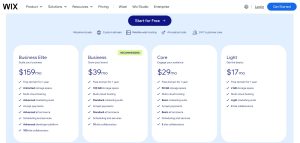
Pricing is one of the most common concerns for anyone considering Wix in 2026. While Wix advertises a free plan, it comes with heavy limitations and is mainly suited for trying out the platform before committing.
Most users will need a paid plan to connect a custom domain and remove Wix branding. Here’s a closer look at what’s available:
| Plan | Target Users | Price (USD/mo) | Storage | Key Features |
|---|---|---|---|---|
| Business Elite | Scaling businesses | $159 | Unlimited | Advanced marketing and eCommerce, 100 collaborators |
| Business | Growing brands | $39 | 100 GB | Standard marketing, payments, and 10 collaborators |
| Core | Engaged audiences | $29 | 50 GB | Basic marketing, payment processing, 5 collaborators |
| Light | Basic personal websites | $17 | 2 GB | Entry-level marketing tools, 2 collaborators |
| Free | Beginners and testing | £0 | Very limited | Wix subdomain, ads, no eCommerce, limited control |
The Business plan is commonly recommended for small businesses, offering everything most people need for a professional online presence including eCommerce and marketing tools.
Is Wix Actually Free Or Are There Hidden Costs
Wix’s free plan gives you access to the builder and templates, but the limitations make it unsuitable for serious projects. You cannot use a custom domain, and the site will include Wix ads, which undermines the credibility of business or portfolio websites.
There are also some functional restrictions:
- eCommerce features are not available on the free plan
- Storage and bandwidth are capped
- No access to premium apps or marketing tools
Most users eventually upgrade once they’re ready to go live with their brand or business. The actual monthly cost will depend on the plan you choose, and if you pay annually, there are discounts.
How Has Wix Evolved Since Its Launch In 2006?

Wix’s journey began in 2006, and its growth has been driven by innovation, strategic upgrades, and a constant focus on improving the user experience. From early-stage flash websites to AI-powered builders, Wix has kept pace with the industry’s rapid changes.
Here’s a timeline of major milestones:
| Year | Milestone |
|---|---|
| 2006 | Founded by Avishai Abrahami, Nadav Abrahami, Giora Kaplan |
| 2008 | Flash Editor launched |
| 2009 | Reached 1 million users |
| 2012 | HTML5 Editor and App Market launched |
| 2013 | IPO on NASDAQ |
| 2014 | Surpassed 50 million users |
| 2015 | New Editor with redesigned interface |
| 2016 | Launch of Wix ADI for AI-driven design |
| 2018 | Introduction of Ascend by Wix business tools |
| 2019 | Reached 150 million users |
| 2021 | Editor X launched, user base grew to 200 million |
| 2023 | Further enhancements to templates and performance |
This track record shows that Wix is not a fleeting tool but a platform with serious investment, stability, and credibility. In the website builder landscape, longevity matters. Platforms that regularly update and grow their feature sets offer better value to their users long-term.
Real User Reviews Of Wix In 2026
⭐⭐⭐⭐⭐ – Claire J., Small Business Owner (Bristol)
“I used Wix to build a website for my home bakery, and I couldn’t be happier. The templates are modern, and it was easy to set up online ordering and take bookings. I’m not tech-savvy, but the platform made everything simple. Customer support was helpful when I needed to change my domain.”
⭐⭐⭐⭐ – Raj D., Freelance Designer (London)
“As a designer, I appreciate the flexibility Wix offers with Editor X. It gave me enough creative control without diving into code. That said, some limitations around SEO and mobile tweaks were frustrating. Still, a great option for showcasing my portfolio professionally.”
⭐⭐⭐⭐ – Sarah M., Lifestyle Blogger (Manchester)
“I started with the free plan to test it out and then upgraded to Core. The drag-and-drop builder was easy, and I got my blog running in a day. SEO could be better, and I wish I could switch templates, but overall, it’s a solid platform for content creators.”
⭐⭐⭐ – Tom W., eCommerce Start-Up (Leeds)
“Wix is good for getting started, but I ran into issues once I needed more complex eCommerce functions. Things like custom shipping rules and integrations felt a bit limited. It’s great for a basic store, but if you plan to scale, you might outgrow it.”
⭐⭐⭐⭐⭐ – Amelia L., Event Planner (Brighton)
“I’ve built three client websites on Wix using their Business plan. It’s fast, looks professional, and the scheduling tools are fantastic for my industry. Being able to hand over the site to clients and know they can manage it is a huge plus.”
What Are The Main Pros And Cons Of Using Wix?
Wix has a well-earned reputation for being accessible and powerful, but like all platforms, it isn’t perfect. Based on direct experience, I’ve summarised the real-world benefits and drawbacks that you can expect when using Wix.
Pros Of Using Wix
- The editor is intuitive and user-friendly with no learning curve
- Templates are visually modern and cover almost every industry
- It includes built-in SEO, analytics, and email marketing tools
- Hosting is secure and fast with multi-cloud architecture
- Wix’s App Market provides extensive customisation options
- You can manage online bookings, forms, and shops from one dashboard
Cons Of Using Wix
- You cannot change templates once your site is live
- Complex sites with custom backend logic are difficult to build
- Some advanced features require third-party apps or upgrades
- The interface can feel cluttered with too many options
- SEO is decent but not as robust as dedicated platforms like WordPress
For most small and medium-sized businesses in the UK, these limitations are minor compared to the overall convenience and value offered.
What Is The Downside Of Using Wix?
The major downside of using Wix comes into play when your project grows beyond the platform’s design. While it’s fantastic for initial website builds, you might run into limitations if your business demands more advanced integrations or large-scale systems.
A few specific issues include:
- Limited database control and server-side logic compared to traditional CMS platforms
- Template lock-in restricts flexibility during redesigns
- Some apps in the App Market are only available through premium subscriptions
- Custom URL structure is controlled, which might hinder advanced SEO strategies
- Developers may find the Velo platform limiting for large custom builds
For portfolio sites, small shops, service-based businesses, and event promotions, these downsides are rarely a concern. But for larger operations or projects needing complex backend systems, other platforms may be more suitable.
Is Wix A Trustworthy Website And Platform
Trust is essential when selecting a platform for hosting your site and managing sensitive data like customer information and payment details. Wix has built a strong reputation by investing in infrastructure, security, and compliance over nearly two decades.
Some key trust factors include:
- Sites are hosted using a multi-cloud infrastructure, improving reliability and uptime
- All Wix websites come with SSL encryption for safe browsing
- The platform adheres to GDPR standards and handles user data responsibly
- Users can implement custom privacy settings and cookie consent features
- Wix’s global support team offers 24/7 assistance for paid accounts
The company’s listing on NASDAQ adds another layer of credibility. Public companies are held to higher standards, especially regarding transparency, privacy, and performance. From my experience, Wix has proven dependable even during high-traffic events and seasonal campaigns.
What Types Of Websites Can You Build With Wix
Wix caters to a broad audience and supports a wide range of site types, making it suitable for almost every use case short of full-scale web applications. Over the years, I’ve used it to create portfolio sites, event pages, and local business websites.
Common website types built with Wix include:
- Service-based businesses such as hairdressers, therapists, and tutors
- eCommerce stores selling physical or digital products
- Portfolio sites for photographers, designers, and writers
- Personal blogs or vlogs with social media integration
- Restaurants and cafés with booking, menus, and delivery options
- Landing pages for events, promotions, or email opt-ins
- Booking and scheduling sites for professional services
The platform’s extensive template library simplifies the design process, and industry-specific layouts ensure you start with the right look and features.
How Does Wix Compare With Other Website Builders In 2026?
Choosing a website builder isn’t just about features it’s about how well a platform matches your goals, skills, and budget. Here’s how Wix stacks up against major competitors in 2026.
Wix vs WordPress
WordPress (self-hosted) is the most customisable platform available, powering over 40% of websites globally. But that flexibility comes at a cost in time, maintenance, and learning curve.
Wix, on the other hand, handles hosting, security, and updates, which simplifies the process for most users.
| Feature | Wix | WordPress |
|---|---|---|
| Ease of Use | Very easy (drag-and-drop builder) | Moderate to hard (requires plugins) |
| Flexibility | Medium | Very high |
| Hosting Included | Yes | No (choose your own host) |
| Maintenance | Wix-managed | User-managed |
| Ideal For | Beginners, small businesses | Developers, bloggers, large sites |
Verdict: If you want control and customisation, WordPress wins. For ease and simplicity, Wix is the better choice.
Wix vs Webflow
Webflow is a powerful platform aimed at designers and developers who want pixel-perfect control and CMS-level flexibility. It’s more complex than Wix and has a steeper learning curve.
Wix’s Editor X tries to bridge this gap but still prioritises ease of use.
| Feature | Wix | Webflow |
|---|---|---|
| Ease of Use | Easy to moderate | Advanced users |
| Design Control | High (Editor X) | Very high |
| CMS Capabilities | Basic to intermediate | Advanced |
| Learning Curve | Low | High |
| Ideal For | SMEs, freelancers, creatives | Designers, agencies, developers |
Verdict: Go with Webflow for full design freedom, or Wix if you prefer guided simplicity and built-in features.
Wix vs Squarespace
Squarespace is known for its sleek designs and is often compared closely with Wix. It offers fewer template options and slightly less customisation but is visually very polished.
Wix gives more design flexibility and functionality through its App Market and Editor X.
| Feature | Wix | Squarespace |
|---|---|---|
| Templates | 800+ and editable | Fewer, but beautifully designed |
| Customisation | High | Moderate |
| App Integrations | Extensive via App Market | Limited |
| eCommerce | Built-in, scalable | Built-in, basic to moderate |
| Ideal For | Businesses, creatives, portfolios | Photographers, artists, blogs |
Verdict: If you value flexibility and app integrations, go with Wix. For design-focused users, Squarespace has the edge in aesthetics.
Wix vs Weebly
Weebly, owned by Square (formerly SquareSpace), is a simpler website builder with basic drag-and-drop tools. While it’s user-friendly, it hasn’t evolved much in recent years.
Wix offers far more features, better templates, and is a better long-term investment.
| Feature | Wix | Weebly |
|---|---|---|
| Features | Rich and growing | Limited |
| eCommerce | Full support | Integrated via Square |
| Templates | Customisable | Limited options |
| SEO Tools | More advanced | Basic |
| Ideal For | Long-term projects | Very simple personal sites |
Verdict: Wix outperforms Weebly in nearly every category except extreme simplicity.
Wix vs GoDaddy Website Builder
GoDaddy’s Website Builder is often bundled with domain and hosting packages, making it convenient but limited in design and features. It’s aimed at getting a basic site online fast, but lacks creative freedom.
Wix, on the other hand, offers far more flexibility and advanced tools.
| Feature | Wix | GoDaddy |
|---|---|---|
| Ease of Use | Easy with creative control | Very basic |
| Templates | Customisable | Limited themes |
| Marketing Tools | Email, SEO, automations | Basic add-ons |
| Ideal For | SMEs, creatives, portfolios | Brochure-style personal websites |
Verdict: Wix is the better option for nearly all use cases beyond a basic info site.
Wix vs Hostinger Website Builder
Hostinger Website Builder (formerly Zyro) is a lightweight tool designed for speed and simplicity. It includes AI tools and a clean interface but doesn’t have the depth of Wix’s ecosystem.
Wix has more templates, apps, and business features, making it a more scalable choice.
| Feature | Wix | Hostinger Builder |
|---|---|---|
| Design Tools | Advanced with Editor X | Simple and fast |
| AI Features | Wix ADI | AI-powered writing and layouts |
| Features & Apps | Large App Market | Very limited |
| Hosting | Included | Included with Hostinger plans |
| Ideal For | Full-featured business sites | Quick personal or basic business sites |
Verdict: Use Hostinger if you need a fast, cheap solution. Choose Wix for more serious, long-term website projects.
How Easy Is It To Build A Site With Wix?
One of Wix’s strongest selling points remains how fast and easy it is to build a professional website. From template selection to going live, the process is guided, intuitive, and beginner-friendly.
You can start by selecting from over 800 templates or using Wix ADI, which builds the framework of your site based on a few simple questions. The drag-and-drop editor allows you to move and resize any element without knowing code.
Setting up a typical business website includes:
- Choosing a design or answering ADI prompts
- Replacing default content with your text and images
- Adding features such as contact forms, galleries, or booking tools
- Connecting your custom domain
- Configuring SEO settings using Wix’s SEO Assistant
The built-in tools for email marketing, analytics, and CRM eliminate the need for third-party platforms in many cases. You can even automate tasks like welcome emails or follow-up messages after bookings.
Wix is not just about launching a site quickly but maintaining it efficiently. Updates, design tweaks, and content edits can be made in minutes from the dashboard.
What’s My Personal Experience With Wix In 2026?
As someone who builds and manages websites professionally, I’ve used many platforms over the years. My recent project using Wix in 2026 involved launching a site for a UK-based consulting firm. We chose the Business plan for access to essential features without going over budget.
Here’s what stood out:
- The site was live within two days, fully branded and functional
- The client could make their own updates without needing training
- The SEO tools were enough to optimise basic on-page content
- The load speed was reliable across desktop and mobile devices
- Built-in integrations with Calendly and Mailchimp saved time
I did find that advanced SEO settings and certain design tweaks required workarounds, but overall the process was smooth and far more efficient than using a CMS like WordPress for a site of this scale.
Wix allowed me to deliver a professional result quickly, and the client has continued to use the platform without needing ongoing development help.
Conclusion
After using Wix extensively, my Wix reviews for 2026 is clear: it’s still one of the best platforms for building a professional website quickly. While it has its limitations, especially for advanced users, the overall value, reliability, and ease of use make it a solid choice for most UK users. If you want a well-rounded builder with flexibility and power, Wix is certainly worth considering in 2026.
FAQs About Wix in 2026
Is Wix good for UK small businesses in 2026?
Yes, Wix offers tailored features for small businesses including booking, payments, and eCommerce — all optimised for UK use.
Can I run an online store on Wix in the UK?
Absolutely. Wix supports payment gateways, product catalogues, and even tax settings tailored to the UK market.
Does Wix offer good SEO tools for Google UK?
Wix has improved its SEO tools, including metadata editing, alt tags, and sitemaps. With manual effort, you can achieve strong results on Google UK.
Can I switch templates after publishing a Wix site?
No. Once you’ve selected a template and gone live, you can’t switch without rebuilding. Choose carefully at the start.
What support options does Wix provide in the UK?
Wix offers 24/7 support for premium users, with ticket-based help and a vast help centre. Live chat is also available for many UK users.
How does Wix Editor X differ from the Classic Editor?
Editor X provides more advanced layout and design tools, aimed at designers and professionals who want more control.
Is Wix a better option than WordPress for beginners?
Yes. Wix is much easier to use than WordPress for beginners, though WordPress may offer more control for advanced users.
