


In today’s digital-first world, having a reliable website builder and host is non-negotiable, especially if you’re in the UK and aiming for high-performance, security, and ease of use.
That’s where WordPress.com comes into play, a managed, all-in-one platform that handles everything from hosting and performance to design and content creation. Whether you’re a blogger, small business owner, freelancer, or online retailer, WordPress offers the tools to help you succeed online.
But is WordPress.com still the best solution in 2024? Let’s dive into this detailed WordPress reviews, breaking down everything from features and pricing to support, real user feedback, and comparisons with leading alternatives.
What Is WordPress?

Before choosing WordPress, it’s helpful to understand that the platform exists in two distinct versions, each designed for different types of users. WordPress.org is open-source software that you install on your own hosting, giving full control but requiring you to manage updates, backups, and security yourself.
WordPress.com, on the other hand, is a fully hosted solution where all technical responsibilities are handled for you. In this reviews, WordPress refers specifically to WordPress.com.
It works by letting you sign up, select a plan, and build your site using a visual block editor and ready-made themes. Everything is managed through a clean dashboard.
- Sign up and choose a plan
- Customise your site with themes and blocks
- Publish and manage content easily
WordPress.com takes care of hosting, security, updates, and performance, making it ideal for users who want a simple, stress-free website setup without technical maintenance.
Why WordPress Continues to Lead?
There are dozens of website builders and hosting platforms available, but very few offer the depth, performance, and flexibility of WordPress.com.
Here’s why it remains a standout choice:
- Trusted by 409 million users and over 70 million new posts each month
- Unmetered bandwidth across all plans
- Built-in SEO and marketing tools
- Global CDN for blazing-fast speeds in the UK and worldwide
- Enterprise-grade security, DDoS protection, malware scanning, SSL, backups
- WooCommerce-ready eCommerce solutions
- Real human support via WordPress Happiness Engineers (Premium+ plans)
- Plugin access to 50,000+ tools (Business plan and above)
- Freedom of design with full CSS, JS, and block customisation
Whether you’re a content creator, small business, freelancer, or developer, WordPress.com offers the flexibility to grow with your goals.
What Are the Key Features of WordPress.com?
WordPress.com brings together all the essential features you need to launch, grow, and monetise your site, whether it’s a blog, portfolio, or eCommerce store.
| Feature | Details |
|---|---|
| Drag-and-Drop Editor | Block-based visual editor for full design freedom without coding |
| Themes & Templates | Hundreds of free and premium responsive themes |
| WooCommerce Integration | Set up a full eCommerce store with shipping, payments, marketing tools |
| Plugin Access | 50,000+ plugins (from Business plan onwards) |
| SEO & Marketing | Built-in SEO tools, email marketing, newsletter integration |
| Jetpack Features | Backups, image optimisation, security, downtime monitoring |
| Site Speed | Global CDN, high-frequency CPUs, image compression, unmetered bandwidth |
| Advanced Security | SSL, DDoS protection, malware scanning, 2FA |
| Developer Tools | SSH, Git, SFTP, Staging (Business+ plans) |
| Multilingual Support | Build websites in multiple languages with ease |
These features give you creative and technical control while keeping things user-friendly for beginners.
How Much Do WordPress Plans Cost?
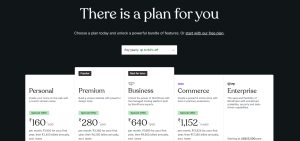
WordPress.com offers a flexible range of plans designed to suit everyone from beginners to large online stores. You can start for free and upgrade as your site grows, with significant discounts available on long-term billing (up to 75% off on 3-year plans). Prices below are based on annual billing and shown in Indian Rupees with GBP equivalents for clarity.
WordPress.com Plan Pricing & Features (Annual Billing)
| Plan | Price (INR / month) | Price (GBP / month)* | Storage | Best For | Key Highlights |
|---|---|---|---|---|---|
| Free | ₹0 | £0 | 1 GB | Beginners | Subdomain, ads, basic features |
| Personal | ₹160 | ~£1.55 | 6 GB | Personal sites | Free domain 1 year, ad-free, premium themes, email support |
| Premium | ₹280 | ~£2.70 | 13 GB | Creators & bloggers | Advanced design tools, video uploads, Google Analytics |
| Business | ₹640 | ~£6.20 | 50 GB | Developers & businesses | Plugins, SEO tools, backups, SFTP/SSH, Git, priority support |
| Commerce | ₹1,152 | ~£11.20 | 50 GB | Online stores | Full WooCommerce, payments, marketing, analytics |
*GBP values are approximate and may vary with exchange rates.
Overall, WordPress.com delivers strong value for long-term users, especially when opting for 2- or 3-year plans. The platform scales smoothly from simple blogs to full eCommerce stores, making it a cost-effective, all-in-one WordPress solution.
What Are the Pros and Cons of WordPress.com?
When choosing a managed website platform, understanding the strengths and limitations of WordPress.com helps set realistic expectations before committing.
Pros:
- Powerful editor with full design flexibility
- Built-in CDN and unmetered bandwidth
- Thousands of plugins (on Business+)
- Reliable 99.99% uptime and speed performance
- Expert-level support (Premium+ plans)
- SEO, backups, and marketing tools included
- Scales easily from blog to enterprise
Cons:
- Plugin access requires Business plan or higher
- Free and Personal plans are very limited
- eCommerce features only available on Commerce plan
- Slight learning curve for the block editor
- Renewal rates can be higher after discount periods
Still, for most UK users, especially content creators, bloggers, and small businesses, the benefits outweigh the limitations.
How Reliable Is WordPress Support and Uptime?

Reliable support and consistent uptime are critical for any website, and this is an area where WordPress.com clearly demonstrates its strength as a fully managed solution.
Here’s what’s included:
- Live Chat 24/7 for Premium and above
- Email Support available on Personal and up
- Extensive Knowledge Base
- AI-Powered Help Bot
- Happiness Engineers (real human support)
- Community Forums
WordPress also offers Jetpack-powered uptime monitoring, daily backups (on Business+), and real-time security alerts. With a 99.99% uptime guarantee, you can expect your website to perform smoothly with minimal interruptions.
What Do Real Users Say About WordPress.com in 2024?
One of the best ways to evaluate a platform is to see what real users, just like you have to say. WordPress.com receives consistently positive reviews from small businesses, bloggers, developers, and enterprise clients.
With millions of users worldwide and trusted by brands like Microsoft, CNN, and Etsy, WordPress.com has earned its reputation as one of the most reliable website builders in the world.
⭐ 4.5+ Star Ratings on Major Review Platforms
- G2, Trustpilot, and Capterra consistently score WordPress.com between 4.3 and 4.7 stars out of 5.
- The platform is especially praised for its user experience, editor interface, customer support, and scalability.
Many UK users specifically highlight how WordPress.com works well for local businesses, offering fast loading speeds, GBP billing options, and a reliable UK-friendly support experience.
User Testimonials: What People Are Saying?
Here are some real-world testimonials from users, reflecting typical feedback from creators and businesses in the UK:
“WordPress.com made it easy to get my site online in a weekend. Their support is incredibly helpful.”
— James M, UK Blogger
James is a freelance writer who used WordPress.com’s free plan initially and later upgraded to Premium to unlock Google Analytics and custom CSS features. He highlighted the ease of setup and responsive support chat as major positives.
“We’ve used WordPress.com for years to manage multiple client websites. It’s secure, stable, and professional.”
— Design Agency, London
This creative agency manages over a dozen client sites on Business plans. Their team appreciates the plugin flexibility, staging environments, and the ability to deploy secure, high-performing websites with little overhead.
“We switched from Wix to WordPress.com because we outgrew their design limits. WordPress gave us total freedom.”
— Sarah B., Online Retailer, Manchester
Sarah runs a niche eCommerce shop using the Commerce plan with WooCommerce, allowing her to run sales campaigns, manage shipping integrations, and track product analytics, all without needing external plugins or third-party apps.
“I didn’t think I could build a website without hiring a developer — but WordPress proved me wrong.”
— Hannah, Freelance Consultant
Hannah built her consulting site using WordPress’s drag-and-drop tools and a pre-designed theme. She praised the block editor for its simplicity and said the learning curve was minimal thanks to the help docs and chat support.
How Does WordPress.com Compare to Other Website Builders?
WordPress.com is a leading platform for building websites and blogs, with a focus on ease of use, integrated hosting, and security. But how does it stack up against top alternatives like Wix, Squarespace, Webflow, Shopify, IONOS, and WordPress.org? Let’s break it down:
WordPress.com vs Wix

Wix is widely known for its drag-and-drop design freedom, making it a favourite for creatives and first-time users. WordPress.com, meanwhile, excels in content management, SEO, and long-term scalability.
| Feature | WordPress.com | Wix |
|---|---|---|
| Starting Price | Free plan; paid from £3/month | Free plan; paid from ~£4.50/month |
| Design Flexibility | Template-based; custom CSS on higher tiers | Drag-and-drop with total layout control |
| Blogging Tools | Full-featured with categories, tags, RSS | Basic blogging tools |
| Ecommerce Options | WooCommerce on Commerce plans | Built-in ecommerce on Business plans |
| Best For | Bloggers, content creators, businesses | Designers, creatives, portfolios |
| Verdict | WordPress.com is ideal for content-focused websites, while Wix offers unmatched design flexibility for visual projects. |
WordPress.com vs Squarespace

Squarespace is famous for beautiful templates and a seamless user experience. WordPress.com offers more control and plugin access, especially on Business+ plans, making it more flexible for growing sites.
| Feature | WordPress.com | Squarespace |
|---|---|---|
| Pricing | Starts at £3/month | Starts at ~£10/month |
| Blogging Tools | SEO-friendly with categories and tags | Visual blog editor with limited depth |
| Plugin Support | Available on Business+ plans | No external plugin support |
| Ecommerce | WooCommerce for Commerce plan | Native store tools on higher plans |
| Best For | Writers, professionals, scalable sites | Creatives, photographers, small brands |
| Verdict | Squarespace wins on visual appeal, but WordPress.com offers better flexibility and expandability. |
WordPress.com vs Webflow
Webflow is loved by designers for its precision and visual CSS control. WordPress.com is better for non-technical users who want to publish content quickly and scale without managing code.
| Feature | WordPress.com | Webflow |
|---|---|---|
| Ease of Use | Beginner-friendly editor | Steep learning curve |
| Design Control | Good (custom themes on Business+) | High (CSS grid-based visual builder) |
| CMS Features | Integrated CMS, scheduling, SEO tools | Advanced CMS and content modelling |
| Best For | Content-focused users, small businesses | Designers, developers, visual control |
| Verdict | Webflow is ideal for designers and agencies; WordPress.com is perfect for writers and entrepreneurs. |
WordPress.com vs Shopify
Shopify is purpose-built for eCommerce, with features tailored for online shops. WordPress.com becomes competitive once you activate WooCommerce on the Commerce plan, offering more flexibility for mixed-content and store sites.
| Feature | WordPress.com | Shopify |
|---|---|---|
| eCommerce Platform | WooCommerce with Commerce plan | Fully integrated Shopify engine |
| Blogging | Full CMS with blog-first focus | Basic blogging functionality |
| Customisation | Theme-based, plugin-ready (Business+) | Limited unless on Shopify Plus |
| Best For | Content + commerce blend | Dedicated online retailers |
| Verdict | Choose Shopify for pure eCommerce; WordPress.com for combining blog, content, and store. |
WordPress.com vs IONOS Website Builder
IONOS caters heavily to UK businesses with localised support and straightforward tools. WordPress.com provides a more powerful platform for blogging, SEO, and long-term content publishing.
| Feature | WordPress.com | IONOS Website Builder |
|---|---|---|
| UK Support | Global live chat (24/7) | Local UK phone support |
| Site Builder | Block editor (like Gutenberg) | Simple drag-and-drop editor |
| Blogging Tools | Excellent (tags, categories, SEO) | Basic features |
| Best For | Freelancers, bloggers, creatives | Local businesses needing quick setup |
| Verdict | IONOS is a quick-start tool for local firms; WordPress.com is far more scalable and versatile. |
WordPress.com vs WordPress.org (Self-Hosted)
The biggest decision for WordPress users: hosted vs self-hosted. WordPress.org gives complete freedom with plugins, themes, and server control. WordPress.com removes the hassle of hosting and updates but limits customisation unless on high-tier plans.
| Feature | WordPress.com | WordPress.org (Self-hosted) |
|---|---|---|
| Hosting | Fully managed, included | Must set up hosting separately |
| Plugin Access | Available on Business+ only | Unlimited |
| Security & Backups | Included in premium plans | User-managed (or paid extras) |
| Best For | Non-tech-savvy users, ease of use | Developers, advanced customisation |
| Verdict | WordPress.org is for full control; WordPress.com is best for ease, reliability, and managed infrastructure. |
WordPress.com stands out as a balanced, scalable solution that works well for content-heavy websites, growing businesses, and anyone seeking ease of use without sacrificing flexibility.
While some alternatives outperform it in specific areas (like Shopify for eCommerce or Webflow for design), WordPress.com remains the best all-rounder for UK users who want professional websites with minimal tech hassle.
Is WordPress.com Right for Your Website in 2026?
If you’re deciding whether WordPress is right for your website in 2026, it largely depends on how much flexibility, scalability, and long-term growth you expect from your platform. For users who want strong control over their site without handling technical maintenance, it offers a balanced and reliable solution.
WordPress.com suits those who need room to grow, from personal blogs to fully developed business websites. It supports advanced SEO tools, built-in marketing features, and powerful eCommerce capabilities through WooCommerce on higher plans. This makes it ideal for creators and UK businesses planning to scale.
By combining the simplicity of a website builder with the depth of a full CMS, WordPress.com delivers a platform that adapts as your goals evolve, without adding unnecessary complexity
Who Is WordPress.com Best For?
I find WordPress.com best suited for beginners, bloggers, freelancers, and small businesses who want an easy-to-manage website without worrying about hosting, updates, or security. When I want a platform that removes technical complexity and lets me focus on content or business growth, this is a strong option.
With built-in features, custom domains, and WooCommerce support on higher plans, I see WordPress.com as a reliable choice for launching a blog, service-based website, or even an online store without needing deep technical knowledge.
WordPress.com Use-Case Overview
| User Type | Is WordPress.com a Good Fit? | Why |
|---|---|---|
| Beginners | Yes | I get a simple setup and secure environment |
| Bloggers | Yes | I can publish quickly with built-in SEO tools |
| Small businesses | Yes | Email, backups, and scalability are included |
| Developers / Agencies | Yes (Business+) | I have access to SFTP, plugins, and customisation |
| Large enterprises | Maybe | I may need more advanced, full-stack control |
Overall, I see WordPress.com as a strong and versatile platform for building an online presence without the complexities of traditional hosting. It works especially well if I’m based in the UK and value performance, reliability, and access to real expert support, while still having room to grow.
FAQs
Can I use plugins on all WordPress plans?
No, plugin installation is only available from the Business plan and above. Free, Personal, and Premium plans do not support third-party plugins.
Is WordPress suitable for eCommerce in the UK?
Yes, the Commerce plan includes full WooCommerce support with UK-friendly payment gateways and VAT options.
Is there a free version of WordPress.com?
Yes, but it’s limited in features and comes with WordPress branding. Ideal for testing, not for professional use.
Does WordPress.com include a free domain?
Yes, Personal plan and above include a free domain for the first year.
Can I migrate from WordPress.org to WordPress.com?
Yes, WordPress offers a guided migration service or step-by-step instructions for manual transfer.
How secure is WordPress.com?
Very secure. It includes SSL certificates, DDoS protection, malware scanning, and regular backups.
Is WordPress good for UK users?
Yes, the global CDN ensures fast speeds across the UK, and pricing is localised in GBP.
