


If you’re deciding between WordPress and Drupal for your next website, here’s my direct take: WordPress is the better all-rounder for most users, especially when ease of use, cost, blogging, and plugin flexibility matter. Drupal shines in security, scalability, and handling complex content architectures, but it demands more technical know-how.
From my experience working with both platforms, here’s how they compare at a glance:
- WordPress is easier to use, more affordable, and offers unmatched plugin support.
- Drupal provides stronger built-in security and excels with structured content and enterprise needs.
- WooCommerce gives WordPress an eCommerce edge, while Drupal Commerce suits bespoke setups.
- For blogging and SEO, WordPress remains my top choice.
Let’s explore how each CMS stacks up in every critical area.
What Makes WordPress and Drupal Different as CMS Platforms?
WordPress and Drupal are both open-source content management systems, but the way they approach website creation is fundamentally different. I’ve used both for years across personal projects and client websites, and the contrast is often very clear right from the start.
WordPress is built for ease. From installation to publishing content, the workflow is smooth. You can choose a theme, install a few plugins, and have a functioning site live in less than an hour. It’s ideal for small businesses, bloggers, and marketers.
Drupal is more powerful in terms of content architecture and control, but it expects a certain level of technical knowledge. You don’t just create a page, you define content types, add fields, configure views, and build templates. It’s incredibly capable, but it doesn’t hold your hand.
| Feature | WordPress | Drupal |
|---|---|---|
| Learning Curve | Low | High |
| Ideal Users | Bloggers, SMEs, marketers | Developers, large organisations |
| Plugin/Module System | Plug-and-play | Requires configuration |
| Custom Content Types | Basic to Moderate | Highly Customisable |
| Community Support | Massive global community | Smaller, developer-focused |
Best for General Use: WordPress 🏆
I’ve found WordPress far easier to adapt across different types of projects. I can build a simple blog, a business website, or even a full eCommerce store using the same platform. Drupal is incredibly capable, but for everyday website needs, it often feels like more complexity than necessary.
Which Platform Offers Better Pricing – WordPress or Drupal?

When it comes to pricing, WordPress offers a clear advantage in terms of transparency, flexibility, and overall affordability. You can start small and scale your site gradually, whereas Drupal, while powerful, involves significantly higher upfront and ongoing costs, especially if you’re building something custom or enterprise-grade.
WordPress Pricing (UK – Billed Annually)
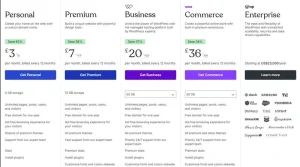
| Plan | Monthly Price | Storage | Key Features |
|---|---|---|---|
| Personal | £3 | 6 GB | Free domain (1 year), no ads, premium themes, traffic stats, support |
| Premium | £7 | 13 GB | Custom design tools, video upload, analytics, advanced stats, all themes |
| Business | £20 | 50 GB | Plugin installation, WooCommerce, 24/7 priority support, SFTP access |
| Commerce | £36 | 50 GB | All Business features + eCommerce tools, store themes, WooCommerce tools |
| Enterprise | From $25,000/year | Custom | High-performance hosting, support, data scaling & security for large brands |
Even on the Personal plan, you’re getting:
- A free domain name for the first year
- A completely ad-free experience
- Access to dozens of premium themes
- Expert support
- Unlimited pages, posts, and users
For most of my clients launching small business sites, the Premium or Business plan offers more than enough value. And thanks to WordPress’s plugin ecosystem, there’s rarely a need for custom development in the early stages.
If you prefer self-hosted WordPress (via WordPress.org), you can get started for as little as £4 to £8/month, using providers like SiteGround, Krystal, or 20i. Add a premium theme and a couple of plugins, and you can still keep your yearly website spend under £200.
Drupal Pricing in the UK
With Drupal, the core software is free, but that’s where the affordability ends. Most Drupal sites, even basic ones, require professional setup and maintenance. Development costs for a typical business website start at around £8,000 and can go well above £100,000 for complex builds.
Here’s what Drupal costs often looks like:
Drupal Development Costs
- Standard Build: From £8,000+, with design alone often ranging £3,500–£5,000
- Complex/Enterprise Builds: Easily exceed £100,000 when custom integrations or UX design is involved
- Specialised Projects: LocalGov Drupal installs begin at around £1,000 for setup, with bespoke themes costing £8.5k+
Maintenance & Support
- Standard Monthly Support: £150–£700
- Premium Support Packages: £805+ per month
- Annual Hosting & Maintenance: ~£6,000 per year (includes backups, security, monitoring)
Developer Rates
- Daily Rate: £550–£950
- Hourly Rate: £100/hour
Even hosting can add up. While basic shared hosting for Drupal may start at £1.49–£2.99/month, serious projects use managed hosting or include enterprise hosting in support contracts, often totalling £6,000+ per year.
Best Option for Pricing: WordPress 🏆
I always appreciate being able to start small with WordPress and only spend on what I actually need. Whether it’s a personal blog, a client site, or an online store, I can control costs without sacrificing quality. Drupal, by comparison, tends to require a larger upfront investment, a dedicated developer, and higher monthly overhead even for moderate projects. For small to medium businesses especially, WordPress offers far better value at every stage.
How Do WordPress and Drupal Compare in Terms of Ease of Use?
When it comes to ease of use, the difference between WordPress and Drupal is night and day, especially for non-technical users.
WordPress is clearly built with simplicity in mind. From the moment you log in, the dashboard feels intuitive. The Gutenberg block editor lets you create content visually by stacking and arranging blocks, headings, images, videos, and buttons without writing a single line of code. And if you want even more control over layouts and designs, page builders like Elementor, Divi, or Beaver Builder add drag-and-drop functionality that rivals modern website builders.
The real magic for me with WordPress is how quickly someone with no development background can go from zero to publishing. Whether it’s adding a contact form, setting up SEO, or building an About page, there’s a plugin or tutorial to help. This makes onboarding clients or team members extremely easy.
In contrast, Drupal presents a much steeper learning curve. It’s not that it’s difficult; it’s just that it’s designed for developers or technically confident users. Even basic content setup requires creating and configuring content types, fields, taxonomies, and views. I’ve had projects where the client needed training just to update a page or add a blog post.
For teams with complex editorial workflows or multi-level content permissions, Drupal offers more power. But the initial effort required to set everything up, even simple functionality like a blog, makes it less approachable.
Here’s how they stack up from my experience:
- WordPress:
- Easy-to-use dashboard and editor
- Massive library of themes and plugins
- Ideal for bloggers, marketers, and general users
- Drupal:
- Requires setup of entities and content relationships
- Better suited for developers or teams with IT support
- Customisation through modules and configuration rather than point-and-click
Easiest to Use: WordPress 🏆
From my experience, WordPress lets me focus on content and growth instead of configuration. I can log in, publish, update pages, and manage media without friction. Drupal offers deeper control, but that control comes at the cost of usability and a much steeper learning curve.
Which CMS Performs Better – WordPress or Drupal?

Performance is one of the areas where both WordPress and Drupal are capable of excelling, but they get there in different ways.
Drupal’s architecture is inherently lean and optimised for performance. I’ve worked on several high-traffic platforms where Drupal handled the load with ease, especially in content-heavy, multi-user environments. It uses advanced caching, built-in performance settings, and efficient query management, which means it generally requires less tweaking to perform well at scale.
Out of the box, Drupal is ready to scale. You don’t need as many add-ons or external performance tools. This is particularly helpful when building platforms for large institutions or enterprise clients who expect speed, even with complex content structures.
WordPress, by comparison, performs well with the right configuration. It’s not slow by nature, but its flexibility does come with trade-offs. A poorly chosen theme or a handful of bloated plugins can quickly affect speed and responsiveness. That said, I’ve optimised countless WordPress sites that run exceptionally fast, especially when paired with tools like:
- Caching plugins (e.g., WP Rocket, W3 Total Cache)
- Lightweight themes (e.g., Astra, GeneratePress)
- CDNs (e.g., Cloudflare, Bunny.net)
- Optimised hosting (e.g., Kinsta, WP Engine)
The key difference is that WordPress gives you more freedom, which means more responsibility to make the right choices. Drupal enforces more structure, which naturally limits performance bottlenecks.
When I build a site for a publisher or media-heavy platform, I have to spend more time fine-tuning WordPress. With Drupal, it’s usually performance-ready once the content architecture is in place.
- WordPress:
- Needs performance plugins to optimise caching and compression
- Performance varies based on hosting and plugin choices
- Easier to slow down accidentally with poor configurations
- Drupal:
- Built-in caching and performance tuning tools
- Better for high-volume, content-rich, multilingual platforms
- More consistent performance under heavy load
Best for Performance at Scale: Drupal 🏆
When I’ve worked on large, data-heavy platforms, Drupal has handled scale more efficiently out of the box. Its architecture feels purpose-built for complex systems. WordPress can absolutely perform well too, but it usually needs extra optimisation, plugins, and hosting tweaks to reach the same level.
Is WordPress or Drupal More Secure?

Security is one of the most critical considerations for me when choosing a platform for government websites, financial services, or any project that handles sensitive user data.
In this area, Drupal has built its reputation on being one of the most secure CMSs available. It’s trusted by large institutions, government agencies, and universities for good reason. Its granular user role system, strict coding standards, and active security team make it one of the most robust platforms in terms of core security.
For instance, when I’ve set up Drupal sites for organisations with multi-level user access and sensitive editorial workflows, I’ve found its security modules (like Paranoia, Content Access, and Captcha) to be more comprehensive than anything WordPress offers by default.
Drupal also has a dedicated security advisory team, and vulnerabilities are handled swiftly via a centralised release and patch system. Updates are tested rigorously, and there’s a strong culture of following best practices among Drupal developers.
WordPress, in contrast, takes a more open-ended approach to security. Its massive plugin ecosystem introduces risk many vulnerabilities arise not from WordPress core, but from third-party themes and plugins. It’s also the most targeted CMS in the world due to its popularity.
However, that doesn’t mean WordPress is insecure. With the right setup, I’ve run WordPress sites that meet strict compliance and security standards. Key elements I use include:
- Security plugins like Wordfence, iThemes Security, or Sucuri
- Regular updates to themes, plugins, and core
- Two-factor authentication and login lockdown tools
- Managed hosting providers that add server-level protection
The major difference is that Drupal is secure by design, whereas WordPress security depends on the owner’s diligence and ongoing maintenance.
Here’s a quick breakdown:
What SEO Capabilities Do WordPress and Drupal Offer?

Both CMS platforms offer robust SEO features, but their approach is very different.
WordPress uses plugins to make SEO accessible to everyone. Whether I’m managing metadata, setting up sitemaps, or optimising for schema, plugins like Yoast SEO and Rank Math simplify everything.
Drupal is capable of excellent SEO performance, too, but it takes more manual setup:
- The Meta Tag module handles page titles and descriptions
- Pathauto creates clean URLs
- Redirect and XML Sitemap modules must be added separately
Best for SEO Flexibility: WordPress 🏆
I prefer WordPress for SEO because it puts control directly in my hands. With plugins like Rank Math or Yoast, I can optimise pages, manage schema, and handle redirects without touching code. Drupal can do the same, but it usually requires technical setup rather than quick adjustments.
How Do WordPress and Drupal Compare in Terms of Customisation and Flexibility?

WordPress offers visual flexibility out of the box. With drag-and-drop editors, custom widgets, and thousands of themes and plugins, I can create something polished without writing a single line of code.
Drupal gives you control at a structural level. You define content types, set permissions, and build relationships between entities. This is incredibly powerful but also time-consuming.
Some areas where Drupal shines:
- Building multi-role editorial workflows
- Creating structured content models
- Handling multilingual requirements
Most Customisable Without Code: WordPress 🏆
What I like about WordPress is how far I can go without writing code. Page builders, themes, and plugins allow me to customise layouts, features, and design quickly. Drupal offers deeper customisation, but most of it assumes you’re comfortable working like a developer.
What’s the Market Share of WordPress vs Drupal in 2026?

Market share tells us a lot about support, popularity, and future-proofing. WordPress continues to dominate the CMS landscape.
| Year | WordPress Share | Drupal Share |
|---|---|---|
| 2020 | 35% | 2.0% |
| 2022 | 43.2% | 1.9% |
| 2024 | 47.9% | 1.5% |
| 2026 | 49.1% | 1.2% |
Most Widely Used and Supported: WordPress 🏆
I’m always confident choosing WordPress because of its massive ecosystem. There’s almost always a solution, tutorial, or plugin available. Drupal’s community is knowledgeable, but smaller, which can slow things down when you need quick answers or resources.
Which CMS Is Better for Blogging – WordPress or Drupal?
When it comes to blogging, WordPress is still the platform I reach for every time. It was originally built for bloggers, and even now, after years of evolution, that foundation remains its greatest strength. Creating, organising, and publishing content is smooth, efficient, and intuitive even for first-time users.
From built-in support for categories and tags to scheduling tools, RSS feeds, and comment moderation, WordPress provides everything a content creator needs straight out of the box. The Gutenberg block editor makes long-form content easier to structure, and it’s ideal for writers who want to enhance their posts visually with pull quotes, media, and calls-to-action.
I’ve personally published hundreds of blog posts using WordPress for myself and for clients, and the publishing workflow just works. There’s no need to manually build a layout or configure the backend before you start writing. Everything you need is already there.
Drupal, on the other hand, supports blogging but treats it like any other custom content type. You’ll need to create a new content structure, assign fields, set up taxonomies, and then configure how the blog content is displayed using Views. That might be ideal for teams that want full control over the structure of their content, but it’s far from plug-and-play.
Even after setup, the writing experience in Drupal feels less focused. It’s designed with flexibility and content modelling in mind, which makes it great for complex publishing platforms but less convenient for writers who just want to draft and publish quickly.
WordPress Blogging Highlights:
- Built-in post types, categories, tags, and RSS
- Intuitive Gutenberg block editor
- Easy integration with newsletters, SEO tools, and social sharing
- Comment management and moderation built in
- Great for single authors, editors, or full content teams
Drupal Blogging Considerations:
- Requires manual setup of content types and fields
- Workflow is more modular, but less intuitive for authors
- Needs Views and display config for listing posts
- Strong permissions system for editorial control, but not beginner-friendly
Best CMS for Blogging: WordPress 🏆
As someone who publishes long-form content regularly, WordPress simply feels built for writing. Drafting, scheduling, categorising, and managing posts is smooth and intuitive. Drupal can support blogging, but it never feels as natural or efficient for content-first workflows.
Which CMS Is Better for eCommerce – WordPress or Drupal?

For building online shops, WordPress paired with WooCommerce is hard to beat. I’ve built everything from single-product landing pages to large-scale stores with complex catalogues and regional shipping, all with WooCommerce at the core. It offers deep functionality while remaining easy enough for non-developers to manage day-to-day.
What makes WooCommerce shine is how seamlessly it integrates into the WordPress ecosystem. I can quickly add:
- Stripe, PayPal, Apple Pay, or Klarna as payment gateways
- Tiered pricing and product variations
- Automated tax calculations and location-based shipping
- Built-in reports, abandoned cart recovery, and email marketing tools
- Reviews, ratings, and user accounts for logged-in shoppers
And the best part? You don’t need to write a single line of code to implement any of this.
Drupal Commerce, by comparison, is much more developer-oriented. It’s powerful, no doubt about that, but it requires significantly more effort to set up. From defining product types and SKUs to handling orders and payments, everything must be manually configured. And because the interface isn’t as user-friendly, store owners often depend on a developer for even simple changes.
Where Drupal Commerce excels is in custom workflows. I’ve used it in projects involving subscription models, B2B portals, and tailored checkout flows. But it’s only worth the investment if you need that level of complexity and have a dev team available to maintain it.
WooCommerce Advantages:
- Pre-built functionality for common eCommerce needs
- Fast setup and plugin support for payments, shipping, and taxes
- Rich extensions marketplace for growth features
- Ideal for physical, digital, and service-based products
Drupal Commerce Advantages:
- Customisable product types and logic
- Designed for complex eCommerce data structures
- Flexible checkout and order workflows
- Ideal for bespoke or enterprise-level commerce needs
Top Choice for eCommerce: WordPress 🏆
With WooCommerce, I can launch an online store quickly and expand it over time. Payments, shipping, marketing tools, and reporting are easy to integrate. Drupal Commerce is powerful, but in my experience, it requires more planning and development before you see real results.
What Is the Plugin and Module Ecosystem Like for Both Platforms?

The strength of any CMS is measured not just by what it does out of the box, but by how easily it can be extended, and this is where WordPress has a major advantage.
With over 59,000 free plugins in the official WordPress repository and thousands more available as premium tools it’s rare that I can’t find an existing solution for a feature I need. Whether it’s for SEO, lead generation, security, backups, eCommerce, or content automation, WordPress has a plugin that gets the job done.
What I love about this ecosystem is how accessible it is. I don’t have to be a developer to add powerful features to a site. In fact, many of my clients run their own websites day-to-day thanks to the intuitive interfaces these plugins provide.
For example, if I want to:
- Set up SEO management → I’ll use Yoast or Rank Math
- Add a contact form → WPForms, Ninja Forms, or Gravity Forms
- Automate email marketing → MailPoet or FluentCRM
- Secure the site → Wordfence, iThemes Security, or Sucuri
- Improve performance → WP Rocket or LiteSpeed Cache
In contrast, Drupal has an extensive module system but it feels more like a toolkit than a finished product. Modules give you pieces of functionality, but they usually require further setup or even custom development to become usable in production.
For instance, while WordPress lets me install a form plugin and start collecting leads in minutes, Drupal modules like Webform require configuration of field types, permissions, and display templates before they’re functional.
In short, Drupal’s module ecosystem is robust, but it’s built for developers. WordPress plugins are built for users.
WordPress Plugin Highlights:
- Massive variety of options
- Easy to install and configure
- Active community and ongoing updates
- Most plugins offer free versions with optional upgrades
Drupal Module Highlights:
- Designed with custom site logic in mind
- Better for building structured applications
- Requires technical knowledge to configure
- Often used alongside custom code
Best Plugin & App Ecosystem: WordPress 🏆
Whenever I need new functionality, WordPress gives me options instantly. From SEO and performance to CRM and automation, there’s almost always a plugin that fits. With Drupal, I often have to assemble solutions manually or rely on developer input.
Which CMS Is Better for Long-Term Scalability – WordPress or Drupal?

Both platforms can scale, but Drupal is designed for it. When I’ve worked with large publishers, membership platforms, and multilingual content sites, Drupal’s flexibility made long-term growth easier.
WordPress can scale well, too, especially with the right hosting and architecture. Multisite networks, custom post types, and headless setups are all possible, but they require careful planning.
Best for Long-Term Scalability: Drupal 🏆
For highly complex projects with multiple content types, workflows, and permissions, Drupal scales more cleanly. I’ve seen it handle enterprise-level requirements with less friction. WordPress scales well too, but beyond a certain point, Drupal’s structure feels more reliable.
What’s the Future of WordPress and Drupal in 2026?
WordPress is moving fast with innovation:
- Full-site editing through Gutenberg
- AI-assisted content tools in Jetpack
- WordPress Cloud hosting solutions
- Increased support for headless frontends
Drupal is focused on maintaining its developer-centric strengths:
- Better support for decoupled architectures
- Security and accessibility enhancements
- A shift toward enterprise adoption
Final Thoughts
After working extensively with both platforms, I can confidently say that WordPress is the more practical choice for most businesses, bloggers, and content creators. Its ease of use, vast plugin ecosystem, and flexibility make it ideal for everything from small sites to enterprise-scale projects.
Drupal, while powerful, is best suited for organisations with complex content needs, strict security requirements, and development resources. Ultimately, it comes down to your goals and team structure. If you want speed, scalability, and user-friendliness WordPress gets my vote. But if you need deep control and structure, Drupal is a strong contender.
FAQs About WordPress vs Drupal
Is WordPress easier to learn than Drupal?
Yes, WordPress is more beginner-friendly and intuitive than Drupal, especially for non-developers.
Is Drupal more secure than WordPress?
By default, yes. Drupal has enterprise-grade security built into the core, while WordPress relies on plugins and proper maintenance.
Which CMS is better for blogging?
WordPress is far superior for blogging due to its native features and ease of use.
Can I build an eCommerce store on both platforms?
Yes, but WordPress (via WooCommerce) is more user-friendly and feature-rich for eCommerce.
Which CMS is more scalable for enterprise projects?
Drupal is more scalable for complex, structured, and multilingual enterprise sites.
Do both platforms offer multilingual support?
Yes. Drupal has better built-in multilingual tools, while WordPress needs plugins like WPML or Polylang.
Is Drupal still relevant in 2026?
Absolutely. While WordPress leads the market, Drupal remains a strong choice for high-security and enterprise content needs.
