



Managing website subscriptions can be a little tricky, especially when multiple services are bundled under a single platform like Wix. Whether you’re planning to switch to another website builder, no longer need your current site, or simply wish to avoid automatic renewal charges, it’s important to understand exactly how to cancel your Wix subscription correctly.
Many users mistakenly believe that deleting a site or removing a domain will automatically stop their billing, but with Wix, each service needs to be cancelled properly to avoid unexpected charges. This guide will walk through every aspect of cancelling a Wix subscription, including Premium or Studio plans, domain services, refunds, and even closing your entire Wix account.
Let’s take it step by step.
What Does It Mean to Cancel a Wix Subscription?
Cancelling a Wix subscription means turning off the auto-renewal setting for paid services like Premium plans, Studio plans, domains, mailboxes, or third-party apps linked to a Wix account. It is not the same as deleting your site or closing your account.
Once a subscription is cancelled, you retain access to the service until the end of the current billing cycle. For example, if your plan renews annually and you cancel after six months, it will stay active until the year is completed. After that, it won’t renew, and your site will revert to Wix’s free plan unless you subscribe again.
It’s important to know that even if you delete your site, the associated premium services could still remain active and billable unless explicitly cancelled.
How Can You Cancel a Wix Premium or Studio Plan?
To cancel a Premium or Studio plan on Wix, users need to go through the subscription settings in their Wix account. The process is straightforward and doesn’t require contacting customer service.
Step-by-step: Cancelling a Wix Premium or Studio Plan
- Log in to your Wix account.
- Navigate to your Billing & Payments section.
- Click on Premium Subscriptions.
- Find the plan you wish to cancel and click the More Actions (three dots) icon next to it.
- Select Cancel Plan.
- Confirm your cancellation by following the on-screen prompts.
After this process, the auto-renewal is switched off. However, the plan will remain active and usable until it expires on its current billing cycle, whether monthly or annually. You can view the expiration date on the same page.
Should you change your mind before the plan expires, you can go back and turn auto-renewal back on to retain uninterrupted access.
Can You Get a Refund After Cancelling Your Wix Plan?

Yes, Wix offers a 14-day money-back guarantee for new Premium and Studio plans. If you cancel within 14 days of purchasing the plan, you are eligible for a full refund.
However, this refund policy does not apply in the following situations:
- If you cancel after the 14-day window
- If you’re requesting a refund for a renewal of an existing plan
- If you upgrade an existing plan, the refund won’t be granted for the upgrade
How to Request a Refund (if Eligible)?
If your cancellation falls within the refund policy:
- Log in to your Wix account.
- Go to the Billing & Payments section.
- Click on the relevant Premium or Studio plan.
- Select Request a Refund if the option appears.
- Complete the request form and submit it.
Once processed, the funds will be returned to your original payment method. Refunds can take up to 45 business days to appear depending on your bank or payment provider.
It’s worth noting that once the refund is issued, your plan is immediately deactivated, and you will lose access to all premium features, including the ability to use a custom domain or remove Wix ads.
How Do You Cancel a Wix Domain Subscription?
Cancelling a domain is not the same as cancelling a website plan. If you’ve purchased a domain through Wix, it will continue to renew annually unless you take action to stop it.
Step-by-step: Cancelling a Wix domain subscription
- Log in to your Wix account.
- Navigate to the Domains section.
- Find the domain you want to cancel and click the Domain Actions icon.
- Select Cancel Domain Subscription or Turn Off Auto-Renewal.
- Follow the instructions to confirm.
Once cancelled, the domain will remain active until it expires. If you don’t want to renew the domain, ensure that auto-renewal is off. You can also set a calendar reminder if the domain has a long renewal cycle.
If your domain is still within its registration period, you can’t close your account until it fully expires and passes the redemption period. This process may take up to 80 days after cancellation.
What is the Difference Between Cancelling a Subscription and Closing Your Wix Account?
Cancelling a subscription simply stops a particular paid service (like a Premium plan or domain), while closing your account permanently deletes everything, your sites, data, billing history, and any associated services.
You should only close your Wix account if:
- You have no plans to use Wix again
- All services and subscriptions have been cancelled or transferred
- Your domains have expired or been removed
- All websites in the account have been deleted
How Can You Close Your Wix Account Completely?
Before closing a Wix account, it’s crucial to ensure that all services have been cancelled or transferred. The platform will not let you proceed if there are still active subscriptions or domains.
Cancel All Premium Services
Go to Premium Subscriptions and cancel each active service one by one (plans, mailboxes, apps, etc.):

Transfer or Remove Any Domains
If needed, you can:
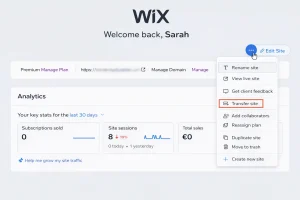
- Transfer your domain to another Wix account
- Transfer it to an external domain registrar
- Or remove it entirely from your account
Delete All Websites
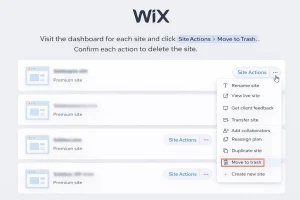
Visit the dashboard for each site and click Site Actions > Move to Trash. Confirm each action to delete the site:
Close Your Account
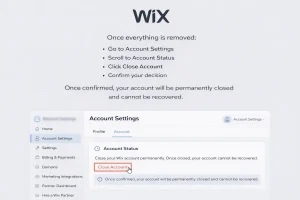
Once everything is removed:
- Go to Account Settings
- Scroll to Account Status
- Click Close Account
- Confirm your decision
Once confirmed, your account will be permanently closed and cannot be recovered.
Can You Transfer Your Wix Site or Services to Another Account?
Yes, Wix gives users the option to transfer sites, along with many connected services, to another account. This is ideal if you’re handing over your website to a client or consolidating multiple accounts.
To transfer a site:
- Go to the dashboard of the site.
- Click on Site Actions.
- Choose Transfer Site.
- Enter the recipient’s email.
- Complete the transfer form and confirm.
Some services like certain premium subscriptions may need to be unassigned manually before transferring the site.
Can a Wix Domain Be Transferred to Another Provider?
Absolutely. Wix domains can be transferred either to a different Wix account or an external registrar like GoDaddy or Namecheap.
Step-by-step: Transferring your domain
- Go to Domains in your Wix account.
- Click on Domain Actions next to your domain.
- Choose either:
- Transfer to another Wix account, or
- Transfer away from Wix
If the only option visible is Remove from Wix, follow that path if you no longer need the domain or wish to manage it elsewhere.
How Long Does It Take to Fully Close a Wix Account After Cancelling Services?

After cancelling all subscriptions, deleting sites, and removing domains, the process of closing the account is immediate from the user’s end. However, domains that were recently cancelled must pass through a waiting period (up to 80 days) before the account can be closed entirely.
What Should Users Remember When Cancelling a Wix Subscription?
It’s easy to overlook details when managing online subscriptions. Here’s a concise breakdown of what users should keep in mind:
| Task | Action Required | Result |
|---|---|---|
| Cancel Premium/Studio Plan | Cancel in Billing settings | Active until expiration |
| Get a refund | Cancel within 14 days of purchase | Full refund, features removed immediately |
| Cancel domain | Turn off auto-renewal | Domain stays active until expiry |
| Close account | Remove all services and sites | Permanent deletion of account |
| Transfer services | Use Transfer Site/Domain options | Services moved to new account |
Frequently Asked Questions
Do I have to cancel my Wix subscription if I delete my website?
Yes, deleting the site does not cancel the subscription. You must cancel the plan separately to avoid billing.
Can I continue using my website after cancelling the Premium plan?
Yes, but the site will revert to the free version with limited features and Wix ads.
Will I lose my domain after cancelling the Premium plan?
Not immediately. If the domain subscription is still active, it will continue to function until expiry unless cancelled separately.
What happens to my email (mailbox) after cancellation?
The mailbox subscription must be cancelled separately. After expiration, email services will stop.
Can I reopen my account after closing it?
No. Once an account is closed, all data is permanently deleted and cannot be restored.
Is cancelling the domain enough to stop all charges?
No. You must also cancel the site plan, mailbox, and any other connected services to fully stop billing.
Can I still access my content during the cancellation period?
Yes, until the end of the billing cycle. Once the plan expires, premium features are disabled.
