


Disclosure: websitehosting.app is a product of SeekaHost Technologies Ltd, the managed cloud hosting platform built by the SeekaHost team. This review is written from the perspective of a website building specialist who has set up and run live WordPress sites on the platform.
Readers should factor that connection into how they weigh the assessment below, which sticks to what the platform actually does and how it performs in practice.
The Short Version
Managed WordPress hosting has a reputation for being expensive. The best known names in the category start at prices that make sense for agencies and funded startups, but leave ordinary bloggers and small business owners priced out.
websitehosting.app is SeekaHost’s answer to that gap: a proper managed cloud WordPress environment, running on NVMe backed infrastructure across three data centre regions, at a price that begins where budget shared hosting sits rather than where premium managed hosting usually starts.
For anyone who wants their WordPress site to be fast and secure without learning server administration, this is one of the more compelling options I have tested this year. Below I walk through what it does, how quickly you can get a site live, and where it sits against the wider market.
What websitehosting.app Actually is?
websitehosting.app is a managed cloud hosting portal aimed squarely at WordPress users. “Managed” is the operative word.
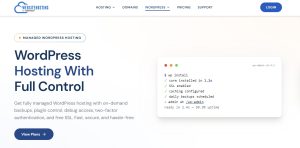
The platform handles the parts of running a WordPress site that most people would rather never touch: server tuning, caching, SSL, backups, malware scanning and security hardening. You are left with the part that matters, which is your content.
It is worth being clear about the difference between this and cheap shared hosting. On a typical shared plan you rent a slice of a crowded server and you are largely on your own for performance and security.
On a managed cloud plan like this one, each WordPress site runs in its own isolated container with its own resource limits, sitting on a cloud stack that has been optimised specifically for WordPress.
If you have read SeekaHost’s own breakdown of superfast managed cloud WordPress hosting, this is that architecture packaged into a clean, self serve portal.
The platform is the natural next step for anyone who has followed a guide on how to start a personal blog and now wants hosting that will not hold the site back as it grows.
Getting a WordPress Site Live
This is where a managed platform earns its keep, and websitehosting.app makes it genuinely quick.
The install is a single click. You choose a plan, pick your region, and the portal provisions WordPress, enables SSL, configures caching and schedules daily backups on your behalf.
In testing, a fresh WordPress site was ready in a couple of minutes with no manual configuration at all. There is no wrestling with an old style control panel, no FTP, and no need to touch a database.
If you are starting from scratch, you can register a domain in the same place, which saves the usual back and forth of pointing a name bought elsewhere. There is a helpful primer on choosing a blog domain for personal blogging if you have not settled on one yet.
For a first time site owner, the value here is obvious. Everything that normally trips people up on day one is already done by the time you reach the WordPress dashboard.
The Control Panel: What You Can Do Without Leaving the Portal?
The dashboard is where websitehosting.app separates itself from basic hosting. Rather than sending you off to different tools for different jobs, it pulls the common WordPress management tasks into one place.
From a single screen you can:
- Update, enable or disable plugins and themes directly, with no SSH or FTP needed
- Open your WordPress admin panel straight from the dashboard, without a separate login
- Take a full backup or snapshot on demand and restore instantly if something breaks
- Run backups, error log searches, database repair and optimisation, and PHP memory limit changes
- Toggle WordPress debug mode and read searchable error logs when you need to diagnose an issue
For more technical users there is real depth too: WP CLI terminal access, SSH and staging environments are all supported. That combination is unusual at this price.
It means a developer building a client site gets the tools they expect, while a non technical blogger never has to see any of it. This dual nature is the platform’s quiet strength. It is easy to use for beginners and capable enough for people who like control.
The portal also streams real time performance metrics with millisecond granularity, so you can watch traffic and resource usage rather than guessing. Once your site is live and you are ready to get it indexed, it pairs naturally with a walkthrough on how to submit a WordPress site to Google Search Console.
Performance
Speed is the reason most people move to managed hosting, and it is the area where websitehosting.app makes the boldest case.
Every layer of the stack runs on NVMe storage with advanced caching configured out of the box, and you choose from three data centre regions: Nuremberg, East Virginia and London. UK and European site owners will want the London or Nuremberg regions for the lowest latency to local visitors.
SeekaHost’s published benchmarks put a WordPress page load on the platform at around 180ms, compared with roughly 1200ms on typical shared hosting and 1850ms on budget hosting.
That works out to about 6.7 times faster than shared hosting and 10.3 times faster than budget hosting. Those are the platform’s own measured figures rather than an independent lab result, so treat them as a directional claim rather than gospel.
That said, the underlying reasons for the gap are real and easy to understand: isolated containers, NVMe disks, WordPress specific caching and a cloud network built for the job.
The more persuasive proof point, to my mind, is that SeekaHost runs its own live properties on this infrastructure, including the founder’s personal blog, which has been used as a working speed test rather than a marketing mockup.
When a company hosts its own flagship content on the product it sells, that tells you more than any benchmark graphic. If value is your main concern, the companion piece on managed WordPress hosting at cheaper prices is worth a read alongside this review.
Security
Security on websitehosting.app is handled silently, which is exactly how it should be for a managed product.
Every plan includes free SSL certificates with automatic provisioning and renewal, and TLS 1.3 with OCSP stapling across every domain, so encryption is set up correctly with zero configuration.
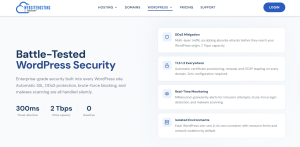
On top of that you get two factor authentication, strict access control, real time malware scanning, and brute force login detection.
The heavier infrastructure protection is where the cloud backbone shows its worth. DDoS mitigation runs through multi layer traffic scrubbing rated at 2 Tbps of capacity, absorbing attacks before they reach your site.
Each WordPress instance is network isolated in its own container, so a problem on one site cannot spill into another. For a small business owner with no security team, having this handled by default removes a genuine source of risk.
Pricing and Plans
The pricing is refreshingly plain, with no introductory bait and renewal shock. All three managed WordPress tiers renew at the same monthly rate they advertise, billed annually:
| Plan | Resources | Renewal price |
| WordPress Starter | 1 vCPU, 2GB RAM, 20GB NVMe, one site | $5.00 / month |
| WordPress Plus | 2 vCPU, 4GB RAM, 40GB NVMe, one site | $10.00 / month |
| WordPress Pro | 4 vCPU, 8GB RAM, 80GB NVMe, one site | $15.00 / month |
Every tier includes expert technical support, free application installation, free SSL and real time malware protection. What stands out is the honesty of the pricing.
Much of the hosting industry runs on low first term rates that double or quadruple at renewal, sometimes only after you commit to several years up front. Here the number you see is the number you keep paying, and you can scale up or down at any time.
For UK buyers who prefer a local billing relationship, the same managed cloud WordPress hosting is also available through the SeekaHost UK cloud hosting page.
How it Compares?
To be fair to the reader, this platform is not trying to be everything to everyone.
Against premium managed hosts such as Kinsta and WP Engine, websitehosting.app competes on value rather than brand.
Those providers are excellent, but their entry plans are several times the price and often cap your monthly visits.
For the vast majority of blogs and small business sites, you are paying for headroom you will not use. websitehosting.app gives you the managed experience, the caching and the security at a fraction of that outlay.
Against a platform like Cloudways, which also offers managed cloud hosting, websitehosting.app is the more finished, more guided experience. You spend less time assembling the pieces and more time running your site.
Against budget shared hosts such as Hostinger or IONOS, the comparison is less about price and more about what you actually get.
Those introductory rates are tempting, but they climb sharply at renewal and they put you on shared infrastructure. websitehosting.app starts in similar territory yet delivers isolated cloud containers, NVMe storage and proper managed support.
On a like for like basis, that is the stronger foundation for a site you intend to grow.
Pros and Cons
What I Liked
- Managed cloud WordPress hosting at a price that starts where shared hosting sits
- A single click install that puts a live, secured site in front of you in minutes
- A control panel that is friendly for beginners and genuinely capable for developers
- Transparent renewal pricing with no first year trickery
- Strong security handled by default, including free SSL, TLS 1.3, two factor and DDoS scrubbing
Worth Knowing
- Plans are single site, so multi property owners will run several plans or size up
- The headline speed figures are the platform’s own benchmarks, so verify against your own site
- Three data centre regions cover Europe and the US well, but there is no Asia Pacific region yet
Verdict
websitehosting.app succeeds at the thing it sets out to do: it makes managed cloud WordPress hosting simple, fast and affordable enough for people who were previously priced out of the category.
The install is effortless, the control panel is thoughtfully built, and the security is comprehensive without asking anything of you. The pricing is honest in a market that too often is not.
If you are a blogger, a startup or a small business owner who wants a WordPress site that loads quickly and stays secure, without becoming a part time system administrator, this platform earns a clear recommendation.
It is a strong fit whether you are launching your first site or moving an existing one off slow shared hosting.
Rating: 4.5 / 5
Ready to put a WordPress site on it? Explore the plans at websitehosting.app managed WordPress hosting, or learn more about the wider platform and support from the team at SeekaHost.