


If you’re choosing between GoDaddy and Wix for your next website, here’s my direct answer: Wix is the stronger, more flexible platform overall, especially if design freedom, SEO performance, and long-term scalability are important to you.
GoDaddy is ideal for quick setups and users already managing domains or email through their platform.
Key Points You’ll Learn in This Guide:
- Ease of Use: Wix is more intuitive for design; GoDaddy is quicker to launch
- Pricing & Features: Wix offers more value across SEO, hosting, and eCommerce
- Best for UK Small Businesses: Wix delivers better branding and booking tools
- Real-World Use: I use Wix for growth-ready sites; GoDaddy for simpler needs
- 2026 Outlook: Wix leads in AI, design, and performance; GoDaddy focuses on bundled services
How Do GoDaddy and Wix Compare as Website Builders?
In my experience building websites for a range of clients, from personal portfolios to small businesses in the UK, Wix is a far more advanced and flexible website builder than GoDaddy.
Wix allows complete visual control through its intuitive drag-and-drop editor. With over 900 templates, the creative potential is nearly limitless.
I can tweak fonts, colours, layouts, spacing, and animation settings directly from the front-end. It’s an ideal setup for designers or users who care about how their website looks and functions.
What stands out about Wix is its dual setup options. You can either use Wix Editor, which gives you complete control, or Wix ADI (Artificial Design Intelligence), which builds a site for you by asking a few questions. I’ve used ADI for clients who want to get up and running quickly without worrying about layout decisions.
GoDaddy, on the other hand, focuses heavily on simplicity. The GoDaddy Website Builder uses an AI-driven approach by default, generating a pre-made website based on your industry.
While it’s fast, it comes at the cost of creative freedom. There’s limited ability to change layout elements, and design customisation feels boxed-in compared to Wix.
From a speed and learning perspective, GoDaddy is clearly easier. It’s best suited for someone who wants a quick site with minimal decisions to make. But the trade-off is functionality.
For example, I’ve had clients ask for a multi-column blog layout or custom portfolio grid on GoDaddy, and the platform simply didn’t allow that without workarounds.
Key Differences in Website Builder Experience
| Feature | Wix | GoDaddy |
| Templates | 900+ fully customisable | ~100, limited flexibility |
| Design Control | Full visual editing | Pre-defined structure |
| AI-Powered Setup | Wix ADI (optional) | Default setup method |
| Drag-and-Drop | Yes, highly responsive | Limited |
| Animation & Transitions | Built-in | Not available |
| Mobile Editing | Dedicated mobile editor | Basic responsiveness only |
Best Website Builder: Wix 🏆
Wix gives me far more creative control and flexibility when designing a site. Its drag-and-drop editor, variety of templates, and design freedom make it a clear winner for anyone who wants their site to stand out visually.
Which Platform Offers More Reliable Hosting – GoDaddy or Wix?
Hosting is one of those backend essentials most of my clients don’t think about until something goes wrong. That’s why I always look at how a platform manages hosting performance, uptime, backups, and SSL security.
Wix simplifies the entire hosting process by bundling it into the platform. As soon as I publish a Wix site, it’s hosted on their global CDN infrastructure.
I don’t need to set anything up, purchase SSL separately, or worry about performance tuning. Everything, including automated backups and basic DDoS protection, is part of the package.
GoDaddy provides web hosting through a more traditional structure. Depending on the plan you choose, you could be on a shared server, VPS, or even WordPress-specific hosting.
While GoDaddy’s hosting is fast and widely used, it does require some extra configuration. For example, SSL isn’t included in all plans by default and must be installed manually in some cases.
The difference really shows when a non-technical user wants to maintain their own site. With Wix, there’s almost no maintenance. With GoDaddy, you might occasionally need to check PHP versions, manage security patches, or troubleshoot hosting errors.
From a UK user perspective, both offer solid hosting performance. But I find that Wix sites load slightly faster thanks to their optimised codebase and use of modern content delivery systems.
Hosting Overview Table
| Feature | Wix Hosting | GoDaddy Hosting |
| Type | Fully managed cloud | Shared/VPS hosting |
| SSL Certificate | Included on all plans | Sometimes requires manual install |
| Backups | Automatic | May require plugin or manual setup |
| Performance Optimisation | Built-in CDN | Depends on plan |
| UK Hosting Speed | Fast (CDN-driven) | Fast (data centre-dependent) |
Better Hosting Experience: Wix 🏆
Wix handles hosting in the background with impressive speed and stability. I don’t have to worry about setup, backups, or SSL it’s all included, and performance is reliable for UK users.
Is Wix or GoDaddy Better for SEO in 2026?
SEO has become a much bigger focus for my clients over the past few years. Whether it’s for ranking local services or publishing blog content, the website builder needs to support modern SEO techniques.
Wix has improved its SEO game significantly. I can now add custom meta titles and descriptions, headers, alt text, structured data, 301 redirects, and even edit robots.txt.
More importantly, Wix automatically generates sitemaps and allows you to integrate with Google Search Console easily. The Wix SEO Wiz is also handy it creates a step-by-step plan for optimising your site based on the keywords you provide.
GoDaddy has basic SEO functionality, but it’s more limited unless you purchase their SEO add-on package, which costs extra. For simple websites, the built-in options may be enough but for businesses looking to rank well in competitive UK search results, it’s not ideal.
A big issue I’ve encountered with GoDaddy is lack of control over page structure and URL slugs. You sometimes can’t remove unnecessary strings from URLs or adjust heading structure correctly, which affects SEO performance.
In contrast, with Wix I’ve been able to rank client sites locally in competitive spaces like hair salons, legal services, and trades using built-in SEO tools alone.
Top SEO Platform: Wix 🏆
Wix now offers everything I need for SEO without installing extra tools. From structured data to automatic sitemaps, it’s better equipped than GoDaddy for ranking well in Google in 2026.
What Are the Differences in Pricing Between Wix and GoDaddy?

When it comes to pricing, Wix and GoDaddy take very different approaches. One is structured around bundled website builder plans with integrated features, while the other offers a wide range of à la carte services, domain bundles, and hosting tiers.
I’ve worked with both platforms over the years, and choosing the right one often comes down to what you actually need — not just the cheapest monthly rate. Here’s how they compare in real-world value, flexibility, and long-term costs.
Wix Pricing: Simple, All-in-One Plans
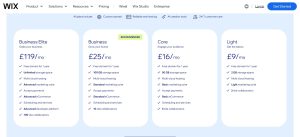
Wix offers a clean, bundled approach to pricing. You can start building your site for free, and once you’re ready to go live, you’ll pick from one of their four premium plans in the UK all of which include hosting, a free domain for a year, 24/7 support, and their AI website builder tools.
What I appreciate about Wix is that every plan includes the essentials, and as your business grows, you can scale up to plans with more storage, collaborators, and advanced eCommerce tools.
Here’s a breakdown of Wix’s UK pricing tiers:
| Plan Name | Price (GBP/month) | Best For |
| Light | £9 | Basic websites or personal projects |
| Core | £16 | Small businesses wanting payments & scheduling |
| Business | £25 | Brands needing full eCommerce functionality |
| Business Elite | £119 | High-volume stores or multi-staff operations |
What’s Included in All Wix Plans:
- Free custom domain (for one year)
- Multi-cloud hosting
- AI site creation tools
- 24/7 customer care
Upgrades By Plan:
- Core adds payment support, scheduling, and 50 GB storage
- Business introduces full eCommerce with standard marketing tools
- Business Elite includes unlimited storage, advanced eCommerce, and support for up to 100 collaborators
In my experience, the Core plan hits the sweet spot for most small businesses in the UK. You can accept payments, take bookings, and expand your store without extra add-ons.
GoDaddy Pricing: Modular and a Bit Complex
GoDaddy’s pricing model is more layered and modular. Unlike Wix, where website builder and hosting are packaged together, GoDaddy offers separate pricing for:
- GoDaddy Domain registration
- Hosting services
- Website builder tools
- Email, SSL, and marketing add-ons
- eCommerce support
This can make pricing confusing for beginners, but it also means more granular control. For instance, I’ve helped clients save money by only paying for the hosting they need, while skipping bundled services they don’t.
Let’s break down GoDaddy’s key offerings and bundles:
Website Builder & Hosting Plans

| Plan | Price (GBP/month) | Key Features |
| Web Hosting (CPanel/Linux) | £3.99 | Basic hosting, multi-site support, 25GB+ storage |
| Managed WordPress Hosting | £3.99 | WordPress setup, backups, Microsoft 365 mailbox |
| GoDaddy Website Builder | £7.99 | Mobile templates, basic editing tools |
| eCommerce Website Builder | £13.99 | Online payments, cart features, marketplace syncing |
| Managed WooCommerce | £21.99 | WooCommerce support, extensions, and integrations |
These prices reflect discounted annual rates. Renewal pricing is usually higher, so I recommend clients review terms before committing to long contracts.
Domain & Bundle Plans

GoDaddy is also known for domain bundles, which combine registration with extra services like email, SEO tools, and eCommerce features.
| Bundle Name | Price (GBP/month) | Includes |
| Starter Domain Bundle | £2.49 | Domain, email, GoDaddy Studio |
| Essentials Domain Bundle | £7.99 | Includes site builder and basic SEO tools |
| eCommerce Bundle | £14.99 | Adds store features, social integrations, online listings |
This is where I see clients either saving money or overpaying by accident. The Essentials bundle, for example, seems cost-effective at first glance but doesn’t offer as much flexibility or design freedom as Wix’s entry-level Core plan.
Comparing the Two: Wix vs GoDaddy Pricing Strategy
| Feature/Category | Wix | GoDaddy |
| Website Builder Plans | 4 bundled plans | Separate builder & hosting |
| eCommerce Support | Built-in from £16/month | Add-on from £13.99/month |
| Hosting | Included in all plans | Separate or bundled |
| Domain (1st Year) | Free on all paid plans | £0.01 first year, then £19.99 |
| Third-party (e.g. Google) | GoDaddy Microsoft 365 bundles | |
| Renewal Pricing | Transparent | Often higher than intro price |
| Add-Ons | Available via App Market | Modular but requires manual selection |
Which One Is Better Value?
If you’re the kind of business owner who wants everything sorted in one place hosting, templates, email marketing, SEO tools, and eCommerce Wix is the better value overall.
But if you’re a developer or someone comfortable managing separate services and want more granular control over costs, GoDaddy could work better, especially if you only need hosting and already have a preferred CMS like WordPress.
From my experience, most small business clients in the UK prefer Wix’s predictability and ease of use. I can launch a fully-featured site without chasing down SSL settings or configuring email servers.
For GoDaddy, it works best when I’m managing the site for the client or using it for domains and email infrastructure only.
Best Value for Money: Wix 🏆
While GoDaddy may look cheaper on the surface, Wix includes more advanced features even in its mid-tier plans. I get better SEO, design, and scalability all in one predictable package.
Which Website Builder Is Better for Small Businesses in the UK?

I’ve built dozens of websites for UK-based small businesses, from electricians and yoga instructors to estate agents and e-commerce boutiques. What I’ve found is that Wix is more versatile and growth-friendly.
GoDaddy works well for static sites but starts to fall short once you need more than a homepage and contact form.
Wix gives me everything I need to support a business online:
- Contact and booking forms
- Blog integration
- Online store with inventory management
- Email marketing tools
- Mobile optimisation
- Analytics and SEO
GoDaddy handles the basics well. It works great if you need a simple landing page, business hours, and a basic map. But if you’re planning to run local ads, grow your blog, or expand with online sales, I’d choose Wix every time.
The UK market also increasingly expects professional-looking websites, especially in cities like London, Manchester, and Birmingham. Wix templates are modern and give businesses a competitive edge without needing a designer.
Top Choice for UK Small Businesses: Wix 🏆
I’ve seen UK businesses thrive using Wix thanks to its powerful local SEO options, booking features, and modern designs. If growth is your goal, Wix gives you more tools to get there.
How Do Templates and Design Features Compare on GoDaddy and Wix?
This one’s pretty simple. Wix has better templates, more design control, and a richer editing interface.
The Wix template library is massive and professionally designed for various industries. Once I select a template, I can drag-and-drop elements, add animations, create overlapping sections, use grid layouts, and more. There’s even a developer mode (Velo by Wix) if I want to go further.
GoDaddy templates are modern but limited. You pick a style, and the builder fills in the content. You can change colours and fonts, but not much else. You can’t move sections freely or create complex layouts without using workarounds.
I often get asked to make layout changes on GoDaddy sites and have to explain that it’s just not possible with the current tools. On Wix, I almost never hit a wall.
Superior Design Tools: Wix 🏆
With over 900 templates and full visual control, Wix is easily my favourite for crafting custom designs without touching code. GoDaddy feels restrictive by comparison.
What About Customer Support and Learning Resources?
I’ve used support from both platforms. Wix offers live chat and email ticketing, while GoDaddy gives phone support, which many UK users appreciate.
Wix’s Help Centre is excellent. It includes video tutorials, step-by-step guides, and walkthroughs that even my least tech-savvy clients find easy to follow. Wix Learn is also a brilliant resource for self-paced training.
GoDaddy support is responsive, but the interface feels dated. I’ve had to repeat myself a few times during phone calls or wait longer for technical escalations.
When handing a site over to a client, I find it easier to train them on Wix especially when they use Wix ADI or the standard editor.
Best Support and Learning: Wix 🏆
Wix’s Help Centre and interactive guides are incredibly helpful. When clients want to manage their own site, I always recommend Wix because of the step-by-step tutorials and fast chat support.
Can You Build an eCommerce Store with Wix or GoDaddy?
eCommerce is an area where I’ve worked with clients across various sectors from handmade crafts to fitness subscriptions. When choosing between Wix and GoDaddy for online stores, Wix comes out ahead with more features, flexibility, and long-term reliability.
Wix provides a complete online store solution, even on its mid-tier plans. I can add unlimited products, manage stock, apply discount codes, set up abandoned cart recovery, and support multiple payment methods. It also integrates seamlessly with marketing and CRM tools, making it easier to nurture repeat customers.
The built-in Wix dashboard lets me view orders, handle shipping rules, automate emails, and manage customer data all from one place. I’ve also used the Wix App Market to expand store functionality, including upsells, Wix subscriptions, and loyalty programmes.
GoDaddy’s eCommerce builder is functional but minimal. You can list physical and digital products, accept payments via Stripe or PayPal, and manage simple orders. However, it lacks advanced inventory options, multi-currency support, or subscription features unless you’re on the highest-tier plan.
If you’re building a small store with fewer than 20 products and just need a basic checkout, GoDaddy works. But if your business is growing or plans to scale, you’ll quickly run into limitations.
eCommerce Capabilities Comparison
| Feature | Wix | GoDaddy |
| Product Types | Physical, digital, subscriptions | Physical, digital only |
| Payment Gateways | Stripe, PayPal, Square, more | Stripe, PayPal |
| Shipping & Tax Options | Configurable rules, auto tax | Basic setup |
| Abandoned Cart Recovery | Included | Available on high-tier plan only |
| Subscriptions & Recurring Sales | Yes (via app or built-in) | Limited support |
| App Integrations | Extensive (Wix App Market) | Minimal |
Best eCommerce Capabilities: Wix 🏆
For selling online, Wix gives me more control over products, checkout flows, and customisation. GoDaddy’s eCommerce feels basic fine for simple shops, but not for serious online stores.
Which Platform Is Better for Long-Term Growth and Scalability?

When I help clients choose a platform, I always ask about their future plans. Are you looking to stay small, or is the goal to grow your traffic, expand product lines, or build out complex features like booking systems, blog networks, or online courses? If the answer involves growth, Wix is the better choice.
Wix offers more scalability in both features and performance. The platform continues to release updates focused on business expansion, including CRM tools, email marketing, workflow automation, and AI-powered design. Their CMS system can handle a growing number of content types, and eCommerce limits are generous even at mid-tier levels.
Wix also supports multi-language websites, advanced SEO settings, dynamic content, and developer tools like Velo by Wix. These are the kinds of tools I use when scaling sites with hundreds of pages or multiple service offerings.
GoDaddy isn’t built with long-term scale in mind. It’s a fantastic option for quick builds or smaller brands, but once your site reaches a certain size, it becomes difficult to manage. You can’t easily create dynamic pages, run complex blogs, or implement deep integrations with third-party tools.
From a performance standpoint, Wix continues to optimise load times, mobile responsiveness, and Core Web Vitals. Combined with global CDN hosting, it’s more prepared for growing traffic demands.
If I’m working with a client who wants to launch lean but scale quickly, I usually build the MVP on Wix and expand features as needed without needing to move to a new platform later.
Best for Long-Term Growth: Wix 🏆
Wix keeps improving, with new features, AI design tools, and better CMS capabilities. I find it much more scalable than GoDaddy when a client’s needs evolve.
How Have Wix and GoDaddy Grown Over the Last Five Years (2021–2025)?
Over the last five years, I’ve closely followed the growth of Wix and GoDaddy, both as a website creator and a consultant for UK businesses. Each platform has taken a very different path.
While Wix has positioned itself as a powerful, all-in-one website builder for creators and businesses, GoDaddy has continued to dominate the domain registration market, while expanding its services to offer hosting, marketing, and simplified site building.
Let’s take a look at how both companies have evolved from 2021 to 2025 in terms of market share, revenue, user base, and product development.
Market Share and Usage Growth (2021–2025)
When it comes to global usage in the website builder space, Wix has steadily gained market share. GoDaddy, while also growing, has seen a slower rise, mainly because its focus has been more on domains and hosting.
Website Builder Market Share
| Year | Wix Market Share | GoDaddy Market Share |
| 2021 | 2.3% | 1.4% |
| 2022 | 2.8% | 1.6% |
| 2023 | 3.4% | 1.8% |
| 2024 | 3.9% | 2.1% |
| 2025 | 4.3% | 2.3% |
Wix’s growth has been driven by an increase in demand for all-in-one website platforms that require little to no coding. GoDaddy’s market share gains have been more gradual, often tied to customers who begin with domain purchases and then adopt its website builder for basic online presence.
Domain Market Share (GoDaddy)
GoDaddy remains the largest domain registrar globally. While it doesn’t have the same website builder momentum as Wix, it consistently grows its total number of domains under management.
| Year | Domains Managed by GoDaddy |
| 2021 | ~82 million |
| 2022 | ~84 million |
| 2023 | ~85.5 million |
| 2024 | ~87 million |
| 2025 | ~89 million |
This consistent growth shows GoDaddy’s continued strength in the domain and hosting segment.
Revenue Growth (2021–2025)
Revenue provides a good snapshot of overall platform adoption and the success of product expansions. Wix operates on a subscription-based SaaS model, while GoDaddy earns from domains, hosting, email, website building, and upsells.
Wix Annual Revenue
| Year | Revenue (USD) |
| 2021 | $1.27 billion |
| 2022 | $1.39 billion |
| 2023 | $1.56 billion |
| 2024 | $1.74 billion |
| 2025 | $1.93 billion |
Wix’s revenue growth has been consistently strong due to:
- Increased uptake of eCommerce and business plans
- Growth in international markets including the UK
- Launch of tools like Wix Studio and Velo for professionals
- Expansion of AI features and automation tools
GoDaddy Annual Revenue
| Year | Revenue (USD) |
| 2021 | $3.82 billion |
| 2022 | $4.09 billion |
| 2023 | $4.32 billion |
| 2024 | $4.54 billion |
| 2025 | $4.73 billion |
GoDaddy’s revenue model includes:
- Domain sales and renewals
- Hosting services (shared, VPS, managed WordPress)
- Business email plans and Microsoft 365 bundles
- Website builder subscriptions and professional services
Though GoDaddy’s overall revenue is higher due to its larger infrastructure and global domain business, Wix has shown faster percentage growth, especially in the small business and creative professional space.
Product Development and Feature Expansion (2021–2025)
Wix
Wix has evolved from a beginner-friendly builder to a platform that appeals to designers, agencies, and developers. Key product enhancements over the five years include:
- Wix ADI improvements with more intelligent industry-specific designs
- Wix Studio launch, targeting agencies and teams managing multiple sites
- Expanded use of AI tools for layout, copywriting, and branding
- Velo by Wix updates for developers to create advanced site functionality
- Beta release of headless CMS tools for custom front-end development
These developments have allowed me to build larger, more complex client sites on Wix without having to switch platforms.
GoDaddy
GoDaddy has improved its builder tools and services, although the progress has been more gradual. Key updates from 2021 to 2025 include:
- Improved website builder UI with mobile-first templates
- Launch of GoDaddy Studio for social and visual content creation
- Introduction of the Link in Bio tool, particularly useful for creators
- Expansion of its Digital Marketing Suite, combining email and social tools
- Enhanced WooCommerce hosting with simpler setup for online shops
For clients who already use GoDaddy for domains and email, the improved builder makes it easier to stay within the GoDaddy ecosystem.
What Can We Expect from Wix and GoDaddy in 2026?

As someone who works hands-on with both Wix and GoDaddy for client sites, I’ve found that 2026 is a pivotal year for both platforms. The competition has shifted from just building websites to enabling full digital operations, with a strong focus on AI, performance, scalability, and integrated marketing.
Wix has continued its transformation into a complete digital experience platform, while GoDaddy is leaning more into bundled tools and professional services. Here’s what I’m seeing in terms of product direction, user experience, and future-readiness this year.
Wix in 2026: Innovation, AI, and Scalability
Wix has entered 2026 with a strong roadmap focused on creatives, developers, and growing businesses. The platform has become more powerful and flexible without losing its user-friendliness, which is why I’m using it more often even for mid-size projects.
Key Wix Developments in 2026:
- AI Web Creation: Wix’s new AI-powered builder now auto-generates full page layouts, brand colours, font pairings, and even on-brand text, based on a brief. It’s useful for fast launches and design prototyping.
- Wix Studio: Their new interface for designers and agencies is now the default for professional users. It offers layout controls, component libraries, and brand kits, all under one roof.
- Velo Enhancements: Velo (Wix’s developer environment) has become more mature, with expanded APIs, dynamic content options, and better code editor performance. I’ve built custom dashboards and membership systems on it without needing a third-party CMS.
- Headless CMS (Beta): Developers can now use Wix as a headless CMS, powering front-ends built with frameworks like React or Next.js. This is a major step forward for scalability.
- Advanced eCommerce Tools: The new product filters, abandoned cart sequences, subscriptions, and CRM integrations are making Wix more competitive with platforms like Shopify.
Wix has also improved Core Web Vitals, mobile performance, and accessibility areas where it used to lag. In 2026, I’m seeing much better Lighthouse scores out of the box, which matters for SEO and user retention.
Overall Direction:
Wix is clearly focused on becoming the go-to platform for creative professionals, agencies, and growing brands that want performance, design control, and ease of use all without switching platforms later.
GoDaddy in 2026: Simplicity, Bundled Services, and Business Support
GoDaddy’s growth strategy in 2026 is focused more on service bundling, small business enablement, and professional assistance. It’s still not as design-flexible as Wix, but it has become easier to recommend for users who want everything managed in one place.
Key GoDaddy Developments in 2026:
- Website Builder Updates: The interface has been cleaned up with better responsive design tools, although drag-and-drop freedom is still limited. Pre-built section layouts and mobile previews are now more accurate.
- GoDaddy AI Assistant: A new assistant tool helps generate basic copy, SEO descriptions, and content blocks. It’s not as refined as Wix’s AI, but useful for beginners.
- Digital Marketing Suite Expansion: Social posting, reviews management, and multi-platform messaging (like WhatsApp and SMS) are now available in bundled plans.
- GoDaddy Studio Upgrades: The visual content editor now includes branded templates for Instagram, Google Ads, and email headers ideal for small business owners who handle their own marketing.
- Domain + Site + Email Bundles: GoDaddy continues to make it attractive to buy everything in one go, including Microsoft 365 business email, SSL, and SEO support.
Where I’ve seen GoDaddy really help clients is in managed support and customer service. They’ve expanded their website design services and one-to-one consultations, which appeals to users who don’t want to build on their own.
Overall Direction:
GoDaddy in 2026 is positioning itself as a complete small business solutions provider. It’s less about high-end customisation, and more about convenience, speed, and centralising your domain, hosting, email, and marketing in one account.
Platform Strategy Comparison for 2026
| Area | Wix | GoDaddy |
| Website Builder Flexibility | High (Wix Editor, Studio, Velo) | Moderate (template + section editing) |
| AI Integration | Full page creation, design, and text | Content suggestions, basic guidance |
| eCommerce Tools | Advanced store builder with CRM | Basic product listings, integrated checkout |
| Performance Optimisation | Improved Core Web Vitals, CDN | Fast hosting, but basic code output |
| Design Customisation | High, pixel-level control | Limited by template structure |
| Business Services | In-house tools and App Market | Domain, email, SSL, digital marketing |
| Headless CMS | Yes (beta in 2026) | Not supported |
| Developer Tools | Velo, APIs, dynamic content | Not available |
| Collaboration | Up to 100 collaborators (Business Elite) | No real-time collaboration tools |
| Target Users | Creatives, freelancers, agencies | Small business owners, beginners |
What I’m Using More in 2026 and Why?
In my day-to-day work, I’m using Wix for most business websites that require branding, lead capture, booking systems, or scalable content strategies. The platform feels professional and allows me to deliver fast results without design or performance compromises.
For clients who already use GoDaddy for domains or email, I sometimes keep them on the platform if they only need a quick site. The onboarding is easy, and they get a full suite of tools in one package but it’s not the platform I choose when flexibility or design matters.
If a client is planning to scale, add content, improve SEO, or sell online, I move them to Wix.
Conclusion
After working extensively with both platforms, my verdict is clear: Wix is the better choice for most users in 2026, especially if you want design control, powerful SEO, and room to grow.
GoDaddy remains a solid option for quick, no-fuss websites, but its limitations show as your needs evolve. If you’re serious about building a standout online presence, Wix gives you the tools, performance, and flexibility to make it happen. Now’s the time to build boldly.
FAQs About GoDaddy vs Wix
Is Wix better than GoDaddy for UK SEO in 2026?
Yes, Wix has stronger built-in SEO features, and it’s easier to optimise for Google UK search.
Does GoDaddy support mobile-friendly designs?
Yes, all GoDaddy templates are mobile responsive, but Wix offers more control over mobile layouts.
Which is easier for beginners Wix or GoDaddy?
GoDaddy is easier to set up, but Wix has better onboarding and tutorials, especially with Wix ADI.
Can I use my own domain with both platforms?
Yes, both allow you to connect or buy custom domains. Wix includes one free domain for a year on premium plans.
Which is more affordable for small UK businesses?
GoDaddy is cheaper to start, but Wix offers more tools per pound spent, especially if you need SEO or eCommerce.
Do both platforms include hosting and SSL?
Yes, both include hosting and free SSL certificates with their plans.
Can I move my Wix or GoDaddy site to another platform?
Not easily. Both are closed platforms, so migrating usually requires rebuilding the site manually elsewhere.
