

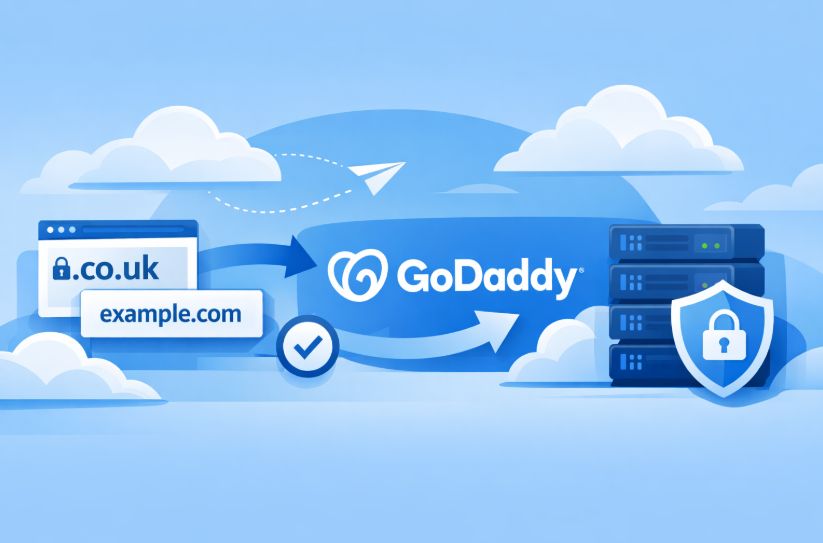

Transferring a domain name may seem daunting if you’ve never done it before. But in reality, the process is quite straightforward, especially when using a trusted registrar like GoDaddy. Whether you’re managing a personal blog, a business website, or an entire portfolio of domains, moving your domain to GoDaddy can give you more control, convenience, and added benefits all in one place.
GoDaddy is one of the most established domain registrars in the world, trusted by millions of users for its ease of use, customer support, and bundled services.
If you’re based in the UK and thinking about centralising your domain services, this guide will walk you through everything you need to know from understanding what a domain transfer entails, to how long it takes, what it costs, and exactly what steps you need to follow to complete your domain transfer smoothly.
Let’s break down the entire process so you can feel confident about making the switch.
What Does It Mean to Transfer a Domain to GoDaddy?
A domain name transfer is the process of moving your domain registration from your current provider to a new registrar here, GoDaddy. It’s important to understand that when you transfer a domain, you’re not moving your website files, hosting service, or email. You’re only changing the registrar that manages the domain’s registration and renewal.
However, GoDaddy offers assistance with moving your website content and email services as well, if needed. This ensures that everything can eventually be managed under one roof without disruption.
One key benefit of transferring your domain to GoDaddy is that your existing registration period is retained. On top of that, GoDaddy adds an extra year of registration for free, unless your domain has already reached its maximum registration length.
Why Should You Transfer Your Domain to GoDaddy?
There are several compelling reasons to make GoDaddy your registrar of choice. Firstly, the platform is built for both beginners and professionals. Whether you have one domain or hundreds, GoDaddy’s domain management tools are designed for simplicity and efficiency.
Secondly, GoDaddy offers competitive pricing. For instance, .com domains can be transferred for as little as £9.99, and .co.uk domains can be transferred for free. These prices often include one additional year of registration at no cost.
Thirdly, GoDaddy provides award-winning support with 24/7 availability, including chat and phone support that’s especially helpful for UK-based users. Other benefits include:
- Free domain privacy protection (on eligible domains)
- Real-time domain monitoring to prevent downtime
- Discounts for bulk domain transfers
- Access to tools like GoDaddy Studio and a free logo maker
With over 20 million customers globally and thousands of positive reviews, GoDaddy has earned a strong reputation for reliability and performance.
Are There Any Restrictions When Transferring Domains to GoDaddy?
Yes, there are certain eligibility rules you need to be aware of before starting a domain transfer. These are largely based on ICANN’s transfer policy, as well as the policies of the current registrar.
Some of the key restrictions include:
- The domain must be at least 60 days old from its initial registration date.
- If the domain was recently transferred from another registrar, you must wait 60 days before transferring again.
- If contact information (like the registrant email) was updated and the registrant opted for a 60-day lock, the domain cannot be transferred during that time.
- The domain must not be in redemption or expired status.
- Some domain extensions such as .uk, .eu, .au, and .ca have unique transfer procedures, which should be reviewed individually.
If your domain meets these conditions, you’re ready to begin the transfer process.
What Steps Should You Take Before Starting the Domain Transfer?
To ensure a successful and smooth domain transfer to GoDaddy, there are several preparatory steps to follow with your current registrar. These actions should be completed before initiating the transfer.
Step 1: Unlock the Domain

Log into your current registrar’s control panel and navigate to the domain settings. Look for the “Domain Lock” or “Transfer Lock” option and disable it. Domains that are locked cannot be transferred to another registrar.
Step 2: Obtain the Authorisation Code
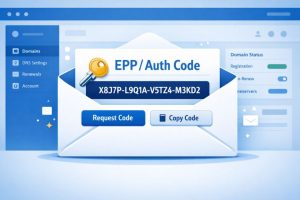
Next, request your authorisation code, also known as the EPP code or transfer key. This code confirms that you own the domain and have the right to move it. It’s typically emailed to the administrative contact associated with the domain.
Step 3: Check and Update Contact Details
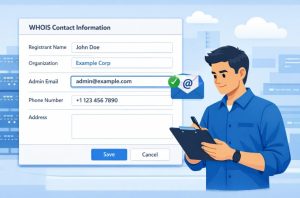
Go to the WHOIS data associated with your domain and verify that the admin email address is correct. GoDaddy will send a confirmation email during the transfer process, and you’ll need access to this email to approve the transfer.
Step 4: Review Domain-Specific Instructions

If you’re transferring a domain with a country-code TLD (like .uk, .ca, .eu, or .au), review any special requirements that may apply. These may include registrar-specific steps or variations in how EPP codes are handled.
How Do You Transfer a Domain to GoDaddy Step by Step?
Once your domain is unlocked and you have the necessary authorisation code, here’s a step-by-step guide to transfer it to GoDaddy:
Step 1: Visit GoDaddy’s Transfer Page

Navigate to the GoDaddy Domain Transfers page. Enter the domain name you wish to transfer in the search bar to begin the process.
Step 2: Confirm Domain Eligibility
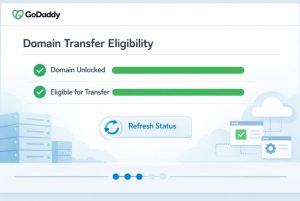
GoDaddy will check if the domain is unlocked and eligible for transfer. If the domain is ready, you’ll see green confirmation bars. You can also manually click “Refresh Status” if needed.
Step 3: Enter the Authorisation Code
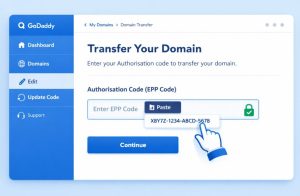
Paste the authorisation code (EPP code) into the designated field. If you make an error, you can edit this code later through your GoDaddy account dashboard.
Step 4: Select Domain Protection
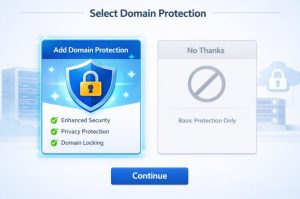
You’ll have the option to add Domain Protection, which offers enhanced security features like accidental transfer prevention. You can choose to add protection or opt out.
Step 5: Complete the Checkout
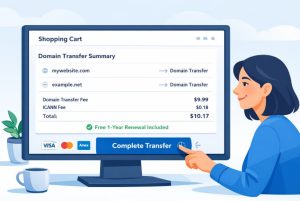
Proceed to the checkout stage and complete your payment. In most cases, the transfer cost includes a free 1-year domain renewal.
How Long Does It Take to Transfer a Domain to GoDaddy?
Most domain transfers are completed within five to seven days, but some may finalise sooner depending on the registrar and domain extension.
Here’s what happens during this period:
- A confirmation email is sent to the admin contact (make sure to approve it).
- The current registrar may also notify you and give you the option to approve or deny the transfer.
- GoDaddy will handle the rest of the process in the background, keeping your website live throughout the transition.
You can track the transfer status any time in your GoDaddy dashboard under “My Products” or “Transfers.”
What Happens After the Domain Transfer is Complete?
Once the domain transfer is finalised, it will appear in your GoDaddy account with full access and control. From here, you can:
- Manage DNS records
- Enable auto-renewal
- Add email accounts
- Set up domain forwarding
- Add or manage domain privacy features
If your domain was previously pointing to a live website or email service, there’s no interruption as long as DNS settings remain unchanged. You can later update DNS records or name servers if you want to host your site or email with GoDaddy.
Can You Also Transfer Email Services to GoDaddy?

Yes, GoDaddy provides expert migration services to help you transfer:
- Emails
- Attachments
- Contacts
- Folders
These transfers are completed seamlessly in the background, ensuring no downtime or disruption. This is particularly helpful for businesses that rely heavily on email communication.
What Are the Costs and Benefits of Transferring a Domain to GoDaddy?
Here’s a breakdown of the typical costs and benefits:
| Feature | Details |
|---|---|
| .com Transfer Fee | £9.99 (includes 1-year renewal) |
| .co.uk Transfer Fee | Free |
| Additional Year of Registration | Included at no extra cost (some TLDs excluded) |
| ICANN Fee | Applied as required by domain extension |
| Domain Privacy | Free for eligible domains |
| Email Transfer | Available with expert assistance |
| Access to Tools | Includes GoDaddy Studio and free logo maker |
Why Is GoDaddy a Trusted Registrar for Domain Transfers?
With a Trustpilot rating of 4.5 out of 5, GoDaddy has become a go-to choice for millions of users seeking reliable and affordable domain services. The transfer process is automated, meaning most steps are handled in the background. No special technical knowledge is needed.
Additional perks like bulk discounts, free privacy, and real-time domain monitoring help GoDaddy stand out from other providers. With everything accessible from one intuitive dashboard, managing your domains becomes a much easier task.
Conclusion
If you’re looking for a trusted registrar that offers affordability, simplicity, and comprehensive support, GoDaddy is an excellent choice. Whether you’re moving away from Google Domains (following their acquisition by Squarespace), consolidating your domains, or looking for better control, transferring your domain to GoDaddy is a smart move.
With helpful features, an extra year of free registration, and top-tier support, it’s easy to see why millions already use GoDaddy to manage their digital identity.
Frequently Asked Questions
Can I transfer a domain that was just registered?
No. Domains cannot be transferred within 60 days of registration, transfer, or a registrant contact update.
Will my website go offline during the transfer?
Not if you keep the DNS settings the same. Your website and email should remain fully functional.
Is domain privacy included after the transfer?
Yes, GoDaddy provides free privacy protection for eligible domains to hide your WHOIS data.
Can I transfer more than one domain at a time?
Yes. GoDaddy supports bulk transfers and offers discounts when transferring six or more domains.
What if I entered the wrong EPP code?
You can update or correct the code later from your GoDaddy dashboard.
Are country-specific domains like .uk treated differently?
Yes. Domains like .uk, .eu, .au, and .ca may follow different procedures. GoDaddy provides tailored instructions during the process.
What support is available during the transfer?
GoDaddy’s award-winning customer support is available 24/7 to assist via chat or phone.
