


If you’re asking me which platform is better, WordPress or Wix, I’d say WordPress is the better choice overall. It offers more flexibility, long-term scalability, and control. That said, Wix is still a great option if you want something quick, easy, and fully managed.
Based on my experience using both, here’s how they compare:
- Pricing: WordPress gives you cost control, while Wix offers all-in-one simplicity. Both offer great value depending on your needs.
- Ease of Use: Wix is more beginner-friendly with its drag-and-drop editor.
- Design & Customisation: WordPress allows deeper control and freedom in design.
- SEO & Marketing: WordPress leads with advanced plugin support.
- eCommerce: WooCommerce on WordPress is more powerful for growth, while Wix suits smaller stores.
- Growth & Future Outlook: WordPress is evolving for enterprise use, and Wix is pushing AI and visual design for small business users.
Let’s explore each in detail.
What Are the Main Differences Between WordPress and Wix?
WordPress and Wix are fundamentally different platforms serving similar needs in contrasting ways. WordPress is a content management system (CMS), whereas Wix is a fully hosted website builder.
The CMS model allows users to install WordPress on a hosting provider of their choice, giving full control over the server, database, and files. Wix, on the other hand, provides a streamlined experience that bundles hosting, security, and design tools into a single platform.
WordPress.org (self-hosted) allows deep customisation, from back-end PHP scripts to frontend styling using CSS and JavaScript. It is well-suited for developers or users who require flexibility and scalability.
In contrast, Wix simplifies the web creation process with a visual editor and pre-built templates, making it ideal for users who want to build a site quickly with minimal technical knowledge.
Notable differences include:
- WordPress has access to over 50,000 plugins, while Wix offers a more limited selection via its App Market.
- Wix templates are easier to use but less flexible than WordPress themes.
- Hosting is included with Wix but must be arranged separately for WordPress.
- WordPress requires more hands-on maintenance, including backups, updates, and security configurations.
🏆 WordPress wins for flexibility and control
I’ve used both extensively, and if you’re someone who likes tinkering or needs complete freedom, WordPress is the clear winner here. I like knowing I can change anything from the structure of my database to the fine details of my site layout.
Which Platform Offers Better Pricing – WordPress or Wix?
Pricing between Wix and WordPress can be tricky to compare directly because they use different pricing models. Wix provides all-in-one subscription plans that include hosting, templates, security, and support, making it straightforward for beginners.
In contrast, WordPress.com offers a range of plans with tiered features and heavy discounts for annual commitments, while WordPress.org requires users to manage separate hosting, plugins, and themes.
Below is a clear pricing comparison for both platforms to help you understand the value offered by each.
💰 WordPress.com Pricing (Annual Billing)
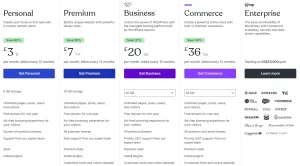
| Plan Name | Price (Monthly, Billed Annually) | Storage | Key Features |
|---|---|---|---|
| Free | £0 | 1 GB | Basic website, limited customisation |
| Personal | £3 | 6 GB | Custom domain, ad-free, support |
| Premium | £7 | 13 GB | Premium themes, Google Analytics, video upload |
| Business | £20 | 50 GB | SEO tools, plugin installation, priority support |
| Commerce | £36 | 50 GB | WooCommerce features, store themes, advanced marketing tools |
Note: WordPress.com offers up to 75% off if you choose a 3-year billing cycle.
💻 Wix Pricing (UK – Annual Billing)
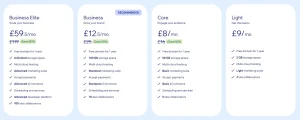
| Plan Name | Price (Monthly) | Storage | Best For |
|---|---|---|---|
| Light | £9 | 2 GB | Basic websites |
| Core | £8 | 50 GB | Blogs, small business sites |
| Business | £12.50 | 100 GB | Growing brands, standard eCommerce |
| Business Elite | £59.50 | Unlimited | Advanced eCommerce, agencies |
Wix includes hosting, templates, security, and 24/7 customer support in all plans.
Both platforms offer value depending on what you’re looking for. Wix simplifies things with one fixed monthly fee, while WordPress gives users the ability to customise features and costs more granularly.
🏆 It’s a tie – both offer excellent value depending on use case
When pricing is broken down, Wix is a good deal for beginners who want predictability. WordPress gives me the chance to tailor my costs sometimes saving money, sometimes not but I love having that control. That makes them equally strong, just in different ways.
Is WordPress or Wix Easier to Use for Beginners?
Ease of use is one of the most defining differences between these platforms. Wix shines with its intuitive drag-and-drop editor and minimal setup. Users can build and publish a website within a few hours without needing to install anything or understand technical terms.
Its visual builder, Wix ADI (Artificial Design Intelligence), automatically generates website layouts based on user answers to simple questions.
WordPress has made strides in recent years with its Gutenberg block editor, allowing users to build content using a drag-and-drop system. However, the setup process still involves choosing a host, installing WordPress, managing themes, and learning how plugins work, steps that may feel overwhelming to beginners.
Ease-of-use breakdown:
- Wix provides onboarding tours, tutorials, and built-in assistance.
- WordPress requires external resources or community forums for guidance.
- Wix has no learning curve; WordPress requires time to master.
🏆 Wix wins for simplicity and beginner-friendliness
When I recommend a platform to someone building their first website, Wix is usually my go-to. The drag-and-drop interface makes everything so approachable. I still remember how refreshing it was the first time I used it everything just worked.
Which Website Builder Offers More Design and Customisation Options?
When it comes to design freedom and customisation, WordPress and Wix offer very different experiences, both tailored to specific types of users. Both platforms have evolved, but the core difference remains the same. WordPress is built for flexibility, while Wix prioritises ease and speed.
Wix Design & Customisation Features
Wix has significantly upgraded its design features in recent years with the introduction of Wix Studio, allowing designers to build visually stunning and responsive layouts without touching a single line of code. The platform includes:
- 900+ professionally designed templates categorised by industry (portfolio, restaurant, blog, etc.)
- A drag-and-drop builder that lets users place elements anywhere on the page
- Wix ADI (Artificial Design Intelligence), which creates a website for users based on answers to a few questions
- Built-in visual effects, scroll animations, video backgrounds, and interactive galleries
- Integrated mobile editor for responsive design control
- Limited ability to change templates after selection (requires redesigning from scratch)
Wix is highly suitable for users who prioritise visual control and want a fast, intuitive platform without technical complexity. However, the visual freedom has limits: users can only work within the boundaries set by the platform, and advanced developers might find it restrictive for large-scale or high-performance websites.
WordPress Design & Customisation Features
WordPress is an open-source CMS, which means you can customise every single aspect of your website. It doesn’t come with a drag-and-drop editor out of the box, but with tools like Elementor, Divi, or Beaver Builder, it easily matches and often surpasses the visual design capabilities of Wix.
Here’s what makes WordPress powerful for design and layout:
- Access to 10,000+ free and premium themes, many of which are built for specific niches like ecommerce, blogging, or photography
- The ability to create completely custom themes or modify existing ones via PHP, CSS, and JavaScript
- Page builders that rival Wix’s drag-and-drop experience but with far more flexibility and custom widget libraries
- Full access to HTML, CSS, and JS, allowing advanced users to create fully bespoke designs
- Ability to use child themes and custom post types to expand layouts and functionality
- Block-based Gutenberg editor, which is increasingly visual and user-friendly
Additionally, WordPress can integrate with third-party design tools, animation libraries, icon sets, and custom fonts without limitation.
Key Differences Between Wix and WordPress (Design Capabilities)
Feature WordPress Wix
Drag-and-drop Editor Via page builders (Elementor, Divi) Built-in, native interface
Themes & Templates Thousands of free/premium themes 900+ industry-specific templates
Template Switching Easy, no data loss Limited, requires redesign
Custom Code Access Full access to HTML, CSS, JS Very limited
Visual Effects & Animations Depends on builder or plugins Built-in animations and media tools
Mobile Responsiveness Fully responsive themes & custom rules Visual mobile editor
Design Ownership & Portability Full ownership of design files Locked into Wix ecosystem
Wix is best for:
- Users who want to launch quickly with a visually polished design
- Designers who prefer visual editing without code
- Small businesses or creatives who need limited functionality with great presentation
WordPress is best for:
- Designers or developers who need complete control
- Websites requiring advanced layouts, integrations, or future scaling
- Agencies and professionals building custom client websites
🏆 WordPress wins for design customisation
I’ve worked on both platforms, and while Wix is fantastic for getting started fast, WordPress gives me full design freedom. I can customise everything from site layout to how specific sections behave. It’s the only platform that never feels limiting when clients ask for very specific design elements.
Which Is Better for SEO – WordPress or Wix?
Search engine optimisation (SEO) plays a crucial role in website visibility. WordPress has the advantage due to its ability to install powerful SEO plugins like Yoast, Rank Math, and All in One SEO. These plugins provide comprehensive tools such as schema markup, XML sitemaps, canonical URLs, and content analysis.
Wix offers integrated SEO features, including metadata editing, alt text support, automatic sitemaps, and SSL. While Wix’s tools are suitable for basic SEO, they lack the advanced functionalities that SEO professionals rely on when scaling a site’s reach.
WordPress SEO Benefits:
- Plugin access for in-depth control
- Supports third-party analytics
- Customisable permalink structures
Wix SEO Benefits:
- Built-in wizards for setup
- Simple tools for quick optimisation
- Automatic updates without user intervention
🏆 WordPress wins for advanced SEO capabilities
Having worked with several SEO campaigns, I’ve always found WordPress to be far superior. The level of optimisation you can achieve from sitemaps to schema makes a real difference in search performance.
Should You Choose WordPress or Wix for Blogging?
WordPress started as a blogging platform, and it remains the most powerful tool for bloggers today. It supports custom post types, advanced formatting, media embedding, category/tag management, and editorial workflows. Combined with tools like Jetpack and Akismet, it’s a comprehensive solution for personal or professional bloggers.
Wix has a blogging module that’s sufficient for casual writers. It includes media uploads, scheduling, and basic SEO options. However, it lacks the deep customisation, content categorisation, and integration options that WordPress provides.
Blogging Comparison:
- WordPress allows multi-author blogs, content gating, RSS feeds, and newsletters.
- Wix is good for straightforward blogs without complex needs.
🏆 WordPress wins for serious blogging
As a content writer and blogger, WordPress has always given me more flexibility. From adding contributors to managing tags and scheduling, it just feels built for people who write a lot and need to organise everything.
Which Is Better for Building a Portfolio Website – Wix or WordPress?
For creatives like photographers, designers, and freelancers, the presentation of their portfolio matters as much as the content itself. Wix offers dozens of templates specifically for portfolios with integrated image galleries, lightboxes, and contact forms. It also supports animations, scroll effects, and video backgrounds, helping creatives build visually striking websites.
WordPress offers more control through plugins like Envira Gallery, NextGEN, and page builders that allow complete layout freedom. However, it takes longer to set up and may require premium themes or development knowledge.
Portfolio Website Highlights:
- Wix is quicker and easier to launch.
- WordPress offers superior control and future scalability.
- Wix’s built-in features suit time-sensitive creative projects.
🏆 Wix wins for quick and beautiful portfolio websites
Whenever I help a designer or artist build a portfolio, I usually recommend Wix. The templates are stunning and easy to tweak, and it’s perfect for launching something visually impressive in a short time.
Which Platform Is More Suitable for eCommerce – WordPress or Wix?
WordPress combined with WooCommerce is one of the most powerful eCommerce solutions globally. It supports thousands of product listings, flexible payment integrations, shipping rules, tax setups, and advanced product filters. You can add nearly any feature through plugins from subscription services to inventory management.
Wix has a built-in eCommerce solution that supports basic and intermediate features like product variants, payment gateways, and shipping options. It is more beginner-friendly, but less customisable than WooCommerce.
Comparison Table:
| Feature | WordPress (WooCommerce) | Wix |
|---|---|---|
| Product Management | Advanced | Moderate |
| Payment Options | Extensive (Stripe, PayPal, local gateways) | Limited |
| Scalability | Excellent | Moderate |
| Add-ons | Thousands of plugins | Limited to App Market |
🏆 WordPress wins for serious eCommerce
For any store beyond 10–20 products or with complex needs, WordPress and WooCommerce win hands down. I’ve built stores with advanced features like subscriptions and gift cards something Wix just can’t handle at that level.
Should I Switch from Wix to WordPress?
Many users start with Wix and later migrate to WordPress as their needs evolve. This is common for businesses seeking greater control over SEO, design, integrations, and data. Migrating isn’t entirely seamless, especially in terms of design, but content and assets can be transferred with the help of tools or developers.
Reasons to Switch:
- Need for advanced plugins and integrations
- Desire to control hosting and performance
- Limitations of Wix for large or complex sites
🏆 WordPress wins for long-term growth
I moved several clients from Wix to WordPress over the years. Once they hit a ceiling with Wix’s functionality, the move made all the difference. More flexibility, better SEO, and true ownership of their content and site.
Which Platform Offers Better Scalability – WordPress or Wix?
Scalability refers to a platform’s ability to grow with a website as its traffic, functionality, and content needs increase. Whether it’s a personal blog that evolves into a multi-author publication, or a small online store turning into an international brand, scalability is a crucial consideration when choosing a platform.
Wix Scalability
Wix is ideal for small to medium-sized websites. It includes managed hosting, built-in features, and a visual editor that works well for sites with limited complexity. However, it becomes harder to scale beyond a certain point due to platform limitations.
What limits Wix’s scalability:
- Limited database or dynamic content support
- Restricted server access (no custom backend logic)
- Dependence on Wix’s proprietary infrastructure
- Higher-tier pricing as usage grows
- Fewer developer tools and API integrations
Wix works well for:
- Local service providers
- Small businesses
- Creatives with modest portfolios
- Basic eCommerce sites
WordPress Scalability
WordPress is designed with growth in mind. As a CMS, it allows site owners to move between hosting environments, upgrade resources, and extend functionality using thousands of plugins. With custom development, a WordPress website can support millions of monthly visitors, multi-language functionality, and robust back-end systems.
Why WordPress scales better:
- Freedom to choose high-performance hosting providers
- Ability to integrate CDNs, caching layers, and performance boosters
- Access to developer tools, APIs, staging environments, and CI/CD
- Compatible with enterprise tools and headless CMS architectures
- Multi-site capability for managing multiple websites from one dashboard
Feature WordPress Wix Hosting Flexibility High Fixed Server Access Full (via SFTP, SSH) None CDN Support Third-party integration Built-in Custom Apps/API Yes Limited Database Expansion Fully supported Restricted Traffic Handling Enterprise-ready Basic to mid-tier
🏆 WordPress wins for long-term scalability
Having scaled client websites from 100 to 100,000+ visits per month, WordPress has never let me down. With the right hosting and tools, it becomes unstoppable. Wix just isn’t made for that level of traffic or feature customisation.
Which Platform Provides Better Plugin and App Ecosystem – WordPress or Wix?
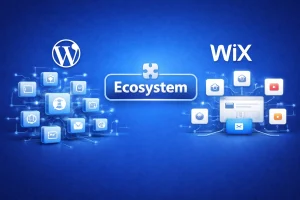
A major component of website functionality comes from the platform’s ecosystem, namely, its plugins (in WordPress) or apps (in Wix). These tools let users extend the capabilities of their websites with minimal technical intervention.
Wix App Market
The Wix App Market provides over 300 apps designed to enhance website functionality in a controlled environment. These apps are easy to install and maintain, and cover a range of use cases:
- Contact forms and live chat
- Booking and scheduling
- Social media feeds and reviews
- Email marketing integrations
- eCommerce extensions for coupons, shipping, and product filters
However, apps in the Wix ecosystem are limited in customisation. They must comply with Wix’s framework and don’t offer deep access to website architecture. This can limit more advanced or industry-specific solutions.
Wix App Market Pros:
- Easy to install and use
- Clean interface with vetted apps
- Works seamlessly within the Wix ecosystem
- Great for simple business needs
Wix App Market Cons:
- Smaller ecosystem than WordPress
- Limited control over app behaviour
- Minimal developer integration options
WordPress Plugin Ecosystem
The WordPress plugin repository includes over 59,000+ free plugins, not counting thousands of premium ones available through marketplaces like CodeCanyon or independent developers.
Popular plugin categories include:
- SEO (Yoast, Rank Math)
- Security (Wordfence, Sucuri)
- Performance (WP Rocket, LiteSpeed Cache)
- Forms (WPForms, Gravity Forms)
- eCommerce (WooCommerce extensions)
- Marketing (Mailchimp, ConvertKit, Google Tag Manager)
WordPress also allows developers to build completely custom plugins for unique features, client needs, or integrations with CRMs, APIs, and third-party systems.
| Feature | WordPress | Wix |
|---|---|---|
| Total Extensions | 59,000+ | ~300 |
| Developer Access | Full | None |
| Custom Plugin Support | Yes | No |
| Integration Depth | Deep | Moderate |
| Updates & Control | Manual or automated | Automatic only |
| Plugin Customisation | Complete | Very limited |
🏆 WordPress wins for plugin and app flexibility
I can confidently say that nearly every feature I’ve ever needed could be added to WordPress through a plugin. And if not, I could build it. Wix is great for basic needs, but if you want to push your website further, WordPress is the only real option.
How Have WordPress and Wix Grown from 2020 to 2025?
Over the last five years, both WordPress and Wix have experienced consistent growth, but in very different ways. WordPress has maintained its dominance as the most used content management system (CMS) in the world, while Wix has steadily expanded its reach as an all-in-one website builder focused on ease of use and visual editing.
WordPress Growth (2020–2025)
WordPress continues to power a significant portion of the web. According to data from W3Techs and various CMS market share reports, WordPress grew not just in the number of websites using it, but also in how it’s being used, from blogging and eCommerce to full-scale enterprise applications.
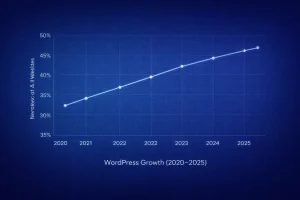
Key WordPress Metrics:
- 2020: 35% of all websites used WordPress
- 2021: 39.5%
- 2022: 43.2%
- 2023: 45.8%
- 2024: 47.9%
- 2025: 49.1% (approx.)
Growth Drivers:
- Increase in WooCommerce usage for online stores
- Expansion of page builder tools like Elementor and Divi
- Adoption of WordPress in enterprise and headless CMS environments
- Large, active global community and plugin ecosystem
Wix Growth (2020–2025)
Wix has taken a different approach by targeting small businesses, freelancers, and users without coding skills. Its growth has been steady, fuelled by its visual editor, built-in hosting, and aggressive marketing.

Key Wix Metrics:
- 2020: ~160 million users globally
- 2021: 180 million
- 2022: 200 million
- 2023: 220 million
- 2024: 250 million
- 2025: 270 million+ (estimated based on trend)
Growth Drivers:
- Launch of Wix Studio for advanced design features
- Expanded eCommerce functionality
- AI-based design tools (Wix ADI) and mobile-first editing
- Strong presence in the freelancer and creative industries
Summary Table for Graph Reference:
| Year | WordPress Market Share (%) | Wix Total Users (in Millions) |
|---|---|---|
| 2020 | 35 | 160 |
| 2021 | 39.5 | 180 |
| 2022 | 43.2 | 200 |
| 2023 | 45.8 | 220 |
| 2024 | 47.9 | 250 |
| 2025 | 49.1 (approx.) | 270+ (estimated) |
What Can We Expect from WordPress and Wix in 2026?
As the web continues to evolve, both WordPress and Wix are gearing up for significant changes and enhancements in 2026. Their strategic focus areas, upcoming features, and target audiences indicate how they plan to remain competitive in a fast-paced digital landscape.
WordPress in 2026: Focus on Performance, Headless, and AI
WordPress is expected to strengthen its position as the world’s leading CMS by continuing to prioritise flexibility, performance, and extensibility. Its open-source foundation ensures that the platform adapts to modern development practices and user demands.
Predicted WordPress Trends for 2026:
- Increased adoption of Headless WordPress
Developers and enterprises are moving towards using WordPress as a content backend with frontends built using React, Next.js, and Vue for faster performance. - Better native SEO and performance tools
Core updates in WordPress are focusing more on performance, including faster loading times, better Core Web Vitals scores, and built-in image optimisation. - AI content creation and plugin enhancements
AI tools are being integrated into popular page builders and plugins to help with content writing, design automation, SEO, and accessibility. - More enterprise-level features with WP Cloud
com’s infrastructure is offering scalable cloud hosting to match enterprise needs with high-speed performance and security. - Security improvements
A major push is underway to improve automated vulnerability scanning, plugin reviews, and proactive security alerts through Jetpack and third-party tools.
Overall, WordPress is moving towards a more developer-centric, performance-driven model, while still catering to its strong community of content creators and business owners.
Wix in 2026: Visual Innovation, AI Automation, and SMB Growth
Wix has been investing heavily in making web design smarter and faster. In 2026, its roadmap suggests a strong focus on automation, visual creativity, and tools designed to support entrepreneurs and small businesses.
Predicted Wix Trends for 2026:
- AI-Powered Website Building
Wix ADI is expected to become even more intelligent, using user behaviour, trends, and content types to create fully functional websites in minutes including layouts, copy, and imagery. - Enhanced Wix Studio features
Wix Studio is evolving into a creative suite for designers and agencies, allowing custom animations, better branding workflows, and collaboration tools. - Simplified eCommerce
Wix will likely continue to expand its eCommerce offering to include more features like real-time inventory sync, subscription billing, and native POS integrations. - Marketing automation tools
Expect stronger built-in CRM tools, email campaigns, and sales funnel automation all tailored to non-technical users. - Focus on mobile-first optimisation
As mobile traffic dominates, Wix is doubling down on responsive design tools that adapt seamlessly across devices.
Wix is clearly aiming to be the ultimate platform for non-technical users, freelancers, and small businesses who want speed, convenience, and professional aesthetics without needing coding knowledge.
Summary Forecast: WordPress vs Wix in 2026
| Area of Focus | WordPress | Wix |
|---|---|---|
| Target Audience | Developers, businesses, content creators | Small businesses, freelancers, creatives |
| Design Innovation | Advanced with page builders & Gutenberg | Visual-first with Wix Studio & ADI |
| eCommerce Development | Scalable via WooCommerce + plugins | Simplified with built-in store builder |
| AI & Automation | Through plugins & third-party tools | Natively integrated across all features |
| Performance & Speed | Hosting-dependent, improving in core | Optimised by default with global CDN |
| Enterprise Readiness | WP Cloud & Headless WordPress | Not ideal for enterprise-grade needs |
| SEO | Advanced via plugins | Simple, user-friendly defaults |
Conclusion
After using both WordPress and Wix on countless projects, I’ve come to appreciate what each platform brings to the table. If you’re like me and want full control, the freedom to customise every detail, and the ability to scale your website without limits, WordPress is hands down the better choice. It gives me the tools to build exactly what I envision, no compromises.
That said, I completely get the appeal of Wix. For quick setups, beautiful templates, and a stress-free experience, it’s hard to beat especially if you’re just getting started or want everything managed for you.
The exciting part is that both platforms are pushing boundaries in 2026, whether it’s WordPress going headless or Wix levelling up with AI and design tools.
So now it’s your turn. Pick the platform that fits your goals and build something incredible. The future of your website starts right here.
FAQs About WordPress vs Wix
Is WordPress better than Wix for long-term growth?
Yes, WordPress allows you to scale with plugins, themes, and hosting choices that grow with your business.
Can I migrate my Wix site to WordPress?
Yes, but it requires manual work or a migration tool. You may need to rebuild some design elements.
Is Wix good for a UK-based small business?
Absolutely. Wix is perfect for fast launch, especially if you want everything included in one package.
What’s easier to manage: WordPress or Wix?
Wix is easier initially, but WordPress becomes more manageable as you learn.
Which platform is better for SEO in the UK?
WordPress, thanks to advanced plugins and greater control over on-page SEO and performance.
Is it worth paying for a premium WordPress.com plan?
Yes, especially if you want ad-free experiences, plugins, better analytics, and support.
Do both platforms include email marketing tools?
Wix has built-in marketing tools. WordPress can integrate with services like Mailchimp, ConvertKit, and Jetpack.
