



If you are planning to launch your first website, one of the first questions you may ask is which hosting is best for beginners.
For many UK startups and small business owners, web hosting can feel confusing at first because there are many providers, plans, and technical terms to understand. The good news is that modern hosting platforms are designed to make website creation much easier than it used to be.
Today, many hosting companies provide beginner friendly dashboards, AI powered website builders, one click WordPress installation, and helpful support teams that guide you through the setup process. This means you do not need advanced technical knowledge to get a website online.
In this guide, you will explore seven popular hosting platforms used by UK startups. By comparing their features, pricing, performance, and ease of use, you can decide which hosting is best for beginners and choose the option that fits your website goals.
Why Is Choosing the Right Hosting Important for Beginners in the UK?

Choosing the right hosting provider is crucial when starting a website because it affects your site speed, reliability, and ease of management. For UK startups, a beginner-friendly hosting platform can simplify website setup and prevent technical issues later.
A good hosting provider offers several benefits.
- Reliable performance that keeps your website online
- Faster loading speeds that improve user experience
- Easy dashboards for managing files, domains, and backups
- Built-in tools like website builders or WordPress installers
- Scalable plans that support future growth
Choosing a reliable host allows you to focus on building your business instead of dealing with technical problems.
What Should You Look for When Choosing Beginner Web Hosting?
When deciding which hosting is best for beginners, it helps to understand the features that make a hosting platform easy to use. A beginner-friendly hosting provider should combine performance, simplicity, security, and affordable pricing.
Many modern hosting companies now focus on helping first-time website owners launch quickly. They provide guided setup processes, automated tools, and customer support that assist with technical tasks.
Before choosing a hosting provider, consider the following important factors.
Is the Hosting Easy to Use for First-Time Website Owners?
Ease of use is often the most important factor for beginners. If a hosting platform has a complicated interface, it can make website management difficult and frustrating.
Beginner-friendly hosts typically include simplified dashboards that help you manage essential tasks.
These tasks usually include:
- Installing WordPress with one click
- Managing domains and email accounts
- Creating backups and restoring your site
- Setting up security features such as SSL certificates
Some hosting providers also offer AI-powered website builders that allow you to create a site using prompts and templates. These tools help beginners launch websites without coding knowledge.
Platforms that include guided onboarding and tutorials are also useful because they walk you through the setup process step by step.
How Important Are Speed and Server Performance?
Website speed is critical for both user experience and search engine optimisation. Visitors expect websites to load quickly, and slow pages can cause them to leave before exploring your content.
Hosting providers improve performance through several technologies.
- SSD or NVMe storage, which delivers faster data access
- Content delivery networks that distribute your site globally
- Server-level caching that reduces loading times
- Modern web servers that optimise performance
For UK startups, hosting providers that support global infrastructure and CDN integration can ensure that visitors experience consistent performance.
Reliable hosting also includes high uptime guarantees. Most reputable providers promise uptime levels of around 99.9 percent or higher, which means your site remains accessible most of the time.
What Security Features Should Beginner Hosting Include?
Security is essential for protecting your website and user data. Even small websites can be targeted by automated attacks, so reliable hosting platforms include built-in security tools.
Important security features for beginner hosting include:
- Free SSL certificates to encrypt website data
- Malware scanning and protection tools
- DDoS protection to prevent traffic-based attacks
- Automated backups that allow you to restore your site if something goes wrong
Many hosting providers also perform automatic software updates and server monitoring. These measures reduce the chances of vulnerabilities affecting your website.
Choosing a host with strong security ensures your website stays protected as it grows.
How Much Should Beginners Expect to Pay for Hosting?
Pricing is another key factor when deciding which hosting is best for beginners. Most hosting companies offer introductory pricing that makes it affordable to start a website.
Beginner hosting plans in the UK often start between one and four pounds per month during promotional periods. However, renewal prices may increase after the initial term.
When evaluating pricing, consider the following.
- Introductory price compared to renewal cost
- Length of contract required to receive discounts
- Included features such as domains, email, and backups
- Additional costs for security tools or premium support
The best beginner hosting plans balance affordability with essential features. Choosing a provider that offers value rather than just the lowest price often leads to a better long-term experience.
What Types of Web Hosting Are Best for Beginners?

Before deciding which hosting is best for beginners, it helps to understand the different types of hosting available. Each hosting type is designed for a different level of experience, website size, and technical requirements.
Many beginners assume all hosting works the same way, but the infrastructure and management tools can vary significantly. Some hosting options are designed to keep things simple with guided setup and automated tools, while others offer more flexibility for growing websites.
For most new website owners in the UK, the goal is to find hosting that balances ease of use, affordability, and scalability. Understanding the main hosting types will help you choose the right option based on your needs.
Shared Hosting
Shared hosting is usually the most popular starting point for beginners because it is affordable and easy to manage. With shared hosting, multiple websites are hosted on the same server and share its resources such as storage, memory, and processing power.
Because the cost of the server is shared between many users, hosting providers can offer plans at very low introductory prices. This makes shared hosting ideal for beginners who are launching their first website, blog, or small business site.
Most shared hosting plans include helpful features that simplify the process of building and managing a website.
Common beginner-friendly features include:
- One-click WordPress installation
- Free SSL certificates for website security
- Email accounts connected to your domain
- Website management dashboards like cPanel or custom control panels
- Automatic backups and security tools
Shared hosting works well for websites with moderate traffic and simple functionality. However, if your website grows rapidly or requires more advanced performance resources, you may eventually need to upgrade to a more powerful hosting solution.
WordPress Hosting
WordPress hosting is designed specifically for websites built with WordPress, which is the most widely used content management system in the world. Many hosting providers optimise their infrastructure and tools to improve the performance and security of WordPress sites.
For beginners who plan to build their site using WordPress, this type of hosting can make website management much easier.
WordPress hosting plans often include:
- Pre-installed WordPress software
- Automatic WordPress updates
- Built-in caching for faster page loading
- WordPress security monitoring
- Expert support teams familiar with WordPress issues
Some providers also offer managed WordPress hosting, where the hosting company handles updates, backups, and technical maintenance. This allows beginners to focus on creating content and growing their website rather than managing technical settings.
Because WordPress is flexible and scalable, many startups begin with WordPress hosting and continue using it as their website grows.
Cloud Hosting
Cloud hosting is designed for websites that need scalability and reliable performance. Instead of running on a single server, cloud hosting distributes website resources across a network of servers.
This setup allows your website to handle traffic spikes more effectively because the hosting system can allocate resources dynamically when needed.
For beginners, cloud hosting can be useful if you expect your website traffic to grow quickly or if your business relies heavily on online visitors.
Typical advantages of cloud hosting include:
- Improved reliability due to distributed infrastructure
- Better performance during traffic spikes
- Flexible resource allocation as websites grow
- Higher uptime compared to traditional hosting setups
However, cloud hosting plans are usually more expensive than shared hosting and may include more advanced configuration options. For many beginners, cloud hosting becomes relevant later when the website begins attracting significant traffic.
Website Builder Hosting
Website builder hosting is designed for users who want the simplest possible way to launch a website without dealing with technical details. Instead of installing software or configuring hosting settings, everything is included within a single platform.
These platforms combine hosting, website design tools, and content management features in one interface.
Website builder hosting typically offers:
- Drag and drop website editors
- Pre-designed templates for quick site creation
- Built-in hosting and security
- Integrated marketing and ecommerce tools
- Automatic updates and system maintenance
This approach is particularly useful for beginners who want to launch portfolio websites, small business pages, or personal blogs without learning website development.
However, website builder platforms can be less flexible than traditional hosting because customisation options and third-party integrations may be limited.
For many beginners, the choice often comes down to shared hosting for flexibility or website builder hosting for simplicity.
Which Hosting Is Best for Beginners? Top 7 Hosting Platforms for UK Startups
If you are trying to figure out which hosting is best for beginners, the easiest way to decide is to compare providers using the same checklist each time.
You want beginner friendly setup, clear pricing, reliable performance for UK visitors, and support that does not leave you stuck when something breaks. Below you will find seven popular options, each written in the same structure so you can scan, compare, and choose with confidence.
1. Hostinger
If you are starting your first website and you want something that feels modern and guided, Hostinger positions itself as a beginner-friendly platform with AI-led setup and a simplified dashboard. It is often marketed around affordability and quick launches, which suits UK startups that want to get online fast without learning too much technical jargon.
Hostinger is described as a globally recognised hosting provider focused on affordability, performance, and user-friendly tools. It offers shared hosting, WordPress hosting, cloud hosting, and VPS options, plus an AI Website Builder and AI tools designed to speed up the early setup stage.
Hostinger also highlights strong shared hosting performance when your site is well optimised and traffic is moderate. Its stack is presented as LiteSpeed web servers, NVMe SSD storage on higher tiers, plus built-in caching. At the same time, it is clear that shared hosting still comes with resource limits, so you may need to upgrade as your website grows.
Hostinger Services Highlighted (UK)
- Shared web hosting
- WordPress hosting
- Cloud hosting
- VPS hosting
- AI Website Builder
- Domain and email options depending on plan and term
Features (How the Page Says They Work in Practice)
- AI Website Builder helps you generate a basic website quickly using prompts. It is positioned as best for simpler sites like business pages, landing pages, blogs, portfolios, and small brochure sites.
- hPanel control panel is designed for everyday beginner tasks like backups, caching controls, WordPress installs, and basic site settings. It is described as clean and simplified, though it can feel restrictive when you try to change plans or deal with upgrades and pricing changes.
- Core inclusions highlighted include free SSL, SSD or NVMe storage depending on plan, automated backups that vary by plan, CDN integration on selected tiers, and a one-click WordPress installer.
- Support is mainly 24 and 7 live chat with an AI assistant called Kodee, plus knowledge base content and tutorials. Feedback is described as mixed when issues are complex or related to billing.
- Uptime and security baseline includes a 99.9 per cent uptime guarantee, SSL, and malware protection tooling as part of the general security posture.
Hostinger Web Hosting Shown (UK Pricing Shown)
Plan Intro monthly price Renewal price Key inclusions listed
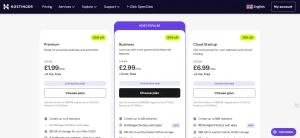
Premium £1.99 per month £10.99 per month 3 websites, 20GB SSD, 2 mailboxes per site, free SSL, AI Website Builder, weekly backups
Business (Most Popular) £2.99 per month £13.99 per month 50 websites, 50GB NVMe, 5 Node.js apps, daily backups, free CDN, AI WordPress Agent
Cloud Startup £6.99 per month £20.99 per month 100 websites, 100GB NVMe, dedicated IP, 4GB RAM, priority expert support
Quick Pros and Cons
Pros:
- Low introductory pricing for beginners on a budget
- AI tools that speed up basic website creation
- Simple dashboard that reduces the early learning curve
- NVMe and CDN options on higher tiers, plus easy WordPress installs
Cons:
- Renewal pricing can rise sharply
- Complaints were reported about auto-renewal and refunds
- No phone support
- Chat heavy support experience can feel limiting for complex cases
- Shared tiers may feel restrictive for developer workflows on some plans
2. IONOS
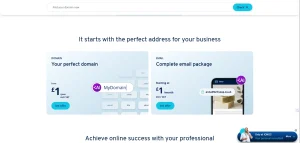
If you are choosing hosting in the UK as a beginner, IONOS presents itself as an all-in-one provider for domains, hosting, email, and website tools, including an AI website builder. It is aimed at small businesses, freelancers, and startups who want to manage everything from one account.
The review content also emphasises that real-world feedback is mixed, with repeated concerns around support availability, technical reliability, billing after cancellation, and system limitations.
This makes IONOS a provider you might consider if you value one dashboard for multiple services, but you will want to be careful about account dependence. If one billing or support issue disrupts your account, it can affect your domain, hosting, and business email at the same time.
Ionos Services Highlighted (UK)
- Domain registration and transfers
- SSL certificates and website security
- AI-powered website builder
- Shared hosting and WordPress hosting, managed and unmanaged options
- VPS, dedicated servers, and cloud hosting
- Business email plus Microsoft 365 integration
- Ecommerce, marketing, and SEO tools
Features (How the Page Says They Work in Practice)
- Personal consultant and 24 and 7 support is marketed as reassuring, but the page reports users being passed between agents, long holds, missed callbacks, and difficulty reaching support during incidents.
- Performance claims such as SSD or NVMe, data centres, and uptime are mentioned alongside reviews that describe strict file count limits, blocked uploads, migration issues, and storage behaving differently than expected.
- WordPress hosting is described as an area where problems can feel amplified, such as domains not connecting correctly, SSL certificates being misassigned or stuck in reissue loops, and migration and storage issues. Slow support can make these problems harder to resolve.
- Low headline pricing is highlighted, but the page suggests it can be undermined by confusion around renewals and cancellation processes, plus disputed billing.
- Business email and Microsoft 365 integration is flagged as a risk area in customer feedback. Email disruption tied to billing or system issues is described as especially damaging for businesses.
Ionos Web Hosting Plans (Excluding VAT)
Plan Intro price then Storage Best for the listed
Starter £3 per month for 6 months, then £6 100GB Blogs and small sites
Plus £1 per month for 12 months, then £9 250GB Growing websites
Premium £8 per month for 6 months, then £16 350GB High-performance sites
Ultimate £12 per month for 6 months, then £24 500GB Large projects and agencies
Quick Pros and Cons
Pros:
- Broad range of services under one account, from domains to hosting to email and ecommerce
- Attention-grabbing introductory pricing
Cons:
- Reports of billing issues, including charges continuing after cancellation
- Support reliability questioned during urgent incidents
- Recurring themes of technical system issues around domains, SSL, and WordPress setup
- An all-in-one structure can increase risk if account issues disrupt multiple services
3. A2 Hosting (now Hosting.com)
If you are a beginner who cares more about speed, uptime, and technical reliability than drag-and-drop builders, the review positions A2 Hosting, now rebranded as hosting.com, as a strong pick. It is framed as performance first rather than design first. That can be ideal if you plan to build on WordPress, care about SEO, and want a platform that can scale without forcing you to switch providers later.
A2 is described around infrastructure and caching, with an edge-first delivery approach intended to reduce time to first byte and keep pages fast globally. This section is useful if you want a host that is not just easy to start with, but also capable when your site grows, and you start paying attention to performance metrics and reliability.
A2 Hosting Services Highlighted
- Shared hosting
- WordPress hosting
- VPS hosting
- Dedicated hosting
- Reseller options for agencies and multi-site management
Features (How the Page Says They Work in Practice)
- Edge-based performance layers are highlighted, including a global edge network, full page edge caching, Cloudflare Enterprise CDN, and an enterprise WAF. The goal is faster delivery and more stable performance during traffic spikes.
- WordPress and WooCommerce-friendly caching is described as behaviour-aware, meaning it can bypass carts and logins and handle cookies and sessions to avoid breaking checkout or personalisation.
- Shared plan inclusions are listed as NVMe SSD storage with LiteSpeed caching, unlimited MariaDB databases, advanced malware protection plus free SSL, daily backups, free website migration, global data centres, and 24 and 7 in house support.
- Security is presented as built into all plans, including SSL, DDoS protection, brute force defence, malware scanning, and server level updates. Imunify360 is called out for VPS and higher tiers.
- Uptime is listed as a 99.9 per cent SLA.
A2 Hosting Shared Hosting Plans
Plan Websites Storage Memory and CPU Email accounts Starting price
Starter 1 15GB 2GB RAM and 2 vCPU 10 $1.99 per month
Plus 2 30GB 3GB RAM and 2 vCPU 10 $1.99 per month
Pro 10 50GB 6GB RAM and 4 vCPU 20 $6.99 per month
Max 100 100GB 8GB RAM and 4 vCPU 40 $8.99 per month
Quick Pros and Cons
Pros:
- Strong performance and caching focus for fast sites
- Security baseline is described as robust across plans
- Clear scalability path from shared to VPS and reseller
- Free expert-led migrations are positioned as a big switching advantage
Cons:
- Higher performance tiers can cost more
- More technical feel than a pure beginner website builder
- Advanced configuration may require more knowledge
4. Namecheap

If you are starting out and you want simple, budget-friendly hosting with a strong focus on privacy and transparent pricing, Namecheap is presented as a beginner-friendly option that has grown from a domain registrar into a broader hosting ecosystem. It offers shared hosting, EasyWP WordPress hosting, VPS, dedicated servers, email, and security-related tools.
This section emphasises practicality. Namecheap is positioned as trying to reduce common beginner hosting headaches like confusing upsells, complicated add-ons, and stressful migrations. If you want a straightforward setup with clear pricing and support that feels human, Namecheap is framed as a good fit.
Namecheap Services Highlighted
- Domain registration and management
- Shared hosting
- EasyWP managed WordPress hosting
- VPS and dedicated options
- Email hosting
- Security tools and privacy oriented add ons
Features (How the Page Says They Work in Practice)
- Free website migration is highlighted across shared, WordPress, VPS, and dedicated hosting. It is framed as minimal downtime and low effort from you, which is a major beginner win if you already have a site elsewhere.
- Support is described as 24 and 7 live chat with real human agents rather than automated bots, which can reduce frustration when you need help.
- Beginner tooling includes cPanel access, a free website builder, and AI-assisted setup mentioned within shared hosting. This gives you a choice: either build with a simple builder or install WordPress.
- UK performance notes are included from a UK data centre test, describing strong results for a UK-based visitor during a 30-day test.
Namecheap Shared Hosting Plans (UK Pricing Shown)
Plan First year monthly price Renewal price yearly Key inclusions listed
Stellar £1.47 £36.22 per year 3 websites, 20GB SSD, 30 mailboxes, free domain, AI tools
Stellar Plus £2.21 £55.49 per year Unlimited websites, unmetered SSD, unlimited mailboxes, AutoBackup, AI tools
Stellar Business £3.69 £83.64 per year 50GB SSD, AutoBackup plus cloud storage, AI tools, Imunify360 security
Quick Pros and Cons
Pros:
- Very budget-friendly starting point for beginners
- Free migrations reduce switching stress
- Live chat is described as human-led, which helps when you are new
- Practical feature set with cPanel and builder options
Cons:
- Entry plans have limits that can push you to upgrade as you grow
- Renewal pricing is higher than the first-year promotional cost
- Some advanced features may require stepping up to higher tiers
5. Bluehost
If you are launching your first site and you want a host that is heavily WordPress-focused, Bluehost is framed as a beginner-friendly all-in-one option. It combines domains, hosting, email, and site tools, and the review notes its WordPress.org recommendation status. The overall positioning is guided setup, beginner-friendly onboarding, and a clear upgrade path if your startup grows.
For UK startups, one important point mentioned is that Bluehost does not have a UK data centre. Instead, it is described as relying on global infrastructure and a CDN to reduce latency for UK visitors. This matters if you are building a UK-focused business site and care about consistent load speed.
Bluehost Services Highlighted
- Shared hosting
- Managed WordPress hosting
- WooCommerce hosting
- VPS and dedicated options
- Domains, email, and website tools in one account
Features (How the Page Says They Work in Practice)
- AI website builder with drag and drop simplicity is positioned for fast launches, especially for beginners who want a guided flow rather than manual setup.
- Free domain for the first year, free CDN, free SSL, and a 30-day money-back guarantee are listed as beginner-friendly incentives.
- Performance tooling is highlighted as NVMe SSD storage, CDN support, and a LiteSpeed-based performance stack with HTTP and caching references, aiming to keep sites responsive even without a UK data centre.
- Uptime is listed as a 99.99 per cent SLA for shared hosting in the review content. It also mentions managed WordPress updates, weekly backups, and caching options.
- Security tooling referenced includes a WAF, malware scanning, DDoS protection, and SSL, with stronger malware removal on higher WordPress tiers.
Bluehost Shared Hosting Plans (UK Pricing Shown Based on a 36-month Term)
Plan Intro price Renewal price Websites Storage Support
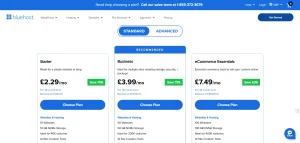
Starter £2.29 per month £7.69 per month 10 10GB NVMe 24 and 7 chat
Business (Recommended) £3.99 per month £14.59 per month 50 50GB NVMe 24 and 7 chat and phone
Ecommerce Essentials £7.49 per month £19.99 per month 100 100GB NVMe 24 and 7 chat and phone
Quick Pros and Cons
Pros:
- Strong WordPress orientation and guided setup for beginners
- Free domain, SSL, and CDN make the first launch simpler
- Upgrade path to more powerful hosting types as you grow
Cons:
- Longer terms may be needed for the best pricing
- Renewal rates can jump compared to the intro deal
- No UK data centre choice, so you rely on CDN and global routing
6. GoDaddy
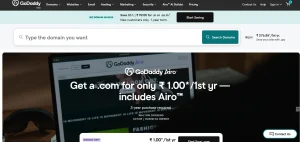
If you want an all-in-one setup that combines domain, hosting, email, and website building, GoDaddy is framed as a reliable choice for UK beginners who want to get online quickly from one dashboard. The review highlights competitive first-year pricing and a strong Trustpilot rating, while also warning you to watch renewal rates and design flexibility depending on the product you choose.
GoDaddy is often chosen by beginners because it reduces decision fatigue. You can buy a domain, connect it to a hosting plan, set up email, and publish a basic website without juggling multiple providers.
Godaddy Services Highlighted
- Domain registration and transfers
- Web hosting, including shared, VPS, and dedicated
- WordPress hosting, including managed tiers
- Website builder tools and marketing features
- Email and Microsoft 365 services
- Ecommerce and online marketing tools
Features (How the Page Says They Work in Practice)
- Domain privacy protection is included with many registrations, helping keep your personal details private in WHOIS records.
- Website builder includes drag and drop plus AI-assisted design, with built-in marketing and SEO features and ecommerce options on relevant plans.
- One-click WordPress hosting is described, with managed features on higher tiers like daily backups, malware scans, performance monitoring, and staging environments.
- Support is listed as 24 and 7 via phone and chat, including a UK-specific phone line referenced in the page content.
- Infrastructure notes mention no UK-specific data centres, but the review references average uptime around 99.97 per cent and positions global infrastructure plus CDN support as a way to reduce latency.
Godaddy Pricing Plan (Hosting and Builder)
Service Price promo term shown Noted inclusions
Web Hosting (cPanel and Linux) £3.99 for 1 year Multi-site support, 25GB plus storage, unlimited SSL
Managed WordPress Hosting £3.99 for 1 year 40GB SSD, one click restore plus listed extras
Website Builder £7.99 annual Templates, mobile responsive design, online payment
Quick Pros and Cons
Pros:
- Very convenient all-in-one ecosystem for beginners
- Phone and chat support options can feel reassuring
- Builder and marketing tools help you launch quickly
Cons:
- Renewal rates may be higher after the first term
- Some products can feel limited for advanced custom design
- No UK data centre selection, so performance depends on global routing and CDN
7. Squarespace
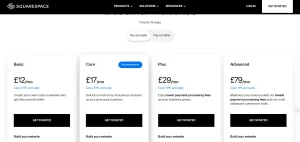
If you want a design-first, all-in-one website platform that lets you publish a polished site without touching hosting settings, plugins, or server updates, Squarespace is presented as a strong pick for UK businesses, creators, and entrepreneurs who value branding and simplicity.
Squarespace is described as a beginner-friendly website builder with no coding needed. It is particularly positioned for photographers, artists, designers, bloggers, portfolio sites, and small business pages where presentation matters. It also offers a 14-day free trial with no payment details required, which makes it easy for you to test the platform before committing.
Squarespace Services Highlighted
- Website builder with templates and section based editor
- Fully managed hosting is included with plans
- Blogging tools and SEO controls
- Email marketing features
- Ecommerce plans for online selling
- Security features, including SSL and DDoS protection
Features (How the Page Says They Work in Practice)
- Hosting is fully managed and includes global CDN support, automatic traffic scaling, and free SSL. This means you do not need to handle updates, caching plugins, or server tweaks.
- Performance and uptime are described as exceeding 99.9 per cent on average, with consistent load performance for UK visitors through distributed infrastructure. You cannot pick server locations or install custom caching, so you trade control for simplicity.
- The editor is structured and section-based, which helps you build consistent pages that look professional. It may feel less free-form than some builders, but it supports clean layouts.
- SEO controls include automatic XML sitemaps and standard site settings that help search engines crawl your pages.
- Built-in email marketing is highlighted, including templates, segmentation, automations, and analytics.
- Security and privacy controls include SSL, DDoS protection, and GDPR friendly cookie and privacy controls.
Squarespace Pricing Plans
Plan Monthly price Annual equivalent noted Best for
Personal £13 per month £10 per month Simple sites and portfolios
Business £21 per month £15 per month Business sites with more features
Basic Commerce £24 per month £20 per month Selling products online
Advanced Commerce £37 per month £30 per month Advanced ecommerce features
Quick Pros and Cons
Pros:
- Very beginner-friendly with hosting fully managed for you
- Excellent design templates for a polished brand look
- Strong built-in tools for blogging, SEO basics, and email marketing
- Free trial makes it easy to test before paying
Cons:
- Less flexibility for advanced custom server-level control
- You cannot choose server locations or add custom caching stacks
- Costs can be higher than basic shared hosting, especially for ecommerce tiers
How Do These Hosting Platforms Compare for Beginners?
Comparing hosting providers side by side makes it easier to decide which hosting is best for beginners. Each platform offers a different balance of pricing, ease of use, performance, and features.
Hostinger and Namecheap are popular for their low prices and simple dashboards. Bluehost is known for strong WordPress integration, while A2 Hosting focuses on speed and performance. GoDaddy and Squarespace offer convenient all-in-one platforms that combine hosting, domains, and website building tools.
The table below summarises how these hosting providers compare for beginners based on key features and pricing.
Hosting Provider Starting Price Best For Beginner Friendly Key Feature
Hostinger £1.99 per month Budget startups High AI website builder and simplified hPanel
IONOS £1 intro price All-in-one services Moderate Personal consultant and integrated tools
A2 Hosting $1.99 per month Performance-focused sites Moderate Edge caching and NVMe storage
Namecheap £1.47 per month Affordable hosting High Free migration and privacy-focused services
Bluehost £2.29 per month WordPress beginners High WordPress integration and guided setup
GoDaddy £3.99 per month All in one domain and hosting Moderate Domain, hosting, and builder in one account
Squarespace £10 per month Design-focused websites High Fully managed hosting with templates
Comparing these options helps you focus on the features that matter most for your website goals. The best hosting provider for beginners is often the one that balances simplicity, performance, and long-term value.
Which Hosting Is Best for Beginners Depending on Your Needs?

Choosing the right hosting provider depends on your website goals and priorities. While many hosting companies offer similar services, each platform stands out in different areas.
If you are launching your first website on a budget, platforms like Hostinger and Namecheap are popular for their low prices and simple setup tools. Bluehost is a strong choice for beginners who want to build a WordPress site because it offers guided onboarding and easy installation.
For users focused on performance, A2 Hosting highlights speed and scalable infrastructure. Meanwhile, GoDaddy offers convenience by combining domain registration, hosting, and website tools in one platform.
You can consider the following recommendations when choosing a beginner hosting provider.
- Choose Hostinger if you want affordable hosting with AI-powered tools and a modern dashboard.
- Choose Namecheap if you value transparent pricing and easy migrations.
- Choose Bluehost if you plan to build a WordPress site and want a guided setup.
- Choose A2 Hosting if performance and speed are your top priorities.
- Choose GoDaddy if you prefer an all-in-one platform with domain and hosting together.
- Choose Squarespace if you want a design-focused website builder with fully managed hosting.
- Choose IONOS if you want a provider that combines domains, hosting, and email services under one account.
By matching your needs with the strengths of each provider, you can confidently choose the hosting platform that supports your website goals.
Conclusion
Choosing which hosting is best for beginners depends on your website goals, budget, and technical experience. Many modern hosting platforms simplify the process with tools like AI builders, one-click WordPress installation, and beginner-friendly dashboards.
For UK startups, Hostinger, Namecheap, and Bluehost are popular for their balance of affordability and ease of use. A2 Hosting focuses on performance and scalability, while GoDaddy and Squarespace provide convenient all-in-one platforms.
The best beginner hosting provider is the one that helps you launch quickly, manage your site easily, and grow your website over time.
Frequently Asked Questions
Is shared hosting good for beginners?
Yes, shared hosting is often the best starting point for beginners because it is affordable and easy to manage. It allows you to host a website without dealing with complex server configuration.
How much does beginner web hosting cost in the UK?
Beginner hosting plans in the UK usually start between £1 and £4 per month during introductory offers. Renewal prices may increase depending on the provider and the features included in the plan.
Do beginners need WordPress hosting or shared hosting?
Most beginners start with shared hosting because it supports many types of websites and is usually cheaper. WordPress hosting can be useful if you specifically plan to build your website using WordPress.
Can you change hosting providers later?
Yes, you can migrate your website to another hosting provider if your needs change. Many hosting companies also offer free migration services to make the transition easier.
Is free hosting a good option for startups?
Free hosting may work for testing or learning purposes, but it usually comes with limitations such as ads, low performance, and limited support. Paid hosting provides better reliability and features for business websites.
Do hosting providers include a free domain?
Many hosting providers include a free domain for the first year when you purchase a hosting plan. After the first year, you usually need to renew the domain annually.
How long does it take to launch a website with beginner hosting?
With modern hosting platforms and website builders, you can launch a basic website within a few hours. More complex websites may take longer, depending on the design and content preparation.
